
LG CU515 Front Housing Replacement

crwdns2959932:0crwdnd2959932:0Zack Mintzercrwdnd2959932:0crwdnd2959932:0crwdnd2959932:09crwdnd2959932:0crwdne2959932:0
crwdns2959936:0N'w 22, 2021crwdne2959936:0
crwdns2869540:0crwdne2869540:0: 750
crwdns2959988:0crwdne2959988:0
- crwdns2959990:0crwdne2959990:0
- 0
- crwdns2959992:0crwdne2959992:0
- 10
- crwdns2959994:0crwdne2959994:0
- 38
- crwdns2959996:0crwdne2959996:0
- 750
crwdns2955950:0crwdne2955950:0: 0
crwdns2959998:0crwdne2959998:0
crwdns2960000:0crwdne2960000:0crwdns2959984:0crwdne2959984:0: 0 1
crwdns2959956:0crwdne2959956:0
crwdns2959968:01crwdne2959968:0
crwdns2959986:0crwdne2959986:0: 0 1
crwdns2959958:0crwdne2959958:0
crwdns2959976:01crwdne2959976:0
crwdns2862633:0crwdne2862633:0
crwdns2862634:0crwdne2862634:0
crwdns2915892:0crwdne2915892:0
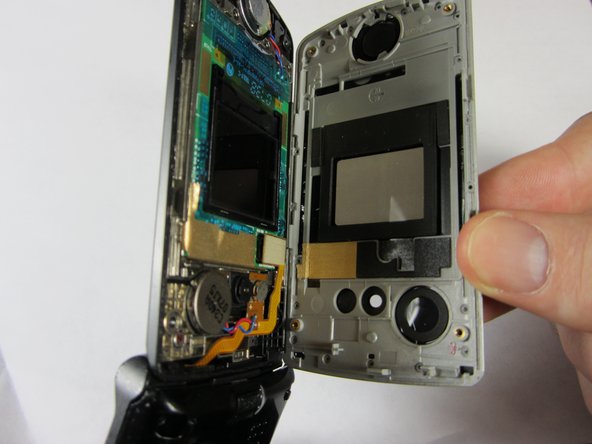
crwdns2959928:0crwdne2959928:0 ↓The front housing is the glossy front cover of the phone which can get scratched easily.
crwdns2959930:0crwdne2959930:0
crwdns2943215:0crwdne2943215:0


-
-
-
Use an opening tool to remove the thin silver part covering the speaker at the top of the phone.
 crwdns2952109:0crwdne2952109:0
-
-
-
-
Remove the four 3 mm Phillips #00 screws.
-
-
-
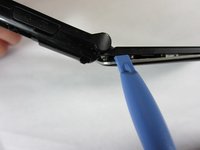
Insert the opening tool in the seam between the silver and black parts of the phone casing.
-
Remove the front housing by running the opening tool around the perimeter of the phone.
-
-


To reassemble your device, follow these instructions in reverse order.

crwdns2935287:0crwdne2935287:0

Cal Poly, Team 21-55, Johann Spring 2013 crwdns2935289:0Cal Poly, Team 21-55, Johann Spring 2013crwdne2935289:0
CPSU-JOHANN-S13S21G55
crwdns2931471:04crwdne2931471:0
crwdns2935297:072crwdne2935297:0
