crwdns2933423:0crwdne2933423:0
crwdns2947577:0crwdnd2947577:0crwdne2947577:0

LG CF360 Front Speaker Replacement

crwdns2942213:0crwdne2942213:0

    1. LG CF360 Front Speaker Replacement, Battery: crwdns2935265:01crwdnd2935265:01crwdnd2935265:02crwdne2935265:0 LG CF360 Front Speaker Replacement, Battery: crwdns2935265:01crwdnd2935265:02crwdnd2935265:02crwdne2935265:0
      • On the back of the phone, place your thumb on the three raised bumps and slide the back cover upward.

      crwdns2952109:0crwdne2952109:0

      crwdns2917038:0crwdne2917038:0

    2. LG CF360 Front Speaker Replacement: crwdns2935265:02crwdnd2935265:01crwdnd2935265:01crwdne2935265:0
      • Lift and remove the battery.

      crwdns2952109:0crwdne2952109:0

      crwdns2917038:0crwdne2917038:0

    1. LG CF360 Front Speaker Replacement, Back Cover: crwdns2935265:03crwdnd2935265:01crwdnd2935265:02crwdne2935265:0 LG CF360 Front Speaker Replacement, Back Cover: crwdns2935265:03crwdnd2935265:02crwdnd2935265:02crwdne2935265:0
      crwdns2935267:0crwdne2935267:0
      Tweezers
      $4.99
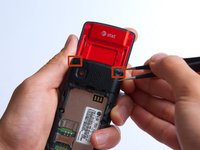
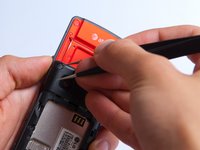
      • Remove the two screw covers at the top of phone with tweezers.

      crwdns2952109:0crwdne2952109:0

      crwdns2917038:0crwdne2917038:0

    2. LG CF360 Front Speaker Replacement: crwdns2935265:04crwdnd2935265:01crwdnd2935265:01crwdne2935265:0
      • Remove the six Phillips #000 (3mm) screws.

      crwdns2952109:0crwdne2952109:0

      crwdns2917038:0crwdne2917038:0

    3. LG CF360 Front Speaker Replacement: crwdns2935265:05crwdnd2935265:01crwdnd2935265:03crwdne2935265:0 LG CF360 Front Speaker Replacement: crwdns2935265:05crwdnd2935265:02crwdnd2935265:03crwdne2935265:0 LG CF360 Front Speaker Replacement: crwdns2935265:05crwdnd2935265:03crwdnd2935265:03crwdne2935265:0
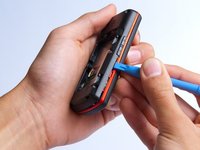
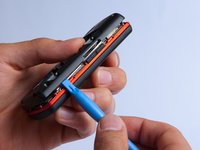
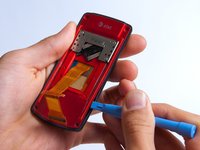
      • Use the plastic opening tool to pry the back cover off. Insert the tool between the back cover and red mid section and go around the entire phone.

      • The plastic side buttons fall out when you take the back cover off.

      • The back cover is connected to the speaker by red and black wires.

      crwdns2952109:0crwdne2952109:0

      crwdns2917038:0crwdne2917038:0

    4. LG CF360 Front Speaker Replacement: crwdns2935265:06crwdnd2935265:01crwdnd2935265:01crwdne2935265:0
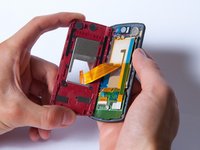
      • Use the tweezers to remove the red and black wires connecting the speaker to the green motherboard by pinching the sides of the plastic base near the motherboard.

      • Set the back cover with the speaker aside.

      crwdns2952109:0crwdne2952109:0

      crwdns2917038:0crwdne2917038:0

    1. LG CF360 Front Speaker Replacement, Motherboard: crwdns2935265:07crwdnd2935265:01crwdnd2935265:02crwdne2935265:0 LG CF360 Front Speaker Replacement, Motherboard: crwdns2935265:07crwdnd2935265:02crwdnd2935265:02crwdne2935265:0
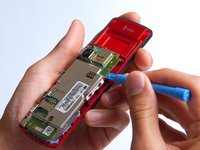
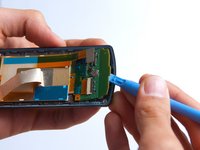
      • Use the plastic opening tool to gently lift the snapped-in motherboard from the front panel.

      • An orange ribbon from the LCD is connected to the underside of the motherboard, so do not force the motherboard from the rest of the phone yet.

      crwdns2952109:0crwdne2952109:0

      crwdns2917038:0crwdne2917038:0

    2. LG CF360 Front Speaker Replacement: crwdns2935265:08crwdnd2935265:01crwdnd2935265:01crwdne2935265:0
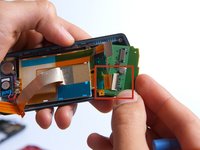
      • Gently remove the blue transparent tape from the connector.

      crwdns2952109:0crwdne2952109:0

      crwdns2917038:0crwdne2917038:0

    3. LG CF360 Front Speaker Replacement: crwdns2935265:09crwdnd2935265:01crwdnd2935265:01crwdne2935265:0
      • With the plastic opening tool, gently pry the LCD connector from the motherboard.

      • Set the motherboard aside.

      crwdns2952109:0crwdne2952109:0

      crwdns2917038:0crwdne2917038:0

    1. LG CF360 Front Speaker Replacement, Front Case: crwdns2935265:010crwdnd2935265:01crwdnd2935265:01crwdne2935265:0
      • Take the front case and unscrew the four Phillips #000 (1mm) screws around the ribbon.

      crwdns2952109:0crwdne2952109:0

      crwdns2917038:0crwdne2917038:0

    2. LG CF360 Front Speaker Replacement: crwdns2935265:011crwdnd2935265:01crwdnd2935265:01crwdne2935265:0
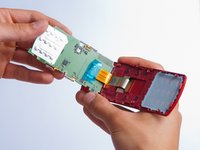
      • Gently pull the orange ribbon from the number pad casing.

      • Set the number pad case to the side once it is detached from the ribbon.

      crwdns2952109:0crwdne2952109:0

      crwdns2917038:0crwdne2917038:0

    3. LG CF360 Front Speaker Replacement: crwdns2935265:012crwdnd2935265:01crwdnd2935265:01crwdne2935265:0
      crwdns2935267:0crwdne2935267:0
      Tweezers
      $4.99
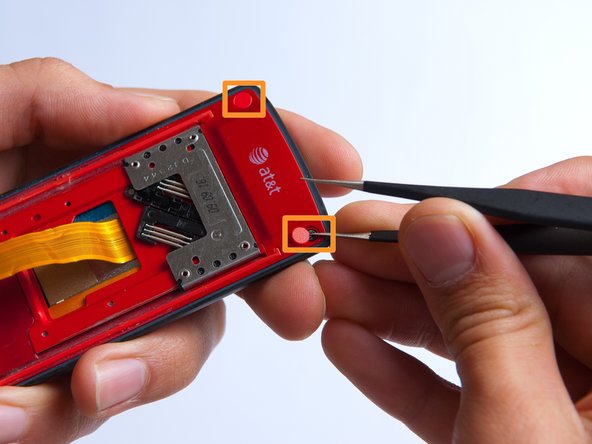
      • Remove the two red sticker screw coverings at the top corners with tweezers.

      crwdns2952109:0crwdne2952109:0

      crwdns2917038:0crwdne2917038:0

    4. LG CF360 Front Speaker Replacement: crwdns2935265:013crwdnd2935265:01crwdnd2935265:01crwdne2935265:0
      • Unscrew the four Phillips #000 (3mm) screws at the corners of the phone.

      crwdns2952109:0crwdne2952109:0

      crwdns2917038:0crwdne2917038:0

    5. LG CF360 Front Speaker Replacement: crwdns2935265:014crwdnd2935265:01crwdnd2935265:02crwdne2935265:0 LG CF360 Front Speaker Replacement: crwdns2935265:014crwdnd2935265:02crwdnd2935265:02crwdne2935265:0
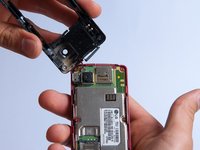
      • Pry the red sliding backing from the front cover by inserting the plastic opening tool in between the two sections and going around the entire phone.

      • Set the red sliding backing and front cover to the side.

      crwdns2952109:0crwdne2952109:0

      crwdns2917038:0crwdne2917038:0

    1. LG CF360 Front Speaker Replacement, Front Speaker: crwdns2935265:015crwdnd2935265:01crwdnd2935265:01crwdne2935265:0
      • Be very careful to not damage the keypad board when using the plastic opening tool.

      • Gently pry the LCD ribbon from the left side of the front cover using the plastic opening tool.

      • One LCD ribbon is still connected to the keyboard, so do not attempt to remove it from the front cover.

      crwdns2952109:0crwdne2952109:0

      crwdns2917038:0crwdne2917038:0

    2. LG CF360 Front Speaker Replacement: crwdns2935265:016crwdnd2935265:01crwdnd2935265:02crwdne2935265:0 LG CF360 Front Speaker Replacement: crwdns2935265:016crwdnd2935265:02crwdnd2935265:02crwdne2935265:0
      • Use the plastic opening tool to partially lift up the keyboard from the front of the phone.

      • Slowly rotate the keyboard clockwise while pulling it to the right to disconnect the second LCD ribbon from the keyboard.

      • Remove the keyboard from the phone and set aside.

      crwdns2952109:0crwdne2952109:0

      crwdns2917038:0crwdne2917038:0

    3. LG CF360 Front Speaker Replacement: crwdns2935265:017crwdnd2935265:01crwdnd2935265:01crwdne2935265:0
      • Do not attempt to completely remove the speaker from the phone at this point - it is still connected to the LCD screen.

      • Use the plastic opening tool to pry the front speaker from the phone.

      crwdns2952109:0crwdne2952109:0

      crwdns2917038:0crwdne2917038:0

    4. LG CF360 Front Speaker Replacement: crwdns2935265:018crwdnd2935265:01crwdnd2935265:02crwdne2935265:0 LG CF360 Front Speaker Replacement: crwdns2935265:018crwdnd2935265:02crwdnd2935265:02crwdne2935265:0
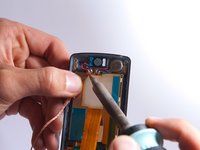
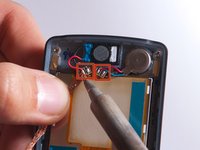
      • Use a soldering iron to desolder the lead junctions. If you have never used a soldering iron or you need a refresher, check out iFixit's soldering guide.

      • Separate the speaker from the LCD screen.

      crwdns2952109:0crwdne2952109:0

      crwdns2917038:0crwdne2917038:0

crwdns2915888:0crwdne2915888:0

To reassemble your device, follow these instructions in reverse order.

crwdns2935221:0crwdne2935221:0

crwdns2935229:02crwdne2935229:0

Annie White

crwdns2935283:010/18/13crwdne2935283:0

265 crwdns2915208:0crwdne2915208:0

crwdns2935297:02crwdne2935297:0

crwdns2935287:0crwdne2935287:0

Cal Poly, Team 4-27, Amido Fall 2013 crwdns2935289:0Cal Poly, Team 4-27, Amido Fall 2013crwdne2935289:0

CPSU-AMIDO-F13S4G27

crwdns2931471:04crwdne2931471:0

crwdns2935297:096crwdne2935297:0

crwdns2947412:00crwdne2947412:0

crwdns2917038:0crwdne2917038:0

crwdns2936625:0crwdne2936625:0:

crwdns2936751:024crwdne2936751:0 6

crwdns2936753:07crwdne2936753:0 21

crwdns2936753:030crwdne2936753:0 62

crwdns2942667:0crwdne2942667:0 749