crwdns2933423:0crwdne2933423:0
crwdns2947577:0crwdnd2947577:0crwdne2947577:0

LG CF360 Front Case Replacement

crwdns2942213:0crwdne2942213:0

  1. LG CF360 Front Case Replacement, Battery: crwdns2935265:01crwdnd2935265:01crwdnd2935265:02crwdne2935265:0 LG CF360 Front Case Replacement, Battery: crwdns2935265:01crwdnd2935265:02crwdnd2935265:02crwdne2935265:0
    • On the back of the phone, place your thumb on the three raised bumps and slide the back cover upward.

    crwdns2952109:0crwdne2952109:0

    crwdns2917038:0crwdne2917038:0

  2. LG CF360 Front Case Replacement: crwdns2935265:02crwdnd2935265:01crwdnd2935265:01crwdne2935265:0
    • Lift and remove the battery.

    crwdns2952109:0crwdne2952109:0

    crwdns2917038:0crwdne2917038:0

  3. LG CF360 Front Case Replacement, Back Cover: crwdns2935265:03crwdnd2935265:01crwdnd2935265:02crwdne2935265:0 LG CF360 Front Case Replacement, Back Cover: crwdns2935265:03crwdnd2935265:02crwdnd2935265:02crwdne2935265:0
    crwdns2935267:0crwdne2935267:0
    Tweezers
    $4.99
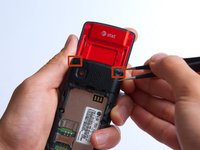
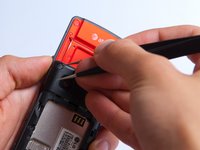
    • Remove the two screw covers at the top of phone with tweezers.

    crwdns2952109:0crwdne2952109:0

    crwdns2917038:0crwdne2917038:0

  4. LG CF360 Front Case Replacement: crwdns2935265:04crwdnd2935265:01crwdnd2935265:01crwdne2935265:0
    • Remove the six Phillips #000 (3mm) screws.

    crwdns2952109:0crwdne2952109:0

    crwdns2917038:0crwdne2917038:0

  5. LG CF360 Front Case Replacement: crwdns2935265:05crwdnd2935265:01crwdnd2935265:03crwdne2935265:0 LG CF360 Front Case Replacement: crwdns2935265:05crwdnd2935265:02crwdnd2935265:03crwdne2935265:0 LG CF360 Front Case Replacement: crwdns2935265:05crwdnd2935265:03crwdnd2935265:03crwdne2935265:0
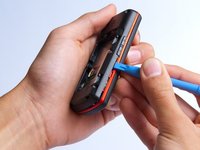
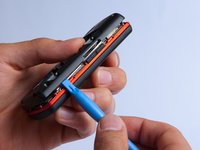
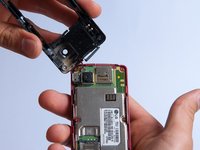
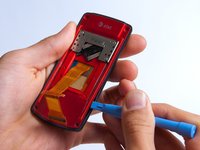
    • Use the plastic opening tool to pry the back cover off. Insert the tool between the back cover and red mid section and go around the entire phone.

    • The plastic side buttons fall out when you take the back cover off.

    • The back cover is connected to the speaker by red and black wires.

    crwdns2952109:0crwdne2952109:0

    crwdns2917038:0crwdne2917038:0

  6. LG CF360 Front Case Replacement: crwdns2935265:06crwdnd2935265:01crwdnd2935265:01crwdne2935265:0
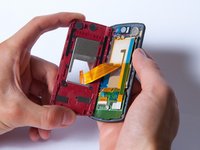
    • Use the tweezers to remove the red and black wires connecting the speaker to the green motherboard by pinching the sides of the plastic base near the motherboard.

    • Set the back cover with the speaker aside.

    crwdns2952109:0crwdne2952109:0

    crwdns2917038:0crwdne2917038:0

  7. LG CF360 Front Case Replacement, Motherboard: crwdns2935265:07crwdnd2935265:01crwdnd2935265:02crwdne2935265:0 LG CF360 Front Case Replacement, Motherboard: crwdns2935265:07crwdnd2935265:02crwdnd2935265:02crwdne2935265:0
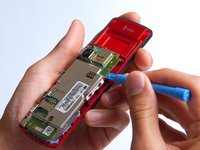
    • Use the plastic opening tool to gently lift the snapped-in motherboard from the front panel.

    • An orange ribbon from the LCD is connected to the underside of the motherboard, so do not force the motherboard from the rest of the phone yet.

    crwdns2952109:0crwdne2952109:0

    crwdns2917038:0crwdne2917038:0

  8. LG CF360 Front Case Replacement: crwdns2935265:08crwdnd2935265:01crwdnd2935265:01crwdne2935265:0
    • Gently remove the blue transparent tape from the connector.

    crwdns2952109:0crwdne2952109:0

    crwdns2917038:0crwdne2917038:0

  9. LG CF360 Front Case Replacement: crwdns2935265:09crwdnd2935265:01crwdnd2935265:01crwdne2935265:0
    • With the plastic opening tool, gently pry the LCD connector from the motherboard.

    • Set the motherboard aside.

    crwdns2952109:0crwdne2952109:0

    crwdns2917038:0crwdne2917038:0

  10. LG CF360 Front Case Replacement, Front Case: crwdns2935265:010crwdnd2935265:01crwdnd2935265:01crwdne2935265:0
    • Take the front case and unscrew the four Phillips #000 (1mm) screws around the ribbon.

    crwdns2952109:0crwdne2952109:0

    crwdns2917038:0crwdne2917038:0

  11. LG CF360 Front Case Replacement: crwdns2935265:011crwdnd2935265:01crwdnd2935265:01crwdne2935265:0
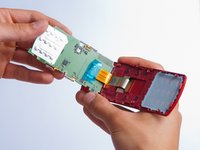
    • Gently pull the orange ribbon from the number pad casing.

    • Set the number pad case to the side once it is detached from the ribbon.

    crwdns2952109:0crwdne2952109:0

    crwdns2917038:0crwdne2917038:0

  12. LG CF360 Front Case Replacement: crwdns2935265:012crwdnd2935265:01crwdnd2935265:01crwdne2935265:0
    crwdns2935267:0crwdne2935267:0
    Tweezers
    $4.99
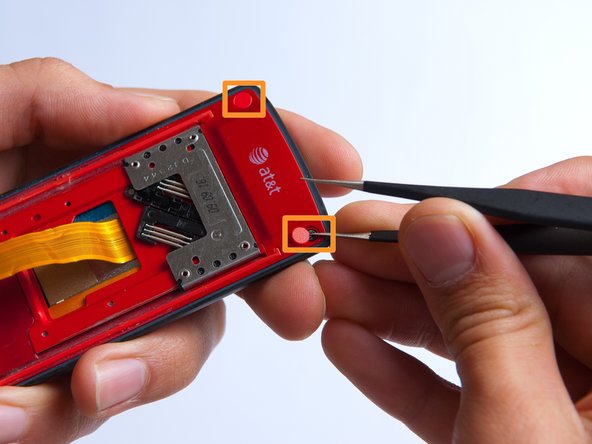
    • Remove the two red sticker screw coverings at the top corners with tweezers.

    crwdns2952109:0crwdne2952109:0

    crwdns2917038:0crwdne2917038:0

  13. LG CF360 Front Case Replacement: crwdns2935265:013crwdnd2935265:01crwdnd2935265:01crwdne2935265:0
    • Unscrew the four Phillips #000 (3mm) screws at the corners of the phone.

    crwdns2952109:0crwdne2952109:0

    crwdns2917038:0crwdne2917038:0

  14. LG CF360 Front Case Replacement: crwdns2935265:014crwdnd2935265:01crwdnd2935265:02crwdne2935265:0 LG CF360 Front Case Replacement: crwdns2935265:014crwdnd2935265:02crwdnd2935265:02crwdne2935265:0
    • Pry the red sliding backing from the front cover by inserting the plastic opening tool in between the two sections and going around the entire phone.

    • Set the red sliding backing and front cover to the side.

    crwdns2952109:0crwdne2952109:0

    crwdns2917038:0crwdne2917038:0

crwdns2915888:0crwdne2915888:0

To reassemble your device, follow these instructions in reverse order.

crwdns2935221:0crwdne2935221:0

crwdns2935227:0crwdne2935227:0

Kathrine Muirhead

crwdns2935283:010/15/13crwdne2935283:0

353 crwdns2915208:0crwdne2915208:0

crwdns2935297:03crwdne2935297:0

crwdns2935287:0crwdne2935287:0

Cal Poly, Team 4-27, Amido Fall 2013 crwdns2935289:0Cal Poly, Team 4-27, Amido Fall 2013crwdne2935289:0

CPSU-AMIDO-F13S4G27

crwdns2931471:04crwdne2931471:0

crwdns2935297:019crwdne2935297:0

crwdns2947412:00crwdne2947412:0

crwdns2917038:0crwdne2917038:0

crwdns2936625:0crwdne2936625:0:

crwdns2936751:024crwdne2936751:0 1

crwdns2936753:07crwdne2936753:0 5

crwdns2936753:030crwdne2936753:0 49

crwdns2942667:0crwdne2942667:0 693