
LG CF360 Back Cover Replacement

crwdns2959932:0crwdnd2959932:0Kathrine Muirheadcrwdnd2959932:0crwdnd2959932:0crwdnd2959932:03crwdnd2959932:0crwdne2959932:0
crwdns2959936:0Mud 7, 2024crwdne2959936:0
crwdns2869540:0crwdne2869540:0: 930
crwdns2959988:0crwdne2959988:0
- crwdns2959990:0crwdne2959990:0
- 2
- crwdns2959992:0crwdne2959992:0
- 23
- crwdns2959994:0crwdne2959994:0
- 90
- crwdns2959996:0crwdne2959996:0
- 930
crwdns2955950:0crwdne2955950:0: 0
crwdns2959998:0crwdne2959998:0
crwdns2960000:0crwdne2960000:0crwdns2959984:0crwdne2959984:0: 0 1
crwdns2959956:0crwdne2959956:0
crwdns2959968:01crwdne2959968:0
crwdns2959986:0crwdne2959986:0: 2 3
crwdns2959982:02crwdne2959982:0
crwdns2959978:03crwdne2959978:0
crwdns2915892:0crwdne2915892:0
crwdns2959928:0crwdne2959928:0 ↓The back case of the phone holds the motherboard and back speaker. You need to disassemble the back to replace these items.
crwdns2959930:0crwdne2959930:0
crwdns2943215:0crwdne2943215:0


-
-
-
On the back of the phone, place your thumb on the three raised bumps and slide the back cover upward.
 crwdns2952109:0crwdne2952109:0
-
-
-
Lift and remove the battery.
-
-
-
-
-
crwdns2935267:0crwdne2935267:0Tweezers$4.99
-
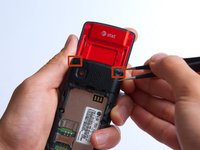
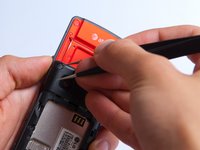
Remove the two screw covers at the top of phone with tweezers.
-
-
-
Remove the six Phillips #000 (3mm) screws.
-
-
-
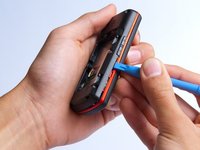
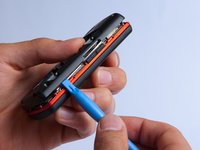
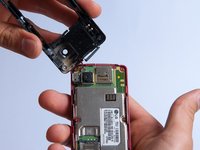
Use the plastic opening tool to pry the back cover off. Insert the tool between the back cover and red mid section and go around the entire phone.
-
-
-
Use the tweezers to remove the red and black wires connecting the speaker to the green motherboard by pinching the sides of the plastic base near the motherboard.
-
Set the back cover with the speaker aside.
-
-





To reassemble your device, follow these instructions in reverse order.

crwdns2935287:0crwdne2935287:0

Cal Poly, Team 4-27, Amido Fall 2013 crwdns2935289:0Cal Poly, Team 4-27, Amido Fall 2013crwdne2935289:0
CPSU-AMIDO-F13S4G27
crwdns2931471:04crwdne2931471:0
crwdns2935297:096crwdne2935297:0
