
LCD Screen Replacement

crwdns2959932:0crwdnd2959932:0Colton Lancsaricscrwdnd2959932:0crwdnd2959932:0crwdnd2959932:02crwdnd2959932:0crwdne2959932:0
crwdns2959936:0Mud 3, 2016crwdne2959936:0
crwdns2869540:0crwdne2869540:0: 1.2천
crwdns2959988:0crwdne2959988:0
- crwdns2959990:0crwdne2959990:0
- 3
- crwdns2959992:0crwdne2959992:0
- 32
- crwdns2959994:0crwdne2959994:0
- 94
- crwdns2959996:0crwdne2959996:0
- 1,208
crwdns2955950:0crwdne2955950:0: 0
crwdns2959998:0crwdne2959998:0
crwdns2960000:0crwdne2960000:0crwdns2959984:0crwdne2959984:0: 1 2
crwdns2959972:01crwdne2959972:0
crwdns2959970:02crwdne2959970:0
crwdns2959986:0crwdne2959986:0: 0 1
crwdns2959958:0crwdne2959958:0
crwdns2959976:01crwdne2959976:0
crwdns2915892:0crwdne2915892:0
crwdns2959928:0crwdne2959928:0 ↓In this guide, you will be taught how to successfully replace the LCD screen on your camera.
crwdns2959930:0crwdne2959930:0
crwdns2943215:0crwdne2943215:0


-
-
-
Remove the M3 x 4mm screws from the bottom of your device as indicated by the picture. using the Philips Head J0 Screw Driver Bit .
 crwdns2952109:0crwdne2952109:0
-
-
-
Use your Philips Head Screwdriver to remove the M3 x 4mm screws from the left side of the device as indicated by the pictures.
-
-
-
Use your Philips Head Screwdriver to remove the M3 x 4mm screws from the right side of the device as indicated by the pictures.
-
-
-
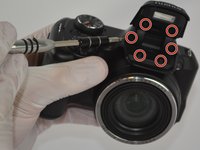
Use your Philips Head Screwdriver to remove the M3 x 4mm screws from the camera flash lid as indicated by the picture.
-
Remove the plastic cover from the flash lid by gentle pulling them apart or using the plastic opening tool.
-
-
-
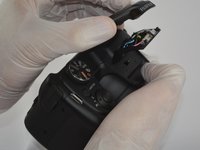
Fold the lid down in order to access and remove the final M3 x 4mm screw using your Philips Head Screwdriver.
-
-
-
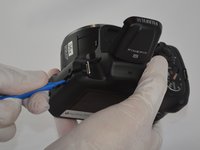
Use the plastic opening tool to pry the back and front casings of the camera apart.
-
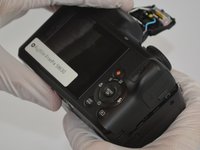
Once pried apart use your hands to pull off the back plate of the camera.
-
You will need to apply a little bit of force to remove the back plate.
-
-
-
-
Once the back plate is removed twist the battery cover clockwise and it should easily dislodge.
-
-
-
-
-
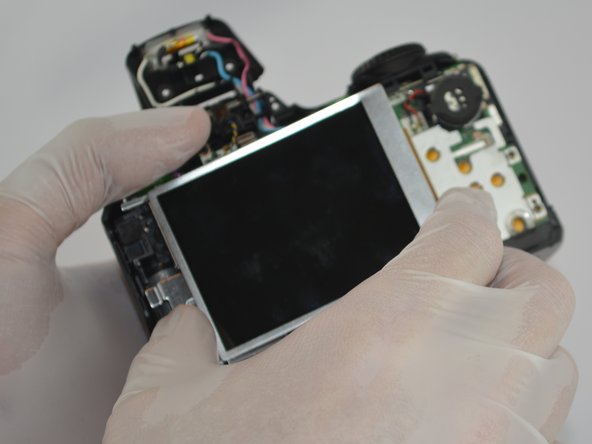
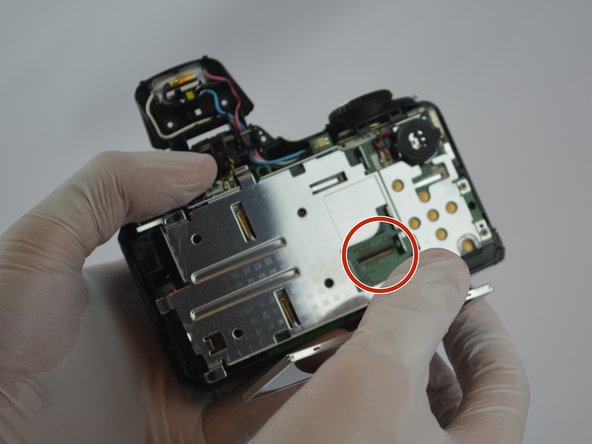
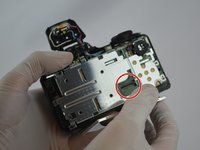
Gently pull the tab out of the motherboard and then the LCD screen should easily be removed.
-
-




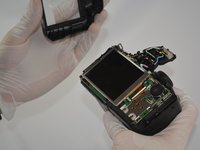


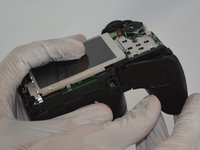
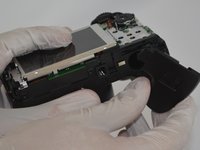
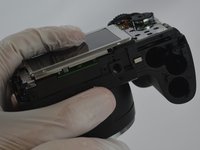

To reassemble your device, follow these instructions in reverse order.
crwdns2935221:0crwdne2935221:0
crwdns2935227:0crwdne2935227:0

crwdns2935287:0crwdne2935287:0

USF Tampa, Team 3-2, Sullivan Spring 2016 crwdns2935289:0USF Tampa, Team 3-2, Sullivan Spring 2016crwdne2935289:0
USFT-SULLIVAN-S16S3G2
crwdns2931471:04crwdne2931471:0
crwdns2935297:072crwdne2935297:0
