crwdns2933423:0crwdne2933423:0
crwdns2947577:0crwdnd2947577:0crwdne2947577:0

KitchenAid Professional 600 Power Cord Replacement

crwdns2942213:0crwdne2942213:0

  1. KitchenAid Professional 600 Power Cord Replacement, Top Cover: crwdns2935265:01crwdnd2935265:01crwdnd2935265:01crwdne2935265:0
    • Take out the screw which holds on the silver band using a Phillips #2 screwdriver.

    • Remove the silver band.

    crwdns2952109:0crwdne2952109:0
  2. KitchenAid Professional 600 Power Cord Replacement: crwdns2935265:02crwdnd2935265:01crwdnd2935265:01crwdne2935265:0
    • Remove the four Phillips #2 screws located around the mixer where the band was removed.

    • This picture only shows two of the screw that you need to remove. The other two are on the exact opposite side of the mixer.

    crwdns2952109:0crwdne2952109:0
  3. KitchenAid Professional 600 Power Cord Replacement: crwdns2935265:03crwdnd2935265:01crwdnd2935265:01crwdne2935265:0
    • Remove the top of the mixer to reveal the inner parts.

    • The top should lift off, but may not if it is stuck. A sharp strike from the back with the hand may unstick it. It will slide forward about a 3/8 of an inch. Push it back again from the front and it should be free enough to lift.

    crwdns2952109:0crwdne2952109:0
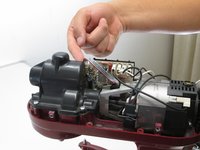
  4. KitchenAid Professional 600 Power Cord Replacement, Speed Selector: crwdns2935265:04crwdnd2935265:01crwdnd2935265:01crwdne2935265:0
    • Locate the selector switch.

    • Remove the two Phillips #2 screws holding the selector switch in place.

    crwdns2952109:0crwdne2952109:0
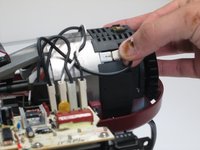
  5. KitchenAid Professional 600 Power Cord Replacement: crwdns2935265:05crwdnd2935265:01crwdnd2935265:03crwdne2935265:0 KitchenAid Professional 600 Power Cord Replacement: crwdns2935265:05crwdnd2935265:02crwdnd2935265:03crwdne2935265:0 KitchenAid Professional 600 Power Cord Replacement: crwdns2935265:05crwdnd2935265:03crwdnd2935265:03crwdne2935265:0
    • Unplug the cords attached the drive motor to the switch.

    • We suggest numbering them left from right so they are reattached to the replacement part in the right order.

    crwdns2952109:0crwdne2952109:0
  6. KitchenAid Professional 600 Power Cord Replacement: crwdns2935265:06crwdnd2935265:01crwdnd2935265:01crwdne2935265:0
    • Pull out the Selector Switch.

    crwdns2952109:0crwdne2952109:0
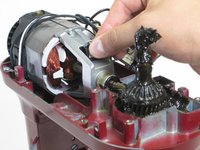
  7. KitchenAid Professional 600 Power Cord Replacement, Drive Motor: crwdns2935265:07crwdnd2935265:01crwdnd2935265:01crwdne2935265:0
    • Remove the two Phillips #2 screws holding the motor in place, located near the fan at the back of the motor.

    • The picture only shows one of the screws. The other screw is located on the exact opposite side of the motor.

    crwdns2952109:0crwdne2952109:0
  8. KitchenAid Professional 600 Power Cord Replacement: crwdns2935265:08crwdnd2935265:01crwdnd2935265:01crwdne2935265:0
    • Pull upward to remove the motor.

    crwdns2952109:0crwdne2952109:0
  9. KitchenAid Professional 600 Power Cord Replacement, Power Cord: crwdns2935265:09crwdnd2935265:01crwdnd2935265:01crwdne2935265:0
    • Remove the Phillips #2 screw attaching the green grounding wire to the frame of the mixer.

    crwdns2952109:0crwdne2952109:0
  10. KitchenAid Professional 600 Power Cord Replacement: crwdns2935265:010crwdnd2935265:01crwdnd2935265:01crwdne2935265:0
    • Remove the three Phillips #2 screws that connect the top portion of the mixer to the "neck" of the mixer.

    crwdns2952109:0crwdne2952109:0
  11. KitchenAid Professional 600 Power Cord Replacement: crwdns2935265:011crwdnd2935265:01crwdnd2935265:01crwdne2935265:0
    • Remove the top portion of the mixer from the "neck" of the mixer.

    • This will make removing the power cord much easier.

    crwdns2952109:0crwdne2952109:0
  12. KitchenAid Professional 600 Power Cord Replacement: crwdns2935265:012crwdnd2935265:01crwdnd2935265:01crwdne2935265:0
    • You can now remove the power cord from the mixer.

    crwdns2952109:0crwdne2952109:0
crwdns2915888:0crwdne2915888:0

To reassemble your device, follow these instructions in reverse order.

crwdns2935227:0crwdne2935227:0

Luke

crwdns2935283:004/11/16crwdne2935283:0

1,380 crwdns2915208:0crwdne2915208:0

crwdns2935297:05crwdne2935297:0

crwdns2935287:0crwdne2935287:0

Cal Poly, Team 25-4, Maness Spring 2016 crwdns2935289:0Cal Poly, Team 25-4, Maness Spring 2016crwdne2935289:0

CPSU-MANESS-S16S25G4

crwdns2931471:04crwdne2931471:0

crwdns2935297:020crwdne2935297:0

crwdns2947412:02crwdne2947412:0

So helpful thank you. I've got my mixer cord changer and the mixer is working now. Unfortunately there's always only one speed, high. Any suggestions?

Britter C - crwdns2934203:0crwdne2934203:0 crwdns2950251:0crwdne2950251:0

Any idea where I can buy the power cord itself?

Jaeger Amzallag - crwdns2934203:0crwdne2934203:0 crwdns2950251:0crwdne2950251:0

crwdns2917038:0crwdne2917038:0

crwdns2936625:0crwdne2936625:0:

crwdns2936751:024crwdne2936751:0 5

crwdns2936753:07crwdne2936753:0 35

crwdns2936753:030crwdne2936753:0 128

crwdns2942667:0crwdne2942667:0 7,252