
Joy-Con ZL Switch Replacement

crwdns2959932:0crwdnd2959932:0Robin Razzellcrwdnd2959932:0crwdnd2959932:0crwdnd2959932:03crwdnd2959932:0crwdne2959932:0
crwdns2959936:0Kho 24, 2024crwdne2959936:0
crwdns2869540:0crwdne2869540:0: 16K
crwdns2959988:0crwdne2959988:0
- crwdns2959990:0crwdne2959990:0
- 19
- crwdns2959992:0crwdne2959992:0
- 128
- crwdns2959994:0crwdne2959994:0
- 439
- crwdns2959996:0crwdne2959996:0
- 16,472
crwdns2955950:0crwdne2955950:0: 4
crwdns2960004:03crwdne2960004:0, crwdns2960006:01crwdne2960006:0
crwdns2960000:0crwdne2960000:0crwdns2959984:0crwdne2959984:0: 3 4
crwdns2959974:03crwdne2959974:0
crwdns2959970:04crwdne2959970:0
crwdns2959986:0crwdne2959986:0: 0 1
crwdns2959958:0crwdne2959958:0
crwdns2959976:01crwdne2959976:0
crwdns2869444:0crwdne2869444:0
crwdns2869445:0crwdne2869445:0
crwdns2862611:0crwdne2862611:0
crwdns2862612:0crwdne2862612:0
crwdns2944444:0crwdne2944444:0
crwdns2944446:0crwdne2944446:0
crwdns2915892:0crwdne2915892:0
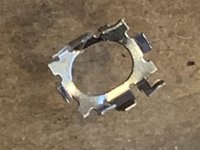
crwdns2959928:0crwdne2959928:0 ↓The metal cover holding the ZL switch together had broken off the switch and jammed the control
crwdns2959930:0crwdne2959930:0
crwdns2943213:0crwdne2943213:0
crwdns2943215:0crwdne2943215:0


-
-
-
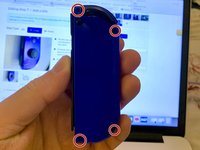
Using the Y00 Tri-Point screwdriver, remove four M1.4 x 5mm screws to loosen the hard plastic back of the Joy-Con.
 crwdns2952109:0crwdne2952109:0
-
-
-
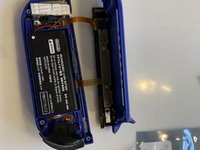
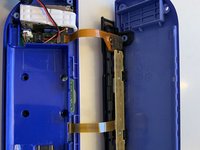
After the screws are removed, lift the cover to reveal the inside of the Joy-Con and locate the ZL button.
-
-
crwdns2935267:0crwdne2935267:0Tweezers$4.99
-
Use tweezers to lift the ZL button a little then pull upwards to get it back into place.
-
Once the button is back in place, place the hard cover back on the Joy-Con and screw it back on.
-
-
-
Click the button a couple times to ensure that it's back in place and working.
-
-
-
-
-
-
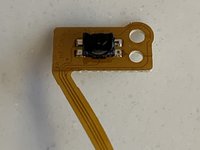
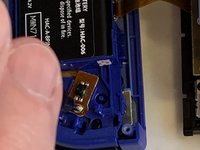
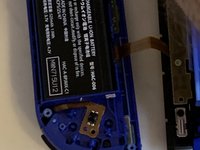
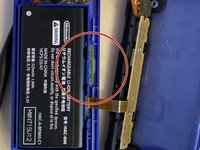
This tiny piece of metal had come off the small pcb and ribbon cable. In doing so it had jammed the switch.
-
Use the guide for un-jamming ZL switch, to remove the case screws, the top cover and the ZL switch and springs.
-
-
-
Having removed the plastic button and 2 springs you uncover the switch and holding screw.
-
Remove the holding screw.
-
-
-
Lift the battery out of the battery chassis tray.Use a plastic splitter if necessary.
-
Do not remove the sticky tape underneath as this is unnecessary. It does not effect the repair.
-
-
-
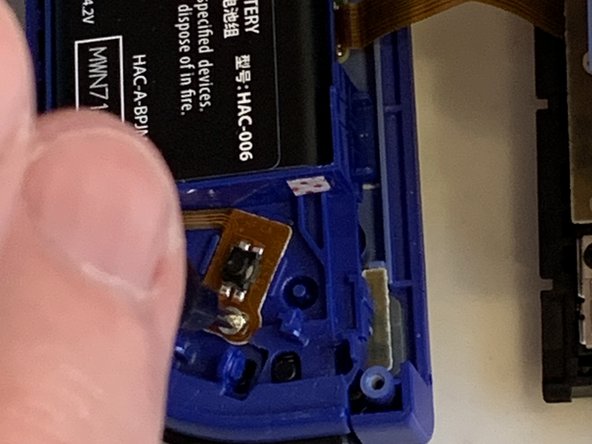
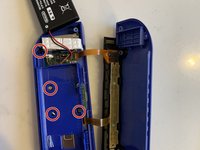
Remove the 4 screws holding down the inner battery support chassis. This exposes the switch connector to the pcb.
-
Note the bottom left screw in this picture is shorter than the others and needs to be put back in the correct aperture.
-
-
crwdns2935267:0crwdne2935267:0Tweezers$4.99
-
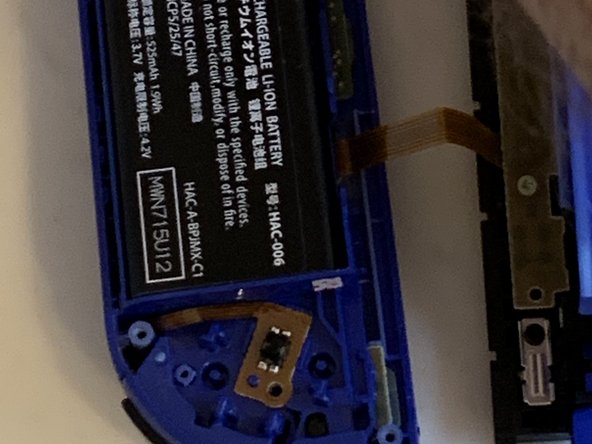
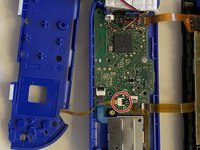
Gently pull on the ribbon cable to remove the plug from the socket.
-
Insert plug on new ribbon cable & switch.
-
You may need to push in the plug with plastic tweezers. Take care not to damage the cable.
-
-
-
Replace batters chassis tray and screw back into place. Note to put back the shorter screw into the correct hole.
-
Fold battery back into place. Gently push down to get the battery stuck back to the tape.
-
Adjust the ribbon cable to ensure it is not trapped. Place the switch over the alignment pin and screw down the retaining screw.
-
-
-
Put the two springs back on their retaining pins and push the button back into place.
-
It should click into place and when you push on the button you should hear the switch click.
-
Fold the cover back over and check there are no trapped wires before screwing back the 4 screws on the cover to complete the repair.
-
-









To reassemble your device, follow these instructions in reverse order.
crwdns2935221:0crwdne2935221:0
crwdns2935229:03crwdne2935229:0

crwdns2947410:01crwdne2947410:0
This doesn’t really cover the removal of the ZL/ZR Buttons.
It is good for removing the actual button on the mother board, but not for removing the plastic button on the remote.
OreoDestroyer93 - crwdns2934203:0crwdne2934203:0 crwdns2950251:0crwdne2950251:0
