
Joy-Con Motherboard Replacement

crwdns2959932:0crwdnd2959932:0Savalio AnanaNIMuscrwdnd2959932:0crwdnd2959932:0crwdnd2959932:06crwdnd2959932:0crwdne2959932:0
crwdns2959936:0Dzi 16, 2025crwdne2959936:0
crwdns2869540:0crwdne2869540:0: 5,7K
crwdns2959988:0crwdne2959988:0
- crwdns2959990:0crwdne2959990:0
- 3
- crwdns2959992:0crwdne2959992:0
- 14
- crwdns2959994:0crwdne2959994:0
- 74
- crwdns2959996:0crwdne2959996:0
- 5.680
crwdns2955950:0crwdne2955950:0: 6
crwdns2960004:02crwdne2960004:0, crwdns2960008:04crwdne2960008:0
crwdns2960000:0crwdne2960000:0crwdns2959984:0crwdne2959984:0: 1 2
crwdns2959972:01crwdne2959972:0
crwdns2959970:02crwdne2959970:0
crwdns2959986:0crwdne2959986:0: 0 1
crwdns2959958:0crwdne2959958:0
crwdns2959976:01crwdne2959976:0
crwdns2862597:0crwdne2862597:0
crwdns2862598:0crwdne2862598:0
crwdns2869334:0crwdne2869334:0
crwdns2862610:0crwdne2862610:0
crwdns2862615:0crwdne2862615:0
crwdns2862616:0crwdne2862616:0
crwdns2890100:0crwdne2890100:0
crwdns2944378:0crwdne2944378:0
crwdns2944444:0crwdne2944444:0
crwdns2944446:0crwdne2944446:0
crwdns2862635:0crwdne2862635:0
crwdns2862636:0crwdne2862636:0
crwdns2915892:0crwdne2915892:0
crwdns2959928:0crwdne2959928:0 ↓Hi! I'll teach you how to replace Joy-Con's motherboard! You need:
- Y00 screwdriver
- 00 screwdriver
- Joy-Con you going to repair
- Replacement motherboard (Must fit with Joy-Con you fix)
crwdns2959930:0crwdne2959930:0
crwdns2943213:0crwdne2943213:0
crwdns2943215:0crwdne2943215:0


-
-
 crwdns2952109:0crwdne2952109:0
-
-
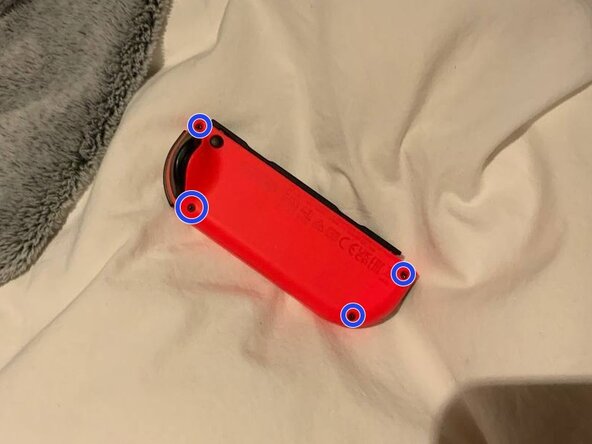
Take your Y00 screwdriver and get to work! Unscrew the four screws holding the back of the Joy-Con in place.
-
-
-
-
Carefully open the Joy-Con backshell, take your time!
-
-
-
Backshell can get really annoying, so why won't we just unscrew it? Take 00 screwdriver and let's get it done!
-
-



To reassemble your device, follow these instructions in reverse order.
crwdns2935221:0crwdne2935221:0
crwdns2935227:0crwdne2935227:0
crwdns2947412:04crwdne2947412:0
This guide only stops at removing the outer screws and doesn't show the fill process. Please update.
Shannon W - crwdns2934203:0crwdne2934203:0 crwdns2950251:0crwdne2950251:0
this guide is horrible
parknich - crwdns2934203:0crwdne2934203:0 crwdns2950251:0crwdne2950251:0
这个指南,残缺品,没有什么价值
好大一个瓜 - crwdns2934203:0crwdne2934203:0 crwdns2950251:0crwdne2950251:0
to all the morons in the comments, the guide is marked as not finished for a reason
[deleted] - crwdns2934203:0crwdne2934203:0 crwdns2950251:0crwdne2950251:0
