crwdns2933423:0crwdne2933423:0
crwdns2947577:0crwdnd2947577:0crwdne2947577:0

Jazz HDV178 Camcorder Lens Replacement

crwdns2942213:0crwdne2942213:0

  1. Jazz HDV178 Camcorder Lens Replacement, Back Cover: crwdns2935265:01crwdnd2935265:01crwdnd2935265:01crwdne2935265:0
    • On the back of the camcorder, the side opposite of the flip-out screen, there is a section of grooved plastic with a small arrow.

    • Press down on the grooved plastic with your thumbs.

    • Push the back cover in the direction indicated by the small arrow on the grooved plastic. The back cover should slide right off.

    crwdns2952109:0crwdne2952109:0
  2. Jazz HDV178 Camcorder Lens Replacement, Battery: crwdns2935265:02crwdnd2935265:01crwdnd2935265:01crwdne2935265:0
    • Once you have the back cover off, the camcorder should look like this.

    • Look on the battery for a model number to assure that you acquire the correct replacement part.

    • The camcorder model number is located in the red box. Verify that you have a Jazz HDV178.

    crwdns2952109:0crwdne2952109:0
  3. Jazz HDV178 Camcorder Lens Replacement: crwdns2935265:03crwdnd2935265:01crwdnd2935265:01crwdne2935265:0
    • Take the battery out by pulling up on the bottom of the battery. You should be pulling from the side of the camera where the wrist strap is attached.

    crwdns2952109:0crwdne2952109:0
  4. Jazz HDV178 Camcorder Lens Replacement, Housing: crwdns2935265:04crwdnd2935265:01crwdnd2935265:01crwdne2935265:0
    • Remove the camera mount by unscrewing the 4.5 mm screw in the hole.

    • This is the bottom of the camcorder near where the wrist strap connects.

    crwdns2952109:0crwdne2952109:0
  5. Jazz HDV178 Camcorder Lens Replacement: crwdns2935265:05crwdnd2935265:01crwdnd2935265:01crwdne2935265:0
    • Remove the 4.5 mm screw located near the battery slot.

    crwdns2952109:0crwdne2952109:0
  6. Jazz HDV178 Camcorder Lens Replacement: crwdns2935265:06crwdnd2935265:01crwdnd2935265:01crwdne2935265:0
    • Break the glue that attaches the lens cover to the camcorder by sliding the plastic prying tool beneath the circumference of the part.

    • After the glue is broken, remove the lens cover.

    crwdns2952109:0crwdne2952109:0
  7. Jazz HDV178 Camcorder Lens Replacement: crwdns2935265:07crwdnd2935265:01crwdnd2935265:01crwdne2935265:0
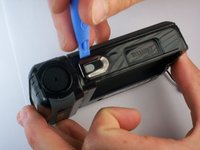
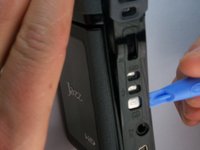
    • Use a small plastic pry tool to gently pry off the silver strip on the top of the camera.

    • Make sure to run the tool under the outline of the strip as you pry it off so the plastic does not snap.

    crwdns2952109:0crwdne2952109:0
  8. Jazz HDV178 Camcorder Lens Replacement: crwdns2935265:08crwdnd2935265:01crwdnd2935265:03crwdne2935265:0 Jazz HDV178 Camcorder Lens Replacement: crwdns2935265:08crwdnd2935265:02crwdnd2935265:03crwdne2935265:0 Jazz HDV178 Camcorder Lens Replacement: crwdns2935265:08crwdnd2935265:03crwdnd2935265:03crwdne2935265:0
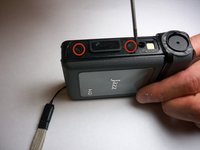
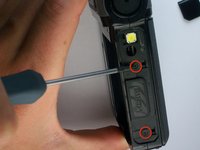
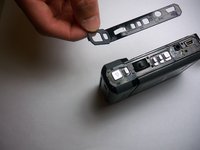
    • Locate the side of the camcorder beneath the lens and on the opposite side of the wrist strap.

    • Remove the silver strip using the same process as the previous step.

    • Remove the two 4 mm screws that were hidden under the cover.

    crwdns2952109:0crwdne2952109:0
  9. Jazz HDV178 Camcorder Lens Replacement: crwdns2935265:09crwdnd2935265:01crwdnd2935265:03crwdne2935265:0 Jazz HDV178 Camcorder Lens Replacement: crwdns2935265:09crwdnd2935265:02crwdnd2935265:03crwdne2935265:0 Jazz HDV178 Camcorder Lens Replacement: crwdns2935265:09crwdnd2935265:03crwdnd2935265:03crwdne2935265:0
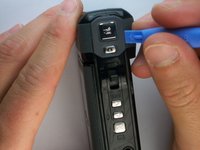
    • Pry off the rubbery cap, which covers the buttons. Use the same process as the previous two steps.

    • Slide your prying tool underneath the entire cover to ensure that the glue breaks cleanly and the cover does not snap.

    crwdns2952109:0crwdne2952109:0
  10. Jazz HDV178 Camcorder Lens Replacement: crwdns2935265:010crwdnd2935265:01crwdnd2935265:01crwdne2935265:0
    • Remove the three combined buttons so they are not misplaced.

    crwdns2952109:0crwdne2952109:0
  11. Jazz HDV178 Camcorder Lens Replacement: crwdns2935265:011crwdnd2935265:01crwdnd2935265:02crwdne2935265:0 Jazz HDV178 Camcorder Lens Replacement: crwdns2935265:011crwdnd2935265:02crwdnd2935265:02crwdne2935265:0
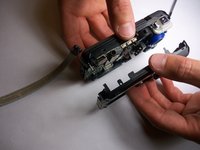
    • Using a firm hold on both sides of the camcorder, gently pull apart the two halves. Pressure should be evenly distributed across the entire device.

    • If the camcorder does not come apart easily, double check that all of the screws are removed. Return to the previous steps for screw removal if you find a screw that is still attached.

    crwdns2952109:0crwdne2952109:0
  12. Jazz HDV178 Camcorder Lens Replacement, Lens: crwdns2935265:012crwdnd2935265:01crwdnd2935265:02crwdne2935265:0 Jazz HDV178 Camcorder Lens Replacement, Lens: crwdns2935265:012crwdnd2935265:02crwdnd2935265:02crwdne2935265:0
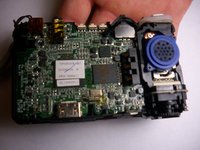
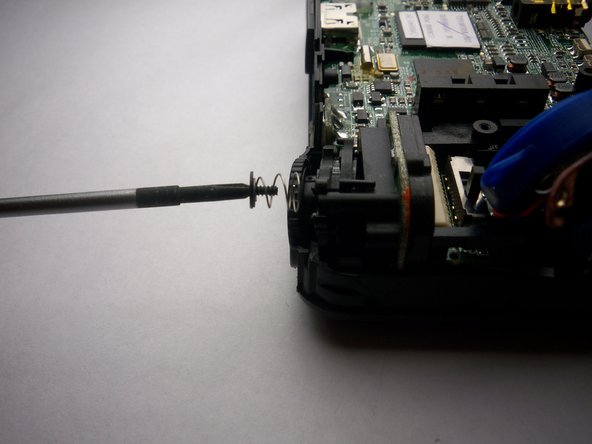
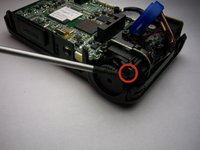
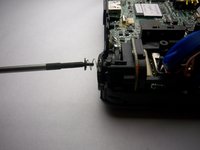
    • Remove the big headed 3.5 mm screw that holds the lens in place.

    crwdns2952109:0crwdne2952109:0
  13. Jazz HDV178 Camcorder Lens Replacement: crwdns2935265:013crwdnd2935265:01crwdnd2935265:02crwdne2935265:0 Jazz HDV178 Camcorder Lens Replacement: crwdns2935265:013crwdnd2935265:02crwdnd2935265:02crwdne2935265:0
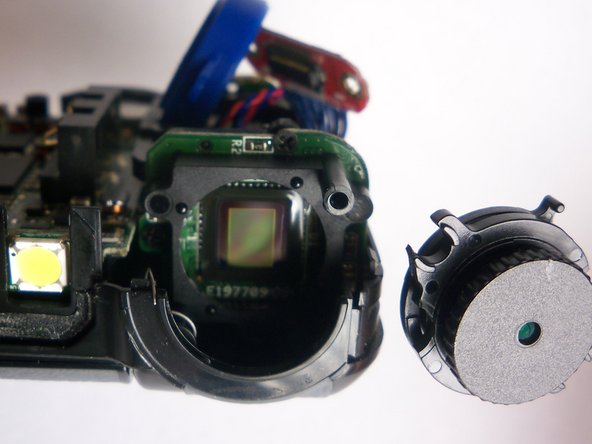
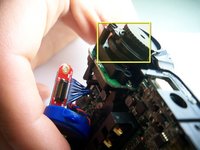
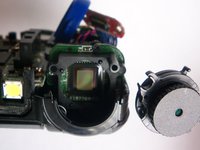
    • Grab the plastic part covering the lens and gently wiggle it out of place to uncover the lens.

    • Be sure to note how the part is attached so that you can replace it correctly.

    crwdns2952109:0crwdne2952109:0
crwdns2915888:0crwdne2915888:0

To reassemble your device, follow these instructions in reverse order.

Sean

crwdns2935283:001/28/11crwdne2935283:0

207 crwdns2915208:0crwdne2915208:0

crwdns2935297:02crwdne2935297:0

crwdns2935287:0crwdne2935287:0

Cal Poly, Team 7-34, Regan Winter 2011 crwdns2935289:0Cal Poly, Team 7-34, Regan Winter 2011crwdne2935289:0

CPSU-REGAN-W11S7G34

crwdns2931471:04crwdne2931471:0

crwdns2935297:07crwdne2935297:0

crwdns2947412:00crwdne2947412:0

crwdns2917038:0crwdne2917038:0

crwdns2936625:0crwdne2936625:0:

crwdns2936751:024crwdne2936751:0 1

crwdns2936753:07crwdne2936753:0 6

crwdns2936753:030crwdne2936753:0 58

crwdns2942667:0crwdne2942667:0 1,985