crwdns2933423:0crwdne2933423:0
crwdns2947577:0crwdnd2947577:0crwdne2947577:0

Jawbone MINI JAMBOX Side Button Assembly Replacement

crwdns2942213:0crwdne2942213:0

  1. Jawbone MINI JAMBOX Side Button Assembly Replacement, Outer Case: crwdns2935265:01crwdnd2935265:01crwdnd2935265:02crwdne2935265:0 Jawbone MINI JAMBOX Side Button Assembly Replacement, Outer Case: crwdns2935265:01crwdnd2935265:02crwdnd2935265:02crwdne2935265:0
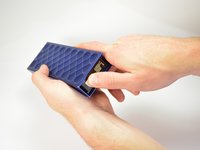
    • Using the standard metal spudger, begin by prying at the bottom of the plain rubber end cap (the end without the USB or auxiliary input).

    crwdns2952109:0crwdne2952109:0
  2. Jawbone MINI JAMBOX Side Button Assembly Replacement: crwdns2935265:02crwdnd2935265:01crwdnd2935265:01crwdne2935265:0
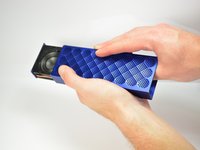
    • Continue prying around the end panel, prying at different points until the entire panel is out of its seating.

    • Carefully remove the end panel.

    • The tabs which connect the panel are on the short sides.

    • WARNING: you will likely cause cosmetic damage to the end cap.

    crwdns2952109:0crwdne2952109:0
  3. Jawbone MINI JAMBOX Side Button Assembly Replacement: crwdns2935265:03crwdnd2935265:01crwdnd2935265:01crwdne2935265:0
    • Slide out the rubber foot located on the bottom of the case.

    crwdns2952109:0crwdne2952109:0
  4. Jawbone MINI JAMBOX Side Button Assembly Replacement: crwdns2935265:04crwdnd2935265:01crwdnd2935265:01crwdne2935265:0
    • Using a T6 bit, remove the flat topped 5mm screw located on the bottom of the casing, underneath the rubber foot.

    • This is the only flat topped screw in the speaker, so keep track of which one it is.

    crwdns2952109:0crwdne2952109:0
  5. Jawbone MINI JAMBOX Side Button Assembly Replacement: crwdns2935265:05crwdnd2935265:01crwdnd2935265:03crwdne2935265:0 Jawbone MINI JAMBOX Side Button Assembly Replacement: crwdns2935265:05crwdnd2935265:02crwdnd2935265:03crwdne2935265:0 Jawbone MINI JAMBOX Side Button Assembly Replacement: crwdns2935265:05crwdnd2935265:03crwdnd2935265:03crwdne2935265:0
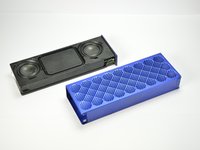
    • Push against the side without end cap to slide the internal components out of the case.

    • While holding the metal outset casing with one hand, press on the black inner plastic casing with your thumb.

    • It will be very difficult the first time. There is a rubber seal on the outside of the plastic inner case that creates a lot of friction with the metal outer case.

    crwdns2952109:0crwdne2952109:0
  6. Jawbone MINI JAMBOX Side Button Assembly Replacement, Side Buttons Assembly: crwdns2935265:06crwdnd2935265:01crwdnd2935265:02crwdne2935265:0 Jawbone MINI JAMBOX Side Button Assembly Replacement, Side Buttons Assembly: crwdns2935265:06crwdnd2935265:02crwdnd2935265:02crwdne2935265:0
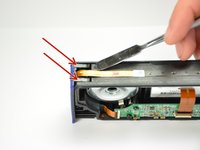
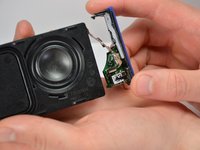
    • Using the standard metal spudger, carefully pry up the top 2 plastic tabs which hold the exterior button and port cover onto the interior plastic frame.

    crwdns2952109:0crwdne2952109:0
  7. Jawbone MINI JAMBOX Side Button Assembly Replacement: crwdns2935265:07crwdnd2935265:01crwdnd2935265:01crwdne2935265:0
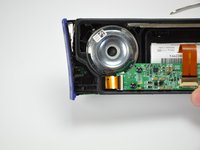
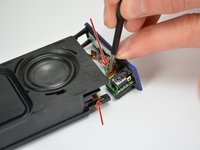
    • Using the standard metal spudger, pry up the bottom 2 tabs attaching the other side of the button panel.

    • It should come off after prying up the first tab.

    crwdns2952109:0crwdne2952109:0
  8. Jawbone MINI JAMBOX Side Button Assembly Replacement: crwdns2935265:08crwdnd2935265:01crwdnd2935265:03crwdne2935265:0 Jawbone MINI JAMBOX Side Button Assembly Replacement: crwdns2935265:08crwdnd2935265:02crwdnd2935265:03crwdne2935265:0 Jawbone MINI JAMBOX Side Button Assembly Replacement: crwdns2935265:08crwdnd2935265:03crwdnd2935265:03crwdne2935265:0
    crwdns2935267:0crwdne2935267:0
    Tweezers
    $4.99
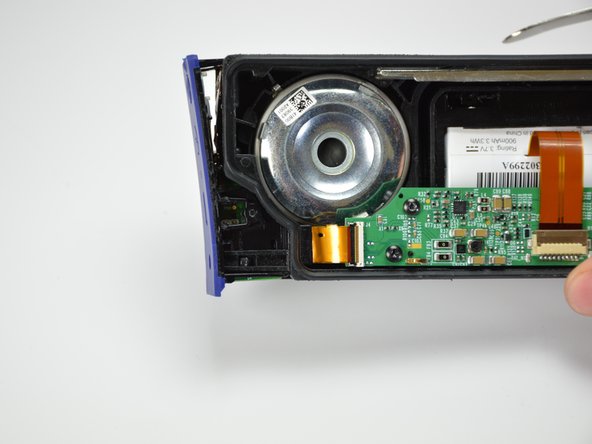
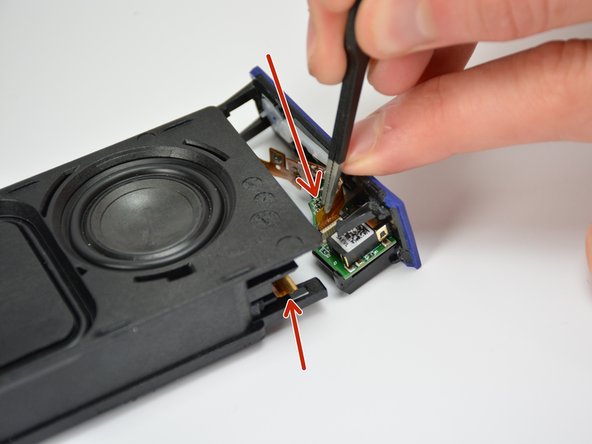
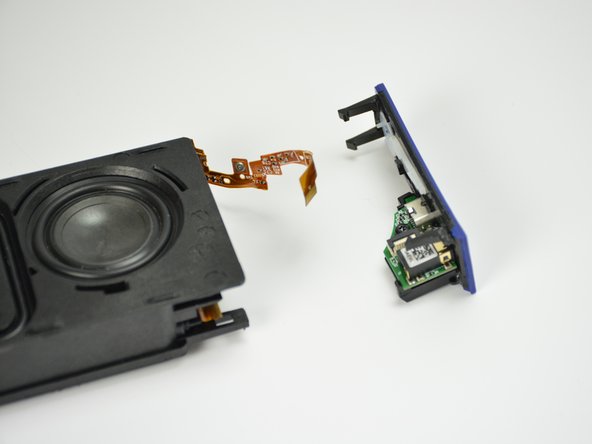
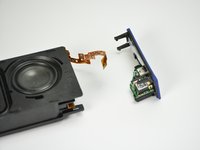
    • Carefully lift out the end panel.

    • Unplug both the connection ribbon and the ZIF or "zero insertion force" ribbon using tweezers or your hands.

    • There is a bit of glue to hold the connection ribbon down.

    crwdns2952109:0crwdne2952109:0
  9. Jawbone MINI JAMBOX Side Button Assembly Replacement: crwdns2935265:09crwdnd2935265:01crwdnd2935265:01crwdne2935265:0
    • Using the spudger, push the button in and create a small gap between the outside structure and the button.

    crwdns2952109:0crwdne2952109:0
  10. Jawbone MINI JAMBOX Side Button Assembly Replacement: crwdns2935265:010crwdnd2935265:01crwdnd2935265:01crwdne2935265:0
    • Using a computer duster, blow any contaminants out from the button junction.

    • Using a q-tip and cleaner, wipe off any stickiness from the buttons, ensuring to prevent excessive moisture.

    • Alternate Reassembly required, read on.

    crwdns2952109:0crwdne2952109:0
crwdns2915888:0crwdne2915888:0

To reassemble your device, follow steps 1 through 5 in reverse order.

Liam McDonnell

crwdns2935283:004/01/15crwdne2935283:0

559 crwdns2915208:0crwdne2915208:0

crwdns2935297:03crwdne2935297:0

crwdns2935287:0crwdne2935287:0

Cal Poly, Team 12-1, Lancaster Spring 2015 crwdns2935289:0Cal Poly, Team 12-1, Lancaster Spring 2015crwdne2935289:0

CPSU-LANCASTER-S15S12G1

crwdns2931471:05crwdne2931471:0

crwdns2935297:011crwdne2935297:0

crwdns2947412:00crwdne2947412:0

crwdns2917038:0crwdne2917038:0

crwdns2936625:0crwdne2936625:0:

crwdns2936751:024crwdne2936751:0 1

crwdns2936753:07crwdne2936753:0 8

crwdns2936753:030crwdne2936753:0 58

crwdns2942667:0crwdne2942667:0 1,129