crwdns2933423:0crwdne2933423:0
crwdns2947577:0crwdnd2947577:0crwdne2947577:0

Jawbone MINI JAMBOX Outer Case Replacement

crwdns2942213:0crwdne2942213:0

    1. Jawbone MINI JAMBOX Outer Case Replacement, Outer Case: crwdns2935265:01crwdnd2935265:01crwdnd2935265:02crwdne2935265:0 Jawbone MINI JAMBOX Outer Case Replacement, Outer Case: crwdns2935265:01crwdnd2935265:02crwdnd2935265:02crwdne2935265:0
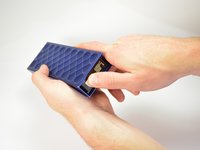
      • Using the standard metal spudger, begin by prying at the bottom of the plain rubber end cap (the end without the USB or auxiliary input).

      crwdns2952109:0crwdne2952109:0

      crwdns2917038:0crwdne2917038:0

    2. Jawbone MINI JAMBOX Outer Case Replacement: crwdns2935265:02crwdnd2935265:01crwdnd2935265:01crwdne2935265:0
      • Continue prying around the end panel, prying at different points until the entire panel is out of its seating.

      • Carefully remove the end panel.

      • The tabs which connect the panel are on the short sides.

      • WARNING: you will likely cause cosmetic damage to the end cap.

      crwdns2952109:0crwdne2952109:0

      crwdns2917038:0crwdne2917038:0

    3. Jawbone MINI JAMBOX Outer Case Replacement: crwdns2935265:03crwdnd2935265:01crwdnd2935265:01crwdne2935265:0
      • Slide out the rubber foot located on the bottom of the case.

      crwdns2952109:0crwdne2952109:0

      crwdns2917038:0crwdne2917038:0

    4. Jawbone MINI JAMBOX Outer Case Replacement: crwdns2935265:04crwdnd2935265:01crwdnd2935265:01crwdne2935265:0
      • Using a T6 bit, remove the flat topped 5mm screw located on the bottom of the casing, underneath the rubber foot.

      • This is the only flat topped screw in the speaker, so keep track of which one it is.

      crwdns2952109:0crwdne2952109:0

      crwdns2917038:0crwdne2917038:0

    5. Jawbone MINI JAMBOX Outer Case Replacement: crwdns2935265:05crwdnd2935265:01crwdnd2935265:03crwdne2935265:0 Jawbone MINI JAMBOX Outer Case Replacement: crwdns2935265:05crwdnd2935265:02crwdnd2935265:03crwdne2935265:0 Jawbone MINI JAMBOX Outer Case Replacement: crwdns2935265:05crwdnd2935265:03crwdnd2935265:03crwdne2935265:0
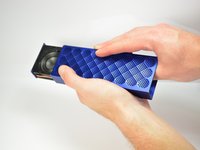
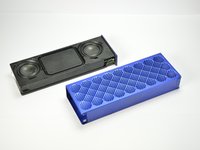
      • Push against the side without end cap to slide the internal components out of the case.

      • While holding the metal outset casing with one hand, press on the black inner plastic casing with your thumb.

      • It will be very difficult the first time. There is a rubber seal on the outside of the plastic inner case that creates a lot of friction with the metal outer case.

      crwdns2952109:0crwdne2952109:0

      crwdns2917038:0crwdne2917038:0

crwdns2915888:0crwdne2915888:0

To reassemble your device, follow these instructions in reverse order.

crwdns2935221:0crwdne2935221:0

crwdns2935227:0crwdne2935227:0

Noah Sadler

crwdns2935283:004/01/15crwdne2935283:0

548 crwdns2915208:0crwdne2915208:0

crwdns2935297:02crwdne2935297:0

crwdns2935287:0crwdne2935287:0

Cal Poly, Team 12-1, Lancaster Spring 2015 crwdns2935289:0Cal Poly, Team 12-1, Lancaster Spring 2015crwdne2935289:0

CPSU-LANCASTER-S15S12G1

crwdns2931471:05crwdne2931471:0

crwdns2935297:096crwdne2935297:0

crwdns2947410:01crwdne2947410:0

Does anyone know where to find replacement outer shells for the big jambox?

aric.valliere - crwdns2934203:0crwdne2934203:0 crwdns2950251:0crwdne2950251:0

crwdns2917038:0crwdne2917038:0

crwdns2936625:0crwdne2936625:0:

crwdns2936751:024crwdne2936751:0 6

crwdns2936753:07crwdne2936753:0 22

crwdns2936753:030crwdne2936753:0 66

crwdns2942667:0crwdne2942667:0 3,854