crwdns2933423:0crwdne2933423:0
crwdns2947577:0crwdnd2947577:0crwdne2947577:0

JBL Pulse 3 Motherboard Replacement

crwdns2942213:0crwdne2942213:0

    1. JBL Pulse 3 Motherboard Replacement, Speaker Grill: crwdns2935265:01crwdnd2935265:01crwdnd2935265:01crwdne2935265:0
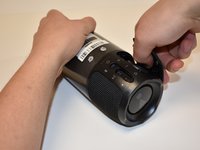
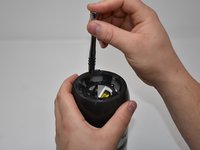
      • Lay the JBL Pulse 3 on its side as shown in the picture.

      • Use a plastic opening tool to lift the top right corner of the speaker grill. A small amount of force is necessary to remove the grill.

      crwdns2952109:0crwdne2952109:0

      crwdns2917038:0crwdne2917038:0

    2. JBL Pulse 3 Motherboard Replacement: crwdns2935265:02crwdnd2935265:01crwdnd2935265:01crwdne2935265:0
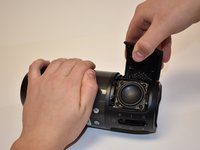
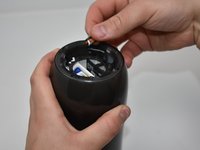
      • Repeat step 1 for bottom right corner of speaker grill.

      crwdns2952109:0crwdne2952109:0

      crwdns2917038:0crwdne2917038:0

    3. JBL Pulse 3 Motherboard Replacement: crwdns2935265:03crwdnd2935265:01crwdnd2935265:02crwdne2935265:0 JBL Pulse 3 Motherboard Replacement: crwdns2935265:03crwdnd2935265:02crwdnd2935265:02crwdne2935265:0
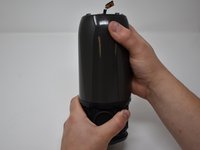
      • After pulling the right side of the grill off, place thumb underneath grill as shown in the picture.

      • Lift and pull straight out to pull grill off the posts.

      crwdns2952109:0crwdne2952109:0

      crwdns2917038:0crwdne2917038:0

      • Repeat steps 1-3 for the left side of the speaker grill on the JBL Pulse 3. The speaker grill should now be completely removed from the JBL Pulse 3.

      crwdns2952109:0crwdne2952109:0

      crwdns2917038:0crwdne2917038:0

    1. JBL Pulse 3 Motherboard Replacement, Outside Casing: crwdns2935265:05crwdnd2935265:01crwdnd2935265:02crwdne2935265:0 JBL Pulse 3 Motherboard Replacement, Outside Casing: crwdns2935265:05crwdnd2935265:02crwdnd2935265:02crwdne2935265:0
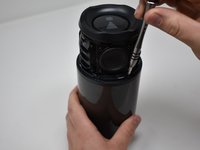
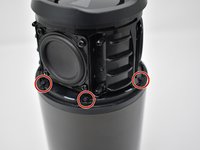
      • Use a Phillips #00 screwdriver to remove the six black 6mm screws on the inside of the top of the bottom section.

      crwdns2952109:0crwdne2952109:0

      crwdns2917038:0crwdne2917038:0

    2. JBL Pulse 3 Motherboard Replacement: crwdns2935265:06crwdnd2935265:01crwdnd2935265:02crwdne2935265:0 JBL Pulse 3 Motherboard Replacement: crwdns2935265:06crwdnd2935265:02crwdnd2935265:02crwdne2935265:0
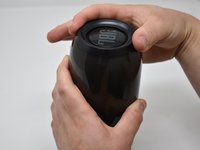
      • Turn the JBL Pulse 3 right-side up and unscrew the top ring of the device. A small amount of force and/or a cotton cloth may be necessary to remove this piece.

      crwdns2952109:0crwdne2952109:0

      crwdns2917038:0crwdne2917038:0

    3. JBL Pulse 3 Motherboard Replacement: crwdns2935265:07crwdnd2935265:01crwdnd2935265:02crwdne2935265:0 JBL Pulse 3 Motherboard Replacement: crwdns2935265:07crwdnd2935265:02crwdnd2935265:02crwdne2935265:0
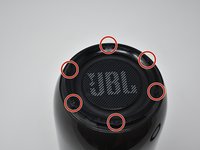
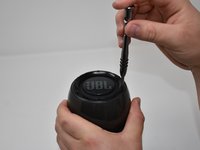
      • Remove the six 5mm screws on top of the JBL Pulse 3 with a Phillips #0 screwdriver.

      crwdns2952109:0crwdne2952109:0

      crwdns2917038:0crwdne2917038:0

    4. JBL Pulse 3 Motherboard Replacement: crwdns2935265:08crwdnd2935265:01crwdnd2935265:01crwdne2935265:0
      • Pull off the top disc of the JBL Pulse 3.

      crwdns2952109:0crwdne2952109:0

      crwdns2917038:0crwdne2917038:0

    5. JBL Pulse 3 Motherboard Replacement: crwdns2935265:09crwdnd2935265:01crwdnd2935265:02crwdne2935265:0 JBL Pulse 3 Motherboard Replacement: crwdns2935265:09crwdnd2935265:02crwdnd2935265:02crwdne2935265:0
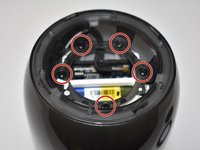
      • Remove the five 7mm screws on the inside of the JBL Pulse 3 with a Phillips #1 screwdriver.

      crwdns2952109:0crwdne2952109:0

      crwdns2917038:0crwdne2917038:0

    6. JBL Pulse 3 Motherboard Replacement: crwdns2935265:010crwdnd2935265:01crwdnd2935265:02crwdne2935265:0 JBL Pulse 3 Motherboard Replacement: crwdns2935265:010crwdnd2935265:02crwdnd2935265:02crwdne2935265:0
      • Peel off black, taped-on electrical lead from the inside side of the JBL Pulse 3.

      crwdns2952109:0crwdne2952109:0

      crwdns2917038:0crwdne2917038:0

    7. JBL Pulse 3 Motherboard Replacement: crwdns2935265:011crwdnd2935265:01crwdnd2935265:01crwdne2935265:0
      • Pull the top section of the JBL Pulse 3 up. The outside casing to the JBL Pulse 3 should now be removed.

      crwdns2952109:0crwdne2952109:0

      crwdns2917038:0crwdne2917038:0

    1. JBL Pulse 3 Motherboard Replacement, LED Light Display: crwdns2935265:012crwdnd2935265:01crwdnd2935265:03crwdne2935265:0 JBL Pulse 3 Motherboard Replacement, LED Light Display: crwdns2935265:012crwdnd2935265:02crwdnd2935265:03crwdne2935265:0 JBL Pulse 3 Motherboard Replacement, LED Light Display: crwdns2935265:012crwdnd2935265:03crwdnd2935265:03crwdne2935265:0
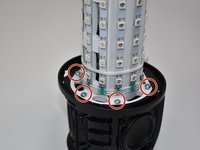
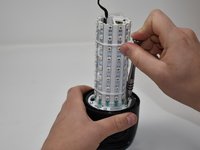
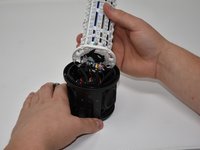
      • Use a Phillips #2 screwdriver to remove the six 11 mm screws that circle the bottom of the LED light display.

      • Pull the LED light display off of the JBL Pulse 3 base.

      crwdns2952109:0crwdne2952109:0

      crwdns2917038:0crwdne2917038:0

    2. JBL Pulse 3 Motherboard Replacement: crwdns2935265:013crwdnd2935265:01crwdnd2935265:02crwdne2935265:0 JBL Pulse 3 Motherboard Replacement: crwdns2935265:013crwdnd2935265:02crwdnd2935265:02crwdne2935265:0
      crwdns2935267:0crwdne2935267:0
      Tweezers
      $4.99
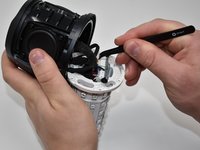
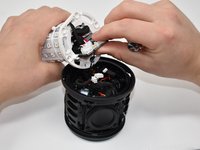
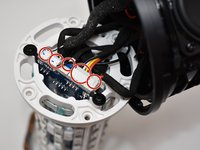
      • Use tweezers to pull the five connections off of the LED light display.

      crwdns2952109:0crwdne2952109:0

      crwdns2917038:0crwdne2917038:0

    1. JBL Pulse 3 Motherboard Replacement, Motherboard: crwdns2935265:014crwdnd2935265:01crwdnd2935265:02crwdne2935265:0 JBL Pulse 3 Motherboard Replacement, Motherboard: crwdns2935265:014crwdnd2935265:02crwdnd2935265:02crwdne2935265:0
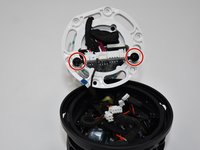
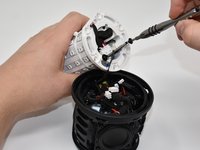
      • Using a Phillips #0 screwdriver, remove the two black 8mm screws on the bottom of the LED light display.

      crwdns2952109:0crwdne2952109:0

      crwdns2917038:0crwdne2917038:0

    2. JBL Pulse 3 Motherboard Replacement: crwdns2935265:015crwdnd2935265:01crwdnd2935265:03crwdne2935265:0 JBL Pulse 3 Motherboard Replacement: crwdns2935265:015crwdnd2935265:02crwdnd2935265:03crwdne2935265:0 JBL Pulse 3 Motherboard Replacement: crwdns2935265:015crwdnd2935265:03crwdnd2935265:03crwdne2935265:0
      crwdns2935267:0crwdne2935267:0
      Tweezers
      $4.99
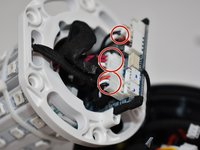
      • Pull out the motherboard slightly from the LED light display as shown. Using tweezers, unplug the three connections attached to the motherboard.

      crwdns2952109:0crwdne2952109:0

      crwdns2917038:0crwdne2917038:0

    3. JBL Pulse 3 Motherboard Replacement: crwdns2935265:016crwdnd2935265:01crwdnd2935265:01crwdne2935265:0
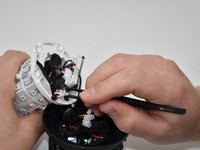
      • Pull the rest of the motherboard out from the LED light display.

      • Using wire cutters, snip the black wire connecting to the base of the JBL Pulse 3 at the base of the motherboard. The motherboard should now be removed from the JBL Pulse 3.

      crwdns2952109:0crwdne2952109:0

      crwdns2917038:0crwdne2917038:0

crwdns2915888:0crwdne2915888:0

To reassemble your device, follow these instructions in reverse order.

Note: To replace the motherboard, you will need to re-solder the black wire to the motherboard.

crwdns2935221:0crwdne2935221:0

crwdns2935229:02crwdne2935229:0

Kaitlyn Greenfield

crwdns2935283:009/20/18crwdne2935283:0

1,188 crwdns2915208:0crwdne2915208:0

crwdns2935297:06crwdne2935297:0

crwdns2935287:0crwdne2935287:0

Central Washington University, Team S1-G2, Pengilly Fall 2018 crwdns2935289:0Central Washington University, Team S1-G2, Pengilly Fall 2018crwdne2935289:0

CWU-PENGILLY-F18S1G2

crwdns2931471:03crwdne2931471:0

crwdns2935297:030crwdne2935297:0

crwdns2947410:01crwdne2947410:0

tengo un pulse 3 que la placa entro en corto… me gustaria saber si alguien me puede ayudar con el diagrama esquematico o algun foto donde pueda conseguir

Wilson Flores - crwdns2934203:0crwdne2934203:0 crwdns2950251:0crwdne2950251:0
crwdns2917038:0crwdne2917038:0

crwdns2936625:0crwdne2936625:0:

crwdns2936751:024crwdne2936751:0 2

crwdns2936753:07crwdne2936753:0 15

crwdns2936753:030crwdne2936753:0 54

crwdns2942667:0crwdne2942667:0 4,658