crwdns2933423:0crwdne2933423:0
crwdns2947577:0crwdnd2947577:0crwdne2947577:0

JBL Grip Battery Replacement

crwdns2942213:0crwdne2942213:0

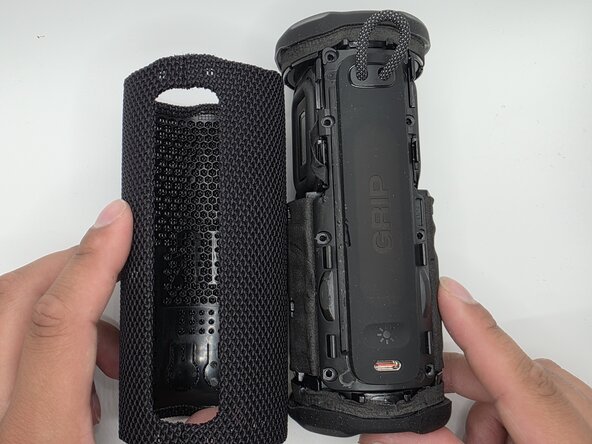
  1. JBL Grip Battery Replacement, Case: crwdns2935265:01crwdnd2935265:01crwdnd2935265:02crwdne2935265:0 JBL Grip Battery Replacement, Case: crwdns2935265:01crwdnd2935265:02crwdnd2935265:02crwdne2935265:0
    • Slide the Jimmy along the seam to separate the case.

    • Caution: Do not bend or puncture membrane.

    crwdns2952109:0crwdne2952109:0
  2. JBL Grip Battery Replacement: crwdns2935265:02crwdnd2935265:01crwdnd2935265:02crwdne2935265:0 JBL Grip Battery Replacement: crwdns2935265:02crwdnd2935265:02crwdnd2935265:02crwdne2935265:0
    • Unlatch the membrane from the rest of body.

    crwdns2952109:0crwdne2952109:0
  3. JBL Grip Battery Replacement, Charging Port Panel: crwdns2935265:03crwdnd2935265:01crwdnd2935265:02crwdne2935265:0 JBL Grip Battery Replacement, Charging Port Panel: crwdns2935265:03crwdnd2935265:02crwdnd2935265:02crwdne2935265:0
    • Remove the eight 6mm screws securing the panel with a Phillips #2 screwdriver.

    crwdns2952109:0crwdne2952109:0
  4. JBL Grip Battery Replacement: crwdns2935265:04crwdnd2935265:01crwdnd2935265:03crwdne2935265:0 JBL Grip Battery Replacement: crwdns2935265:04crwdnd2935265:02crwdnd2935265:03crwdne2935265:0 JBL Grip Battery Replacement: crwdns2935265:04crwdnd2935265:03crwdnd2935265:03crwdne2935265:0
    • Flip up the black latches securing the two blue cables connected to the panel.

    • Caution: Do not pull the cables by force. Ensure the latches are fully lifted.

    crwdns2952109:0crwdne2952109:0
  5. JBL Grip Battery Replacement, Battery: crwdns2935265:05crwdnd2935265:01crwdnd2935265:02crwdne2935265:0 JBL Grip Battery Replacement, Battery: crwdns2935265:05crwdnd2935265:02crwdnd2935265:02crwdne2935265:0
    • Carefully pull the detached end of the battery from the chassis.

    • Be sure not to pull too hard; the cables are fragile.

    crwdns2952109:0crwdne2952109:0
  6. JBL Grip Battery Replacement: crwdns2935265:06crwdnd2935265:01crwdnd2935265:02crwdne2935265:0 JBL Grip Battery Replacement: crwdns2935265:06crwdnd2935265:02crwdnd2935265:02crwdne2935265:0
    • Unplug the wires from their socket.

    • Be gentle; these parts are fragile.

    • Once the wire is unplugged, safely remove it.

    crwdns2952109:0crwdne2952109:0
crwdns2915888:0crwdne2915888:0

To reassemble your device, follow these instructions in reverse order.

Isaac Loma

crwdns2935283:002/09/26crwdne2935283:0

777 crwdns2915208:0crwdne2915208:0

crwdns2935297:07crwdne2935297:0

crwdns2935287:0crwdne2935287:0

University of North Texas, Team 1-4, Kilpatrick Spring 2026 crwdns2935289:0University of North Texas, Team 1-4, Kilpatrick Spring 2026crwdne2935289:0

UNT-KILPATRICK-S26S1G4

crwdns2931471:05crwdne2931471:0

crwdns2935297:08crwdne2935297:0

crwdns2947412:00crwdne2947412:0

crwdns2917038:0crwdne2917038:0

crwdns2936625:0crwdne2936625:0:

crwdns2936751:024crwdne2936751:0 5

crwdns2936753:07crwdne2936753:0 11

crwdns2936753:030crwdne2936753:0 40

crwdns2942667:0crwdne2942667:0 133