crwdns2933423:0crwdne2933423:0
crwdns2947577:0crwdnd2947577:0crwdne2947577:0

JBL Clip 3 Battery Replacement

crwdns2942213:0crwdne2942213:0

    1. JBL Clip 3 Battery Replacement, Speaker Grill: crwdns2935265:01crwdnd2935265:01crwdnd2935265:02crwdne2935265:0 JBL Clip 3 Battery Replacement, Speaker Grill: crwdns2935265:01crwdnd2935265:02crwdnd2935265:02crwdne2935265:0
      • Insert the iFixit opening tool between the speaker grill and speaker housing and pry around the entire perimeter of the device until the grill releases.

      • A strong adhesive attaches the grill to the housing, and requires some time and patience to break. Use mild heat to loosen the adhesive if necessary.

      crwdns2952109:0crwdne2952109:0

      crwdns2917038:0crwdne2917038:0

    1. JBL Clip 3 Battery Replacement, Speaker Housing: crwdns2935265:02crwdnd2935265:01crwdnd2935265:02crwdne2935265:0 JBL Clip 3 Battery Replacement, Speaker Housing: crwdns2935265:02crwdnd2935265:02crwdnd2935265:02crwdne2935265:0
      • Use a Phillips #1 screwdriver to remove the five 6.3 mm screws around the perimeter.

      crwdns2952109:0crwdne2952109:0

      crwdns2917038:0crwdne2917038:0

    2. JBL Clip 3 Battery Replacement: crwdns2935265:03crwdnd2935265:01crwdnd2935265:01crwdne2935265:0
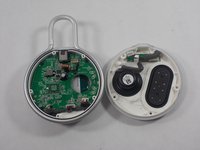
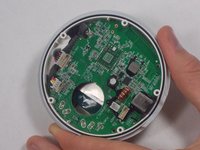
      • Separate the speaker housing from the rest of the body.

      • This requires minimal force; they are not glued together.

      crwdns2952109:0crwdne2952109:0

      crwdns2917038:0crwdne2917038:0

    3. JBL Clip 3 Battery Replacement: crwdns2935265:04crwdnd2935265:01crwdnd2935265:02crwdne2935265:0 JBL Clip 3 Battery Replacement: crwdns2935265:04crwdnd2935265:02crwdnd2935265:02crwdne2935265:0
      crwdns2935267:0crwdne2935267:0
      Tweezers
      $4.99
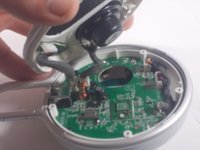
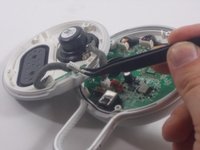
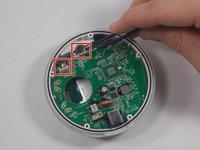
      • Use tweezers to remove the 2 pin and 4 pin connectors from the motherboard.

      crwdns2952109:0crwdne2952109:0

      crwdns2917038:0crwdne2917038:0

    1. JBL Clip 3 Battery Replacement, Carabiner Clip: crwdns2935265:05crwdnd2935265:01crwdnd2935265:02crwdne2935265:0 JBL Clip 3 Battery Replacement, Carabiner Clip: crwdns2935265:05crwdnd2935265:02crwdnd2935265:02crwdne2935265:0
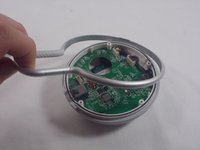
      • Lift the metal carabiner clip from the speaker housing.

      • They are not glued together and should separate easily.

      • There are alignment tabs on the clip so the whole assembly will only reassemble in one orientation.

      crwdns2952109:0crwdne2952109:0

      crwdns2917038:0crwdne2917038:0

    1. JBL Clip 3 Battery Replacement, Speaker Battery: crwdns2935265:06crwdnd2935265:01crwdnd2935265:02crwdne2935265:0 JBL Clip 3 Battery Replacement, Speaker Battery: crwdns2935265:06crwdnd2935265:02crwdnd2935265:02crwdne2935265:0
      crwdns2935267:0crwdne2935267:0
      Tweezers
      $4.99
      • Use a pair of tweezers to lift the two cable connectors from their motherboard sockets.

      • The wires connecting to the battery are not very long, so be careful when removing them.

      crwdns2952109:0crwdne2952109:0

      crwdns2917038:0crwdne2917038:0

    2. JBL Clip 3 Battery Replacement: crwdns2935265:07crwdnd2935265:01crwdnd2935265:01crwdne2935265:0
      • Use a Phillips #1 screwdriver to remove the four screws that secure the motherboard.

      crwdns2952109:0crwdne2952109:0

      crwdns2917038:0crwdne2917038:0

    3. JBL Clip 3 Battery Replacement: crwdns2935265:08crwdnd2935265:01crwdnd2935265:01crwdne2935265:0
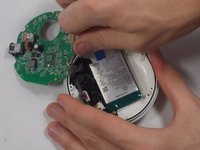
      • Gently lift the motherboard away from the speaker housing.

      • Take care not to damage the soldered connections when lifting the motherboard.

      crwdns2952109:0crwdne2952109:0

      crwdns2917038:0crwdne2917038:0

    4. JBL Clip 3 Battery Replacement: crwdns2935265:09crwdnd2935265:01crwdnd2935265:02crwdne2935265:0 JBL Clip 3 Battery Replacement: crwdns2935265:09crwdnd2935265:02crwdnd2935265:02crwdne2935265:0
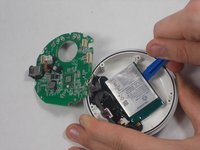
      • Use an opening tool to carefully pry your way around the battery, slowly lifting it off of the epoxy until it fully releases.

      • Avoid puncturing or bending the battery. It is a Lithium cell, so there is a bit of risk involved when completing this step. Be careful and patient, and there will not be any complications.

      • During reassembly, remember to superglue the new battery back into place.

      crwdns2952109:0crwdne2952109:0

      crwdns2917038:0crwdne2917038:0

crwdns2915888:0crwdne2915888:0

To reassemble your device, follow these instructions in reverse order.

crwdns2935221:0crwdne2935221:0

crwdns2935229:06crwdne2935229:0

Kyle Montague

crwdns2935283:003/28/22crwdne2935283:0

265 crwdns2915208:0crwdne2915208:0

crwdns2935297:02crwdne2935297:0

crwdns2935287:0crwdne2935287:0

UMass Dartmouth, Team 1-5, Petersen Spring 2022 crwdns2935289:0UMass Dartmouth, Team 1-5, Petersen Spring 2022crwdne2935289:0

UMASSD-PETERSEN-S22S1G5

crwdns2931471:03crwdne2931471:0

crwdns2935297:016crwdne2935297:0

crwdns2947412:03crwdne2947412:0

Thanks, but unless I missed something I don't see the recommended battery to replace with (only that it's a 1000mAh). Under "what you need" there's no mention of battery.

B.Bender - crwdns2934203:0crwdne2934203:0 crwdns2950251:0crwdne2950251:0

Amazon and others sell them. Just Google "JBL Clip 3 battery for sale". Price varies widely.

CalTee - crwdns2934203:0crwdne2934203:0 crwdns2950251:0crwdne2950251:0

Thank you - very helpful guide! Was able to replace my battery with no issues.

JB Zorg - crwdns2934203:0crwdne2934203:0 crwdns2950251:0crwdne2950251:0

crwdns2917038:0crwdne2917038:0

crwdns2936625:0crwdne2936625:0:

crwdns2936751:024crwdne2936751:0 5

crwdns2936753:07crwdne2936753:0 42

crwdns2936753:030crwdne2936753:0 174

crwdns2942667:0crwdne2942667:0 11,053