crwdns2933423:0crwdne2933423:0
crwdns2947577:0crwdnd2947577:0crwdne2947577:0

JBL Charge 2 Plus Battery Replacement

crwdns2942213:0crwdne2942213:0

    1. JBL Charge 2 Plus Battery Replacement, Passive Radiators: crwdns2935265:01crwdnd2935265:01crwdnd2935265:02crwdne2935265:0 JBL Charge 2 Plus Battery Replacement, Passive Radiators: crwdns2935265:01crwdnd2935265:02crwdnd2935265:02crwdne2935265:0
      • Starting from the front side bottom left corner, use the nylon or metal spudger to lift the grille up from each of the four corners.

      • Follow the previous instruction to remove the back grille.

      crwdns2952109:0crwdne2952109:0

      crwdns2917038:0crwdne2917038:0

    2. JBL Charge 2 Plus Battery Replacement: crwdns2935265:02crwdnd2935265:01crwdnd2935265:03crwdne2935265:0 JBL Charge 2 Plus Battery Replacement: crwdns2935265:02crwdnd2935265:02crwdnd2935265:03crwdne2935265:0 JBL Charge 2 Plus Battery Replacement: crwdns2935265:02crwdnd2935265:03crwdnd2935265:03crwdne2935265:0
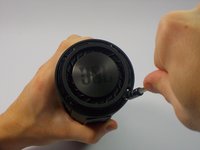
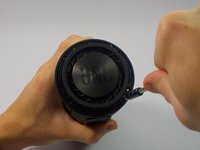
      • Unscrew the two .5 mm screws that hold the sub woofer in place.

      • Repeat the last step for the two screws on the back side.

      crwdns2952109:0crwdne2952109:0

      crwdns2917038:0crwdne2917038:0

    3. JBL Charge 2 Plus Battery Replacement: crwdns2935265:03crwdnd2935265:01crwdnd2935265:02crwdne2935265:0 JBL Charge 2 Plus Battery Replacement: crwdns2935265:03crwdnd2935265:02crwdnd2935265:02crwdne2935265:0
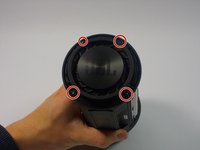
      • Remove the four screws that hold the passive radiator in place

      crwdns2952109:0crwdne2952109:0

      crwdns2917038:0crwdne2917038:0

    4. JBL Charge 2 Plus Battery Replacement: crwdns2935265:04crwdnd2935265:01crwdnd2935265:01crwdne2935265:0
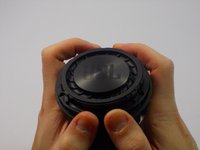
      • Pop the Passive Radiator off.

      crwdns2952109:0crwdne2952109:0

      crwdns2917038:0crwdne2917038:0

    5. JBL Charge 2 Plus Battery Replacement: crwdns2935265:05crwdnd2935265:01crwdnd2935265:03crwdne2935265:0 JBL Charge 2 Plus Battery Replacement: crwdns2935265:05crwdnd2935265:02crwdnd2935265:03crwdne2935265:0 JBL Charge 2 Plus Battery Replacement: crwdns2935265:05crwdnd2935265:03crwdnd2935265:03crwdne2935265:0
      • Repeat Step 2, 3 and 4 for the other passive radiator.

      crwdns2952109:0crwdne2952109:0

      crwdns2917038:0crwdne2917038:0

    1. JBL Charge 2 Plus Battery Replacement, Battery: crwdns2935265:06crwdnd2935265:01crwdnd2935265:02crwdne2935265:0 JBL Charge 2 Plus Battery Replacement, Battery: crwdns2935265:06crwdnd2935265:02crwdnd2935265:02crwdne2935265:0
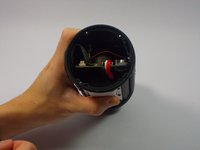
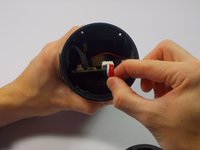
      • Remove the battery wire from the circuit board by pulling it out gently on the side closest to the LCD light.

      crwdns2952109:0crwdne2952109:0

      crwdns2917038:0crwdne2917038:0

    2. JBL Charge 2 Plus Battery Replacement: crwdns2935265:07crwdnd2935265:01crwdnd2935265:01crwdne2935265:0
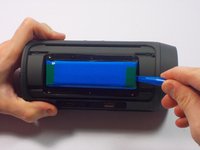
      • Remove the 6 screws that hold the white cover in place.

      crwdns2952109:0crwdne2952109:0

      crwdns2917038:0crwdne2917038:0

    3. JBL Charge 2 Plus Battery Replacement: crwdns2935265:08crwdnd2935265:01crwdnd2935265:02crwdne2935265:0 JBL Charge 2 Plus Battery Replacement: crwdns2935265:08crwdnd2935265:02crwdnd2935265:02crwdne2935265:0
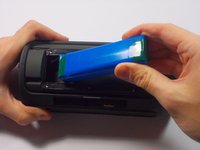
      • Use the plastic opening tool to remove the battery.

      crwdns2952109:0crwdne2952109:0

      crwdns2917038:0crwdne2917038:0

crwdns2915888:0crwdne2915888:0

To reassemble your device, follow these instructions in reverse order.

crwdns2935221:0crwdne2935221:0

crwdns2935229:080crwdne2935229:0

John Reynolds

crwdns2935283:010/16/15crwdne2935283:0

3.354 crwdns2915208:0crwdne2915208:0

crwdns2935297:04crwdne2935297:0

crwdns2935287:0crwdne2935287:0

UMass Dartmouth, Team 4-1, Catania Fall 2015 crwdns2935289:0UMass Dartmouth, Team 4-1, Catania Fall 2015crwdne2935289:0

UMASSD-CATANIA-F15S4G1

crwdns2931471:04crwdne2931471:0

crwdns2935297:060crwdne2935297:0

crwdns2947412:040crwdne2947412:0

Great guide but where to source a battery for a JBL charge 2.

Mine failed, complained to Harman and they sent a new one and didn't want the old one so have a spare I'd like to get working.

Thanks in advance

Rob grist - crwdns2934203:0crwdne2934203:0 crwdns2950251:0crwdne2950251:0

Had my speaker for a month. It won't charge. Why did it only last a month and I have to get a new one? I'm not satisfied with the speaker for the price that I paid.

Jeanette dagastine - crwdns2934203:0crwdne2934203:0 crwdns2950251:0crwdne2950251:0

When I charge my jbl the light in tge power button turns on but when I press it the device does not respond. Please help me...

Tibetan Stoner - crwdns2934203:0crwdne2934203:0 crwdns2950251:0crwdne2950251:0

Try disconnecting the battery and plugging it in again.

MarelyOscar - crwdns2934203:0crwdne2934203:0 crwdns2950251:0crwdne2950251:0

I just had the same problem, the on/off led got stuck and couldn't get any sound or operation from any button. After different attempts a simultaneous pressing of the Phone together with the - and the + button brought my Charge2 to life again.

Javier G. Valdivia - crwdns2934203:0crwdne2934203:0 crwdns2950251:0crwdne2950251:0

crwdns2917038:0crwdne2917038:0

crwdns2936625:0crwdne2936625:0:

crwdns2936751:024crwdne2936751:0 5

crwdns2936753:07crwdne2936753:0 71

crwdns2936753:030crwdne2936753:0 262

crwdns2942667:0crwdne2942667:0 141,843