crwdns2933423:0crwdne2933423:0
crwdns2947577:0crwdnd2947577:0crwdne2947577:0

Integrated Headset Replacement

crwdns2942213:0crwdne2942213:0

  1. Integrated Headset Replacement, Integrated Headset: crwdns2935265:01crwdnd2935265:01crwdnd2935265:03crwdne2935265:0 Integrated Headset Replacement, Integrated Headset: crwdns2935265:01crwdnd2935265:02crwdnd2935265:03crwdne2935265:0 Integrated Headset Replacement, Integrated Headset: crwdns2935265:01crwdnd2935265:03crwdnd2935265:03crwdne2935265:0
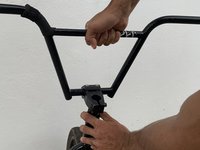
    • Use a 6 mm Allen wrench to loosen the pinch bolts on each side of the stem.

    • Make sure to alternate between each side.

    crwdns2952109:0crwdne2952109:0

    crwdns2917038:0crwdne2917038:0

  2. Integrated Headset Replacement: crwdns2935265:02crwdnd2935265:01crwdnd2935265:03crwdne2935265:0 Integrated Headset Replacement: crwdns2935265:02crwdnd2935265:02crwdnd2935265:03crwdne2935265:0 Integrated Headset Replacement: crwdns2935265:02crwdnd2935265:03crwdnd2935265:03crwdne2935265:0
    • After loosening the bolts, the stem will be free to rotate.

    • Loosen and remove the top cap compression bolt.

    crwdns2952109:0crwdne2952109:0

    crwdns2917038:0crwdne2917038:0

  3. Integrated Headset Replacement: crwdns2935265:03crwdnd2935265:01crwdnd2935265:03crwdne2935265:0 Integrated Headset Replacement: crwdns2935265:03crwdnd2935265:02crwdnd2935265:03crwdne2935265:0 Integrated Headset Replacement: crwdns2935265:03crwdnd2935265:03crwdnd2935265:03crwdne2935265:0
    • Lift the bars and stem to remove them from the fork.

    • Turn the bars side to side while you pull up. This should help you remove a tight stem.

    crwdns2952109:0crwdne2952109:0

    crwdns2917038:0crwdne2917038:0

  4. Integrated Headset Replacement: crwdns2935265:04crwdnd2935265:01crwdnd2935265:03crwdne2935265:0 Integrated Headset Replacement: crwdns2935265:04crwdnd2935265:02crwdnd2935265:03crwdne2935265:0 Integrated Headset Replacement: crwdns2935265:04crwdnd2935265:03crwdnd2935265:03crwdne2935265:0
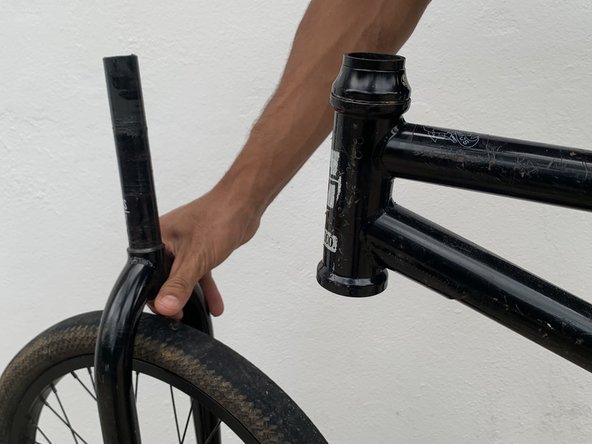
    • Remove the fork and headset from the bottom of the frame.

    crwdns2952109:0crwdne2952109:0

    crwdns2917038:0crwdne2917038:0

  5. Integrated Headset Replacement: crwdns2935265:05crwdnd2935265:01crwdnd2935265:03crwdne2935265:0 Integrated Headset Replacement: crwdns2935265:05crwdnd2935265:02crwdnd2935265:03crwdne2935265:0 Integrated Headset Replacement: crwdns2935265:05crwdnd2935265:03crwdnd2935265:03crwdne2935265:0
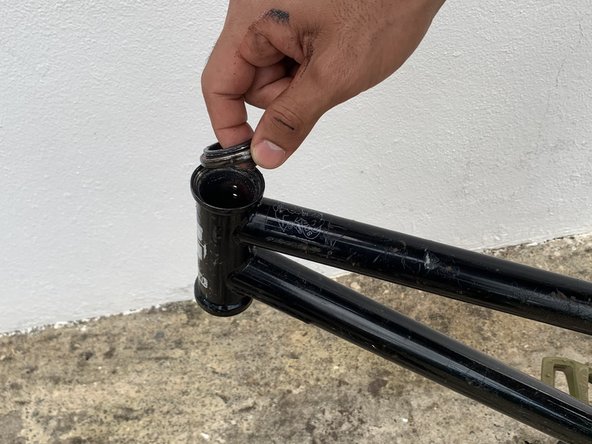
    • Remove the dust cap on top and replace the old bearings with the new headset if necessary.

    • Apply a thin coat of grease as needed on the frame’s head tube or steering head and fork.

    crwdns2952109:0crwdne2952109:0

    crwdns2917038:0crwdne2917038:0

  6. Integrated Headset Replacement: crwdns2935265:06crwdnd2935265:01crwdnd2935265:03crwdne2935265:0 Integrated Headset Replacement: crwdns2935265:06crwdnd2935265:02crwdnd2935265:03crwdne2935265:0 Integrated Headset Replacement: crwdns2935265:06crwdnd2935265:03crwdnd2935265:03crwdne2935265:0
    • Slide the fork back on the frame and place the compression ring on the upper headset bearing.

    crwdns2952109:0crwdne2952109:0

    crwdns2917038:0crwdne2917038:0

  7. Integrated Headset Replacement: crwdns2935265:07crwdnd2935265:01crwdnd2935265:03crwdne2935265:0 Integrated Headset Replacement: crwdns2935265:07crwdnd2935265:02crwdnd2935265:03crwdne2935265:0 Integrated Headset Replacement: crwdns2935265:07crwdnd2935265:03crwdnd2935265:03crwdne2935265:0
    • Slide the dust cover on and install the stem.

    • Check the amount of space between the top of the steerer tube and the top of your stem. Your steerer tube should lay just a few millimeters below, and allow for clamping and compression. If it doesn't, add a spacer on top of the dust cover and under the stem.

    crwdns2952109:0crwdne2952109:0

    crwdns2917038:0crwdne2917038:0

  8. Integrated Headset Replacement: crwdns2935265:08crwdnd2935265:01crwdnd2935265:03crwdne2935265:0 Integrated Headset Replacement: crwdns2935265:08crwdnd2935265:02crwdnd2935265:03crwdne2935265:0 Integrated Headset Replacement: crwdns2935265:08crwdnd2935265:03crwdnd2935265:03crwdne2935265:0
    • Reinstall the compression bolt and tighten it down, while at the same time keeping the bars in alignment.

    • Tighten the compression bolt until the thread becomes hard.

    • Use the socket wrench to turn the bolt half turn more and check for play by rocking the bars forward and backwards while pinching the frame with your knees.

    crwdns2952109:0crwdne2952109:0

    crwdns2917038:0crwdne2917038:0

  9. Integrated Headset Replacement: crwdns2935265:09crwdnd2935265:01crwdnd2935265:03crwdne2935265:0 Integrated Headset Replacement: crwdns2935265:09crwdnd2935265:02crwdnd2935265:03crwdne2935265:0 Integrated Headset Replacement: crwdns2935265:09crwdnd2935265:03crwdnd2935265:03crwdne2935265:0
    • Check for play and make sure the bars turn smoothly.

    • You don’t want to over tighten the compression bolt as this will result in improper steering.

    • Secure the pinching bolts on each side of the stem, alternating between each side as you go.

    crwdns2952109:0crwdne2952109:0

    crwdns2917038:0crwdne2917038:0

crwdns2915888:0crwdne2915888:0

The final product should end up with aligned and firm bars. There should be no forward or backwards play and everything should turn smoothly.

crwdns2935221:0crwdne2935221:0

Carlos

crwdns2935283:003/25/22crwdne2935283:0

169 crwdns2915208:0crwdne2915208:0

crwdns2935295:0crwdne2935295:0

crwdns2935287:0crwdne2935287:0

University of Puerto Rico Mayagüez, Team 23-23, Cools Stephens Spring 2022 crwdns2935289:0University of Puerto Rico Mayagüez, Team 23-23, Cools Stephens Spring 2022crwdne2935289:0

UPRM-COOLS STEPHENS-S22S23G23

crwdns2934841:01crwdne2934841:0

crwdns2935297:02crwdne2935297:0

crwdns2947412:00crwdne2947412:0

crwdns2917038:0crwdne2917038:0

crwdns2936625:0crwdne2936625:0:

crwdns2936751:024crwdne2936751:0 2

crwdns2936753:07crwdne2936753:0 22

crwdns2936753:030crwdne2936753:0 89

crwdns2942667:0crwdne2942667:0 1,305