crwdns2933423:0crwdne2933423:0
crwdns2947577:0crwdnd2947577:0crwdne2947577:0

InFocus Remote Front Cover Replacement

crwdns2942213:0crwdne2942213:0

  1. InFocus Remote Front Cover Replacement, Front Cover: crwdns2935265:01crwdnd2935265:01crwdnd2935265:02crwdne2935265:0 InFocus Remote Front Cover Replacement, Front Cover: crwdns2935265:01crwdnd2935265:02crwdnd2935265:02crwdne2935265:0
    • Use your finger to press the tab on the battery cover.

    • Lift the cover up and out.

    crwdns2952109:0crwdne2952109:0

    crwdns2917038:0crwdne2917038:0

  2. InFocus Remote Front Cover Replacement: crwdns2935265:02crwdnd2935265:01crwdnd2935265:02crwdne2935265:0 InFocus Remote Front Cover Replacement: crwdns2935265:02crwdnd2935265:02crwdnd2935265:02crwdne2935265:0
    • Use your finger to lift the two AA batteries up and out of the remote.

    crwdns2952109:0crwdne2952109:0

    crwdns2917038:0crwdne2917038:0

  3. InFocus Remote Front Cover Replacement: crwdns2935265:03crwdnd2935265:01crwdnd2935265:01crwdne2935265:0
    • Remove the three 9mm Phillips #00 screws located on the backside of the remote.

    crwdns2952109:0crwdne2952109:0

    crwdns2917038:0crwdne2917038:0

  4. InFocus Remote Front Cover Replacement: crwdns2935265:04crwdnd2935265:01crwdnd2935265:02crwdne2935265:0 InFocus Remote Front Cover Replacement: crwdns2935265:04crwdnd2935265:02crwdnd2935265:02crwdne2935265:0
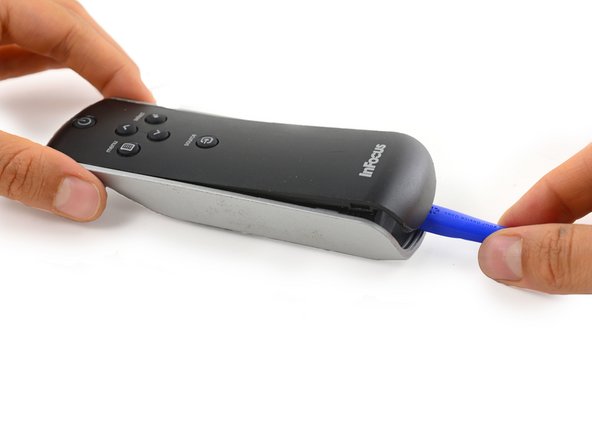
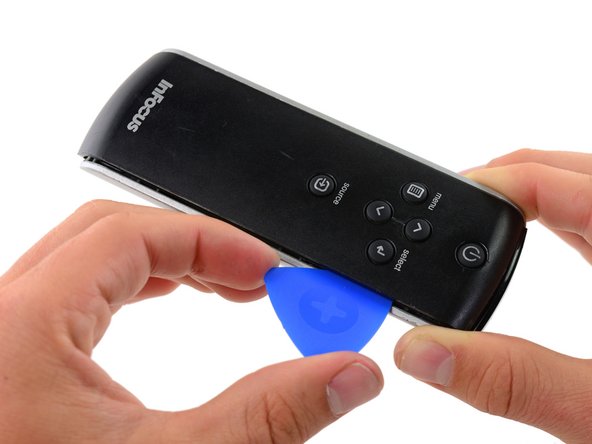
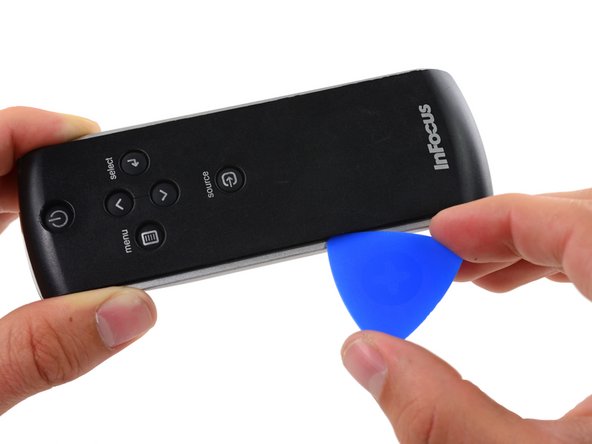
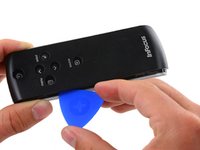
    • Insert a plastic opening tool into the seam between the black top cover and silver base at the bottom edge of the remote.

    • Carefully pry the top cover up and away from the base.

    crwdns2952109:0crwdne2952109:0

    crwdns2917038:0crwdne2917038:0

  5. InFocus Remote Front Cover Replacement: crwdns2935265:05crwdnd2935265:01crwdnd2935265:03crwdne2935265:0 InFocus Remote Front Cover Replacement: crwdns2935265:05crwdnd2935265:02crwdnd2935265:03crwdne2935265:0 InFocus Remote Front Cover Replacement: crwdns2935265:05crwdnd2935265:03crwdnd2935265:03crwdne2935265:0
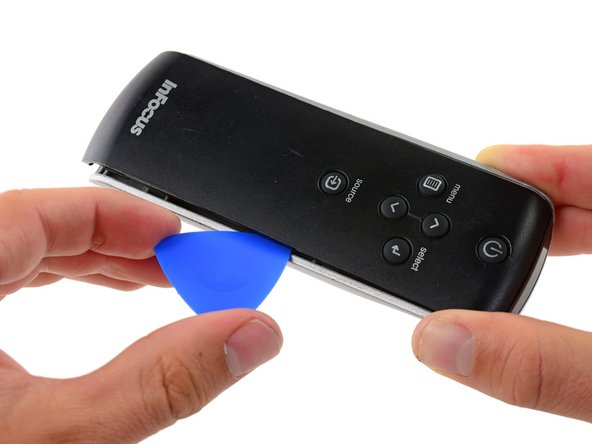
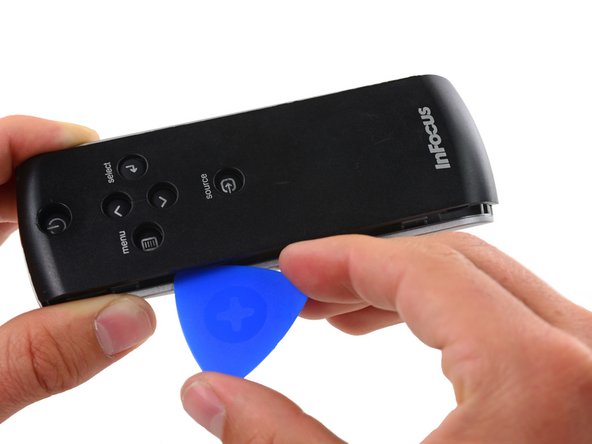
    • Insert an opening pick into the seam on side of the remote, even with the InFocus Label.

    • Slide the opening pick along the side of the remote, moving towards the buttons.

    • There is a plastic tab that holds the covers to the base, located even with the Source button. Push the pick through with a bit more force here to disconnect the cover.

    crwdns2952109:0crwdne2952109:0

    crwdns2917038:0crwdne2917038:0

  6. InFocus Remote Front Cover Replacement: crwdns2935265:06crwdnd2935265:01crwdnd2935265:03crwdne2935265:0 InFocus Remote Front Cover Replacement: crwdns2935265:06crwdnd2935265:02crwdnd2935265:03crwdne2935265:0 InFocus Remote Front Cover Replacement: crwdns2935265:06crwdnd2935265:03crwdnd2935265:03crwdne2935265:0
    • Repeat the previous step on the other side of the remote, working from the InFocus label towards the buttons until the entire cover is loose.

    crwdns2952109:0crwdne2952109:0

    crwdns2917038:0crwdne2917038:0

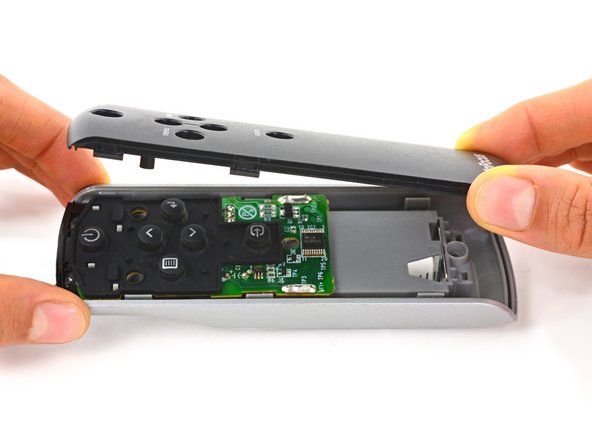
  7. InFocus Remote Front Cover Replacement: crwdns2935265:07crwdnd2935265:01crwdnd2935265:02crwdne2935265:0 InFocus Remote Front Cover Replacement: crwdns2935265:07crwdnd2935265:02crwdnd2935265:02crwdne2935265:0
    • Firmly grasp the cover and lift it away from the remote.

    crwdns2952109:0crwdne2952109:0

    crwdns2917038:0crwdne2917038:0

crwdns2915888:0crwdne2915888:0

To reassemble your device, follow these instructions in reverse order.

crwdns2935221:0crwdne2935221:0

Paige Reisman

crwdns2935283:004/07/14crwdne2935283:0

24.173 crwdns2915208:0crwdne2915208:0

crwdns2935297:015crwdne2935297:0

crwdns2947412:00crwdne2947412:0

crwdns2917038:0crwdne2917038:0

crwdns2936625:0crwdne2936625:0:

crwdns2936751:024crwdne2936751:0 1

crwdns2936753:07crwdne2936753:0 4

crwdns2936753:030crwdne2936753:0 39

crwdns2942667:0crwdne2942667:0 592