crwdns2933423:0crwdne2933423:0
crwdns2947577:0crwdnd2947577:0crwdne2947577:0

IBM Thinkpad R40 Wi-Fi Card Replacement

crwdns2942213:0crwdne2942213:0

    1. IBM Thinkpad R40 Wi-Fi Card Replacement, Wi-Fi Card: crwdns2935265:01crwdnd2935265:01crwdnd2935265:01crwdne2935265:0
      • Use a screwdriver to remove the screws located at the bottom of the laptop, covering the battery pack.

      crwdns2952109:0crwdne2952109:0

      crwdns2917038:0crwdne2917038:0

    2. IBM Thinkpad R40 Wi-Fi Card Replacement: crwdns2935265:02crwdnd2935265:01crwdnd2935265:01crwdne2935265:0
      • Remove the battery from the laptop and place it to the side.

      crwdns2952109:0crwdne2952109:0

      crwdns2917038:0crwdne2917038:0

    3. IBM Thinkpad R40 Wi-Fi Card Replacement: crwdns2935265:03crwdnd2935265:01crwdnd2935265:01crwdne2935265:0
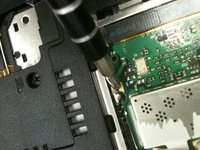
      • Loosen the screw covering the Wi-Fi card panel.

      crwdns2952109:0crwdne2952109:0

      crwdns2917038:0crwdne2917038:0

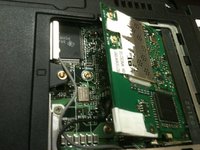
    4. IBM Thinkpad R40 Wi-Fi Card Replacement: crwdns2935265:04crwdnd2935265:01crwdnd2935265:02crwdne2935265:0 IBM Thinkpad R40 Wi-Fi Card Replacement: crwdns2935265:04crwdnd2935265:02crwdnd2935265:02crwdne2935265:0
      • Open the now loosened section.

      • Release the clips that hold the Wi-Fi card in place.

      • Remove the Wi-Fi card.

      crwdns2952109:0crwdne2952109:0

      crwdns2917038:0crwdne2917038:0

crwdns2915888:0crwdne2915888:0

To reassemble your device, follow these instructions in reverse order.

crwdns2935221:0crwdne2935221:0

crwdns2935229:02crwdne2935229:0

Erin

crwdns2935283:009/08/11crwdne2935283:0

231 crwdns2915208:0crwdne2915208:0

crwdns2935297:02crwdne2935297:0

crwdns2935287:0crwdne2935287:0

University of Maine, Team 1-13, Diaz Fall 2011 crwdns2935289:0University of Maine, Team 1-13, Diaz Fall 2011crwdne2935289:0

UMAINE-DIAZ-F11S1G13

crwdns2934841:01crwdne2934841:0

crwdns2935297:024crwdne2935297:0

crwdns2947412:00crwdne2947412:0

crwdns2917038:0crwdne2917038:0

crwdns2936625:0crwdne2936625:0:

crwdns2936751:024crwdne2936751:0 6

crwdns2936753:07crwdne2936753:0 31

crwdns2936753:030crwdne2936753:0 52

crwdns2942667:0crwdne2942667:0 4,911