crwdns2933423:0crwdne2933423:0
crwdns2947577:0crwdnd2947577:0crwdne2947577:0

Hytera TC-580 Microphone Replacement

crwdns2942213:0crwdne2942213:0

    1. Hytera TC-580 Microphone Replacement, Battery: crwdns2935265:01crwdnd2935265:01crwdnd2935265:02crwdne2935265:0 Hytera TC-580 Microphone Replacement, Battery: crwdns2935265:01crwdnd2935265:02crwdnd2935265:02crwdne2935265:0
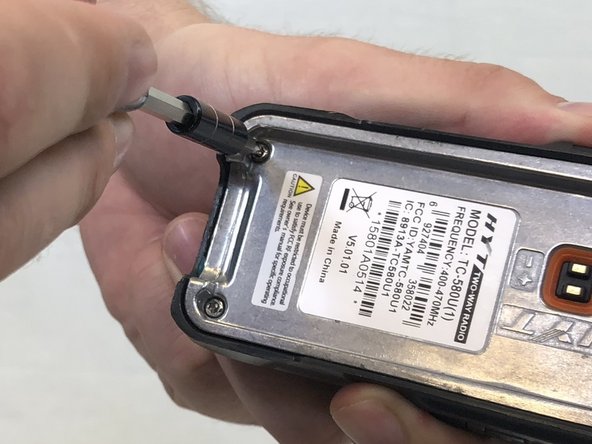
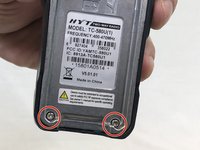
      • Remove the two 10mm Phillips #0 from the belt clip.

      crwdns2952109:0crwdne2952109:0

      crwdns2917038:0crwdne2917038:0

    2. Hytera TC-580 Microphone Replacement: crwdns2935265:02crwdnd2935265:01crwdnd2935265:02crwdne2935265:0 Hytera TC-580 Microphone Replacement: crwdns2935265:02crwdnd2935265:02crwdnd2935265:02crwdne2935265:0
      • Push in the release button and pull up on the battery to remove.

      crwdns2952109:0crwdne2952109:0

      crwdns2917038:0crwdne2917038:0

    1. Hytera TC-580 Microphone Replacement, Antenna: crwdns2935265:03crwdnd2935265:01crwdnd2935265:01crwdne2935265:0
      • Twist antenna counter-clockwise and set damaged antenna aside.

      crwdns2952109:0crwdne2952109:0

      crwdns2917038:0crwdne2917038:0

    1. Hytera TC-580 Microphone Replacement, Keypad: crwdns2935265:04crwdnd2935265:01crwdnd2935265:01crwdne2935265:0
      • Remove the volume knob by firmly lifting up on both sides of it.

      crwdns2952109:0crwdne2952109:0

      crwdns2917038:0crwdne2917038:0

    2. Hytera TC-580 Microphone Replacement: crwdns2935265:05crwdnd2935265:01crwdnd2935265:01crwdne2935265:0
      crwdns2935267:0crwdne2935267:0
      Tweezers
      $4.99
      • Remove the orange o-ring around volume knob using tweezers.

      crwdns2952109:0crwdne2952109:0

      crwdns2917038:0crwdne2917038:0

    3. Hytera TC-580 Microphone Replacement: crwdns2935265:06crwdnd2935265:01crwdnd2935265:01crwdne2935265:0
      • Remove grey nut from base of volume knob by turning it counterclockwise with a set of tweezers.

      crwdns2952109:0crwdne2952109:0

      crwdns2917038:0crwdne2917038:0

    4. Hytera TC-580 Microphone Replacement: crwdns2935265:07crwdnd2935265:01crwdnd2935265:01crwdne2935265:0
      • Remove the brass washer from the base of the antenna slot by turning it counterclockwise with a set of tweezers.

      crwdns2952109:0crwdne2952109:0

      crwdns2917038:0crwdne2917038:0

    5. Hytera TC-580 Microphone Replacement: crwdns2935265:08crwdnd2935265:01crwdnd2935265:02crwdne2935265:0 Hytera TC-580 Microphone Replacement: crwdns2935265:08crwdnd2935265:02crwdnd2935265:02crwdne2935265:0
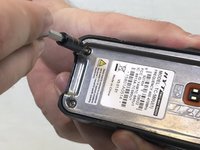
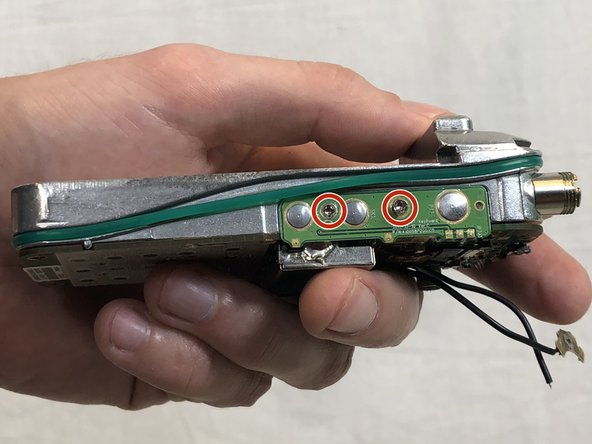
      • Remove the two 15mm T8 Torx screws from the base of the battery cavity.

      crwdns2952109:0crwdne2952109:0

      crwdns2917038:0crwdne2917038:0

    6. Hytera TC-580 Microphone Replacement: crwdns2935265:09crwdnd2935265:01crwdnd2935265:01crwdne2935265:0
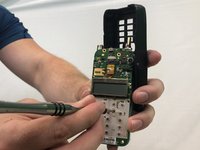
      • Using a plastic opening tool, pry in between the plastic case and metal circuit board to remove the board.

      crwdns2952109:0crwdne2952109:0

      crwdns2917038:0crwdne2917038:0

    7. Hytera TC-580 Microphone Replacement: crwdns2935265:010crwdnd2935265:01crwdnd2935265:01crwdne2935265:0
      • Peel off the keypad by hand.

      crwdns2952109:0crwdne2952109:0

      crwdns2917038:0crwdne2917038:0

    1. Hytera TC-580 Microphone Replacement, Speaker: crwdns2935265:011crwdnd2935265:01crwdnd2935265:03crwdne2935265:0 Hytera TC-580 Microphone Replacement, Speaker: crwdns2935265:011crwdnd2935265:02crwdnd2935265:03crwdne2935265:0 Hytera TC-580 Microphone Replacement, Speaker: crwdns2935265:011crwdnd2935265:03crwdnd2935265:03crwdne2935265:0
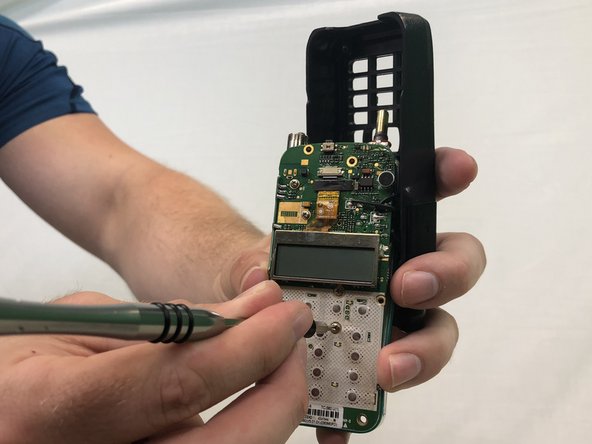
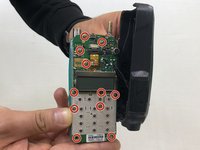
      • Remove eleven 4mm Phillips #00 screws.

      crwdns2952109:0crwdne2952109:0

      crwdns2917038:0crwdne2917038:0

    2. Hytera TC-580 Microphone Replacement: crwdns2935265:012crwdnd2935265:01crwdnd2935265:01crwdne2935265:0
      • Apply a soldering iron to the solder joints to remove the two wires connecting the speaker to the circuit board.

      crwdns2952109:0crwdne2952109:0

      crwdns2917038:0crwdne2917038:0

    1. Hytera TC-580 Microphone Replacement, Microphone: crwdns2935265:013crwdnd2935265:01crwdnd2935265:01crwdne2935265:0
      • If not already done, remove the circuit board completely from the case.

      crwdns2952109:0crwdne2952109:0

      crwdns2917038:0crwdne2917038:0

    2. Hytera TC-580 Microphone Replacement: crwdns2935265:014crwdnd2935265:01crwdnd2935265:01crwdne2935265:0
      • Desolder the two microphone solder joints.

      crwdns2952109:0crwdne2952109:0

      crwdns2917038:0crwdne2917038:0

    3. Hytera TC-580 Microphone Replacement: crwdns2935265:015crwdnd2935265:01crwdnd2935265:01crwdne2935265:0
      • The microphone should fall out after all the solder has been removed.

      crwdns2952109:0crwdne2952109:0

      crwdns2917038:0crwdne2917038:0

crwdns2915888:0crwdne2915888:0

To reassemble your device, follow these instructions in reverse order.

crwdns2935221:0crwdne2935221:0

Stuart

crwdns2935283:002/14/18crwdne2935283:0

485 crwdns2915208:0crwdne2915208:0

crwdns2935297:03crwdne2935297:0

crwdns2935287:0crwdne2935287:0

USF Tampa, Team S3-G4, Nance Spring 2018 crwdns2935289:0USF Tampa, Team S3-G4, Nance Spring 2018crwdne2935289:0

USFT-NANCE-S18S3G4

crwdns2931471:03crwdne2931471:0

crwdns2935297:010crwdne2935297:0

crwdns2947412:00crwdne2947412:0

crwdns2917038:0crwdne2917038:0

crwdns2936625:0crwdne2936625:0:

crwdns2936751:024crwdne2936751:0 0

crwdns2936753:07crwdne2936753:0 8

crwdns2936753:030crwdne2936753:0 26

crwdns2942667:0crwdne2942667:0 1,206