crwdns2933423:0crwdne2933423:0
crwdns2947577:0crwdnd2947577:0crwdne2947577:0

Huawei M750 Camera Replacement

crwdns2942213:0crwdne2942213:0

    1. Huawei M750 Camera Replacement, Battery: crwdns2935265:01crwdnd2935265:01crwdnd2935265:01crwdne2935265:0
      • Depress the top of the battery cover, and pull downwards towards the base of the phone.

      crwdns2952109:0crwdne2952109:0

      crwdns2917038:0crwdne2917038:0

    2. Huawei M750 Camera Replacement: crwdns2935265:02crwdnd2935265:01crwdnd2935265:01crwdne2935265:0
      • Remove the battery by levering the battery out, using the cut just below the camera.

      crwdns2952109:0crwdne2952109:0

      crwdns2917038:0crwdne2917038:0

    1. Huawei M750 Camera Replacement, Back Panel: crwdns2935265:03crwdnd2935265:01crwdnd2935265:01crwdne2935265:0
      • Use the opening tool to start prying the camera and speaker cover, starting from the battery side.

      • Work the opening tool around the border of the camera and speaker cover, until it comes loose.

      crwdns2952109:0crwdne2952109:0

      crwdns2917038:0crwdne2917038:0

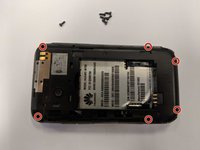
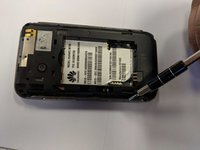
    2. Huawei M750 Camera Replacement: crwdns2935265:04crwdnd2935265:01crwdnd2935265:02crwdne2935265:0 Huawei M750 Camera Replacement: crwdns2935265:04crwdnd2935265:02crwdnd2935265:02crwdne2935265:0
      • Using the T5 Torx screwdriver, remove the six 6mm screws.

      crwdns2952109:0crwdne2952109:0

      crwdns2917038:0crwdne2917038:0

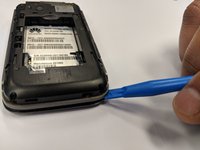
    3. Huawei M750 Camera Replacement: crwdns2935265:05crwdnd2935265:01crwdnd2935265:02crwdne2935265:0 Huawei M750 Camera Replacement: crwdns2935265:05crwdnd2935265:02crwdnd2935265:02crwdne2935265:0
      • Using the opening tool, pry the back panel from the front panel.

      • Work your way around the phone until the panels separate evenly.

      • This step may require a substantial amount of leverage.

      crwdns2952109:0crwdne2952109:0

      crwdns2917038:0crwdne2917038:0

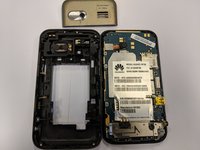
    1. Huawei M750 Camera Replacement, Camera: crwdns2935265:06crwdnd2935265:01crwdnd2935265:01crwdne2935265:0
      crwdns2935267:0crwdne2935267:0
      Tweezers
      $4.99
      • The camera's connection to the motherboard is shown here.

      • Using the tweezers, disconnect the port, shown here in the picture.

      crwdns2952109:0crwdne2952109:0

      crwdns2917038:0crwdne2917038:0

    2. Huawei M750 Camera Replacement: crwdns2935265:07crwdnd2935265:01crwdnd2935265:01crwdne2935265:0
      • Using the tweezers, carefully remove the lens and lens casing.

      • It should be held in by a simple tight fit. The front panel is what keeps the lens secured.

      • Do not touch the camera lens, or the digital camera component, if possible. This will prevent scratching, or damage.

      crwdns2952109:0crwdne2952109:0

      crwdns2917038:0crwdne2917038:0

crwdns2915888:0crwdne2915888:0

To reassemble your device, follow these instructions in reverse order.

crwdns2935221:0crwdne2935221:0

Stuart Smith

crwdns2935283:002/11/18crwdne2935283:0

153 crwdns2915208:0crwdne2915208:0

crwdns2935295:0crwdne2935295:0

crwdns2935287:0crwdne2935287:0

University of North Texas, Team S1-G6, Thompson Spring 2018 crwdns2935289:0University of North Texas, Team S1-G6, Thompson Spring 2018crwdne2935289:0

UNT-THOMPSON-S18S1G6

crwdns2931471:03crwdne2931471:0

crwdns2935297:060crwdne2935297:0

crwdns2947412:00crwdne2947412:0

crwdns2917038:0crwdne2917038:0

crwdns2936625:0crwdne2936625:0:

crwdns2936751:024crwdne2936751:0 1

crwdns2936753:07crwdne2936753:0 7

crwdns2936753:030crwdne2936753:0 33

crwdns2942667:0crwdne2942667:0 571