
How to Hard Restart an Android Phone

crwdns2959932:0crwdnd2959932:0Nicholas Kowalskicrwdnd2959932:0crwdnd2959932:0crwdnd2959932:04crwdnd2959932:0crwdne2959932:0
crwdns2959936:0Mha 6, 2025crwdne2959936:0
crwdns2869540:0crwdne2869540:0: 182 B
crwdns2959988:0crwdne2959988:0
- crwdns2959990:0crwdne2959990:0
- 85
- crwdns2959992:0crwdne2959992:0
- 427
- crwdns2959994:0crwdne2959994:0
- 1.916
- crwdns2959996:0crwdne2959996:0
- 182.493
crwdns2955950:0crwdne2955950:0: 20
crwdns2960004:06crwdne2960004:0, crwdns2960008:014crwdne2960008:0
crwdns2960000:0crwdne2960000:0crwdns2959984:0crwdne2959984:0: 146 147
crwdns2959974:0146crwdne2959974:0
crwdns2959970:0147crwdne2959970:0
crwdns2959986:0crwdne2959986:0: 6 7
crwdns2959982:06crwdne2959982:0
crwdns2959978:07crwdne2959978:0
crwdns2944444:0crwdne2944444:0
crwdns2944446:0crwdne2944446:0
crwdns2915892:0crwdne2915892:0
crwdns2959928:0crwdne2959928:0 ↓A hard restart is a process of restarting a device, such as a smartphone, tablet, or computer, by manually shutting it off and turning it back on again. It is also known as a "force restart" or "hard reset."
A hard restart is different from a soft restart, which is a normal restart of the device that can be performed by selecting the "Restart" option from the device's settings menu. A hard restart is usually done when the device is not responding or has frozen, and it can help resolve some software issues. However, it is important to note that a hard restart may cause the device to lose any unsaved data or settings.
-
-
-
Hold down the power button for 15 to 30 seconds, until the phone screen turns black and restarts.
 crwdns2952109:0crwdne2952109:0
-
-
-
-
Wait for the phone to finish restarting.
-
-
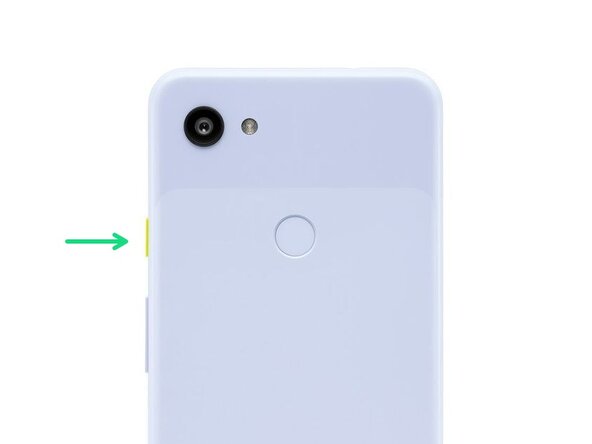

Unlock your phone and you've just hard restarted/rebooted your Android device.
crwdns2935221:0crwdne2935221:0
crwdns2935229:0146crwdne2935229:0

crwdns2947412:014crwdne2947412:0
Nicolas, I think you are confusing people by introducing too many terms in the first sentence.
Android phones - I have had several, including Huawei and now Samsung Galaxy S22, have only two soft buttons - "Power Off" and "Restart".
You should work with that.
BTW - on my S22, when the screen is off, I can hold the "hard" power button forever, and nothing happens.
When the screen is on, and I hold the button for a few seconds, I get the screen with "Power Off", "Restart" and "Emergency Call".
Have a nice day.
aussie43 - crwdns2934203:0crwdne2934203:0 crwdns2950251:0crwdne2950251:0
That is a soft restart you are doing. A hard restart/reboot fixes issues with softwares if you are experiencing your phone working oddly. Thank you
Chuck Welch - crwdns2934203:0crwdne2934203:0 crwdns2950251:0crwdne2950251:0
