crwdns2933423:0crwdne2933423:0
crwdns2947577:0crwdnd2947577:0crwdne2947577:0

How to Fix Joy-Con Drift Without Disassembly

crwdns2869540:0crwdne2869540:0: 116 k

crwdns2959988:0crwdne2959988:0

crwdns2959990:0crwdne2959990:0
37
crwdns2959992:0crwdne2959992:0
306
crwdns2959994:0crwdne2959994:0
1,256
crwdns2959996:0crwdne2959996:0
115,936
crwdns2955950:0crwdne2955950:0: 3

crwdns2960002:01crwdne2960002:0, crwdns2960008:02crwdne2960008:0

crwdns2960000:0crwdne2960000:0
crwdns2959984:0crwdne2959984:0: 42

crwdns2959974:042crwdne2959974:0

crwdns2959986:0crwdne2959986:0: 9

crwdns2959982:09crwdne2959982:0

crwdns2955944:0crwdne2955944:0: crwdns2931287:015crwdne2931287:0
crwdns2955970:0crwdne2955970:0: crwdns2937799:0crwdne2937799:0
How to Fix Joy-Con Drift Without Disassembly

crwdns2915892:0crwdne2915892:0

crwdns2959928:0crwdne2959928:0 ↓

This guide shows how to fix Joy-Con drift for the Nintendo Switch Joy-Cons.

Joy-Con drift is when the Nintendo Switch thinks that the analog stick (also known as the joystick, controller stick, or thumbstick) of the Joy-Con is moving, but it isn't.

Joy-Con drift may occur as you use the Joy-Cons over time from dust and debris building up. You do not need to disassemble the Joy-Con for this repair. In addition, this guide will not corrode any parts of your Joy-Con controller.

Please note this repair is temporary and will last only a certain amount of time.

crwdns2959930:0crwdne2959930:0

crwdns2943215:0crwdne2943215:0

    1. How to Fix Joy-Con Drift Without Disassembly, How to Fix Joy-Con Drift Without Disassembly: crwdns2935265:01crwdnd2935265:01crwdnd2935265:02crwdne2935265:0 How to Fix Joy-Con Drift Without Disassembly, How to Fix Joy-Con Drift Without Disassembly: crwdns2935265:01crwdnd2935265:02crwdnd2935265:02crwdne2935265:0
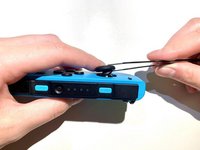
      • Press and hold the black round button on the back of the Joy-Con, then slide it forward to remove.

      crwdns2952109:0crwdne2952109:0

      crwdns2917038:0crwdne2917038:0

    2. How to Fix Joy-Con Drift Without Disassembly: crwdns2935265:02crwdnd2935265:01crwdnd2935265:02crwdne2935265:0 How to Fix Joy-Con Drift Without Disassembly: crwdns2935265:02crwdnd2935265:02crwdnd2935265:02crwdne2935265:0
      • Open the 404B contact cleaner and insert the tube into the nozzle.

      crwdns2952109:0crwdne2952109:0

      crwdns2917038:0crwdne2917038:0

    3. How to Fix Joy-Con Drift Without Disassembly: crwdns2935265:03crwdnd2935265:01crwdnd2935265:01crwdne2935265:0
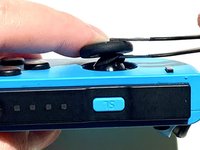
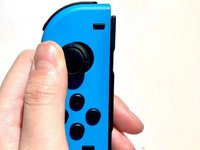
      • Push the Joy Stick to the side and hold.

      crwdns2952109:0crwdne2952109:0

      crwdns2917038:0crwdne2917038:0

    4. How to Fix Joy-Con Drift Without Disassembly: crwdns2935265:04crwdnd2935265:01crwdnd2935265:02crwdne2935265:0 How to Fix Joy-Con Drift Without Disassembly: crwdns2935265:04crwdnd2935265:02crwdnd2935265:02crwdne2935265:0
      crwdns2935267:0crwdne2935267:0
      Tweezers
      $4.99
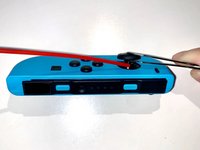
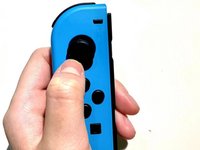
      • Use tweezers to lift the rubber ring under the Joy Stick, and hold.

      crwdns2952109:0crwdne2952109:0

      crwdns2917038:0crwdne2917038:0

    5. How to Fix Joy-Con Drift Without Disassembly: crwdns2935265:05crwdnd2935265:01crwdnd2935265:02crwdne2935265:0 How to Fix Joy-Con Drift Without Disassembly: crwdns2935265:05crwdnd2935265:02crwdnd2935265:02crwdne2935265:0
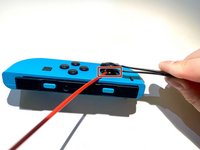
      • Aim the contact cleaner's nozzle at the gap and spray 404B contact cleaner once or twice.

      crwdns2952109:0crwdne2952109:0

      crwdns2917038:0crwdne2917038:0

    6. How to Fix Joy-Con Drift Without Disassembly: crwdns2935265:06crwdnd2935265:01crwdnd2935265:03crwdne2935265:0 How to Fix Joy-Con Drift Without Disassembly: crwdns2935265:06crwdnd2935265:02crwdnd2935265:03crwdne2935265:0 How to Fix Joy-Con Drift Without Disassembly: crwdns2935265:06crwdnd2935265:03crwdnd2935265:03crwdne2935265:0
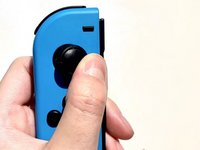
      • Rotate the Joy Stick for 30 seconds to allow full penetration of the liquid inside.

      crwdns2952109:0crwdne2952109:0

      crwdns2917038:0crwdne2917038:0

    7. How to Fix Joy-Con Drift Without Disassembly: crwdns2935265:07crwdnd2935265:01crwdnd2935265:01crwdne2935265:0
      • Wait 10 minutes for the liquid to dry completely.

      crwdns2952109:0crwdne2952109:0

      crwdns2917038:0crwdne2917038:0

    8. How to Fix Joy-Con Drift Without Disassembly: crwdns2935265:08crwdnd2935265:01crwdnd2935265:03crwdne2935265:0 How to Fix Joy-Con Drift Without Disassembly: crwdns2935265:08crwdnd2935265:02crwdnd2935265:03crwdne2935265:0 How to Fix Joy-Con Drift Without Disassembly: crwdns2935265:08crwdnd2935265:03crwdnd2935265:03crwdne2935265:0
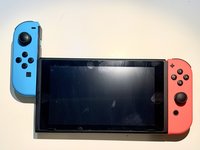
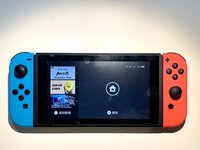
      • Insert the Joy-Con back into the Switch to test the Joy-Con.

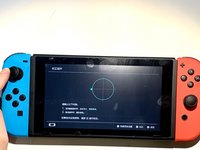
      • Navigate to System Settings > Controllers and Sensors > Calibrate Control Sticks.

      • Follow the on-screen prompts on your Switch.

      crwdns2952109:0crwdne2952109:0

      crwdns2917038:0crwdne2917038:0

crwdns2915888:0crwdne2915888:0

Enjoy your Joy-Con being able to work properly again!

crwdns2935221:0crwdne2935221:0

crwdns2935229:042crwdne2935229:0

Weijie Chen

crwdns2935283:001/16/22crwdne2935283:0

1,293 crwdns2915208:0crwdne2915208:0

crwdns2935295:0crwdne2935295:0

crwdns2947412:02crwdne2947412:0

Process says it requires compressed air then goes on to use contact cleaner instead.

Mike Burr - crwdns2934203:0crwdne2934203:0 crwdns2950251:0crwdne2950251:0

crwdns2917038:0crwdne2917038:0

crwdns2936625:0crwdne2936625:0:

crwdns2936751:024crwdne2936751:0 37

crwdns2936753:07crwdne2936753:0 306

crwdns2936753:030crwdne2936753:0 1,256

crwdns2959996:0crwdne2959996:0 115,936