crwdns2933423:0crwdne2933423:0
crwdns2947577:0crwdnd2947577:0crwdne2947577:0

How to Access the Internal Components of an HP 15-R011DX

crwdns2942213:0crwdne2942213:0

    1. How to Access the Internal Components of an HP 15-R011DX, Battery: crwdns2935265:01crwdnd2935265:01crwdnd2935265:02crwdne2935265:0 How to Access the Internal Components of an HP 15-R011DX, Battery: crwdns2935265:01crwdnd2935265:02crwdnd2935265:02crwdne2935265:0
      • Slide the lock mechanism on the left side of the laptop to the right.

      crwdns2952109:0crwdne2952109:0

      crwdns2917038:0crwdne2917038:0

    2. How to Access the Internal Components of an HP 15-R011DX: crwdns2935265:02crwdnd2935265:01crwdnd2935265:01crwdne2935265:0
      • While holding the right slide mechanism, remove the battery from the laptop.

      • The battery is not pictured here because it is missing from this particular device.

      crwdns2952109:0crwdne2952109:0

      crwdns2917038:0crwdne2917038:0

    1. How to Access the Internal Components of an HP 15-R011DX, How to Access the Internal Components of an HP 15-R011DX: crwdns2935265:03crwdnd2935265:01crwdnd2935265:02crwdne2935265:0 How to Access the Internal Components of an HP 15-R011DX, How to Access the Internal Components of an HP 15-R011DX: crwdns2935265:03crwdnd2935265:02crwdnd2935265:02crwdne2935265:0
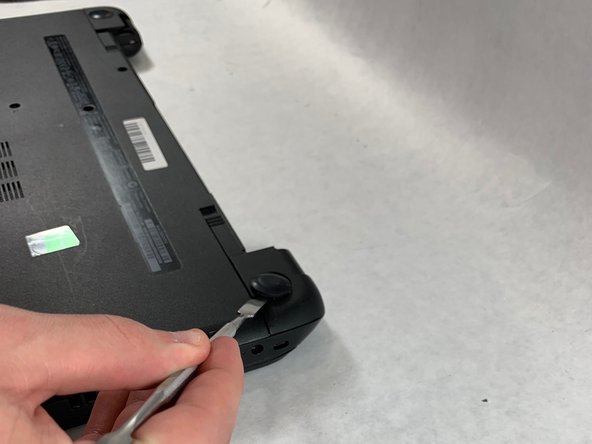
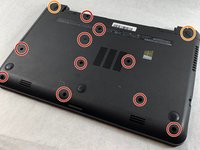
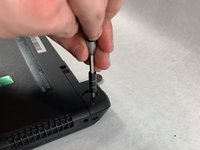
      • Flip the laptop over to reveal screw locations.

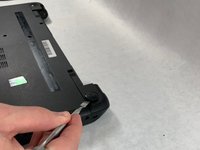
      • Use a metal spudger to remove the two rear rubber feet. There are screws hidden underneath them.

      crwdns2952109:0crwdne2952109:0

      crwdns2917038:0crwdne2917038:0

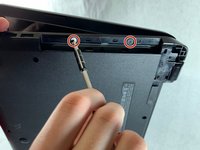
    2. How to Access the Internal Components of an HP 15-R011DX: crwdns2935265:04crwdnd2935265:01crwdnd2935265:02crwdne2935265:0 How to Access the Internal Components of an HP 15-R011DX: crwdns2935265:04crwdnd2935265:02crwdnd2935265:02crwdne2935265:0
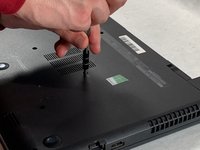
      • Remove the twelve 5mm Phillips #1 screws on the back of the laptop.

      crwdns2952109:0crwdne2952109:0

      crwdns2917038:0crwdne2917038:0

    3. How to Access the Internal Components of an HP 15-R011DX: crwdns2935265:05crwdnd2935265:01crwdnd2935265:02crwdne2935265:0 How to Access the Internal Components of an HP 15-R011DX: crwdns2935265:05crwdnd2935265:02crwdnd2935265:02crwdne2935265:0
      • Remove the DVD drive from the laptop.

      • Remove the two 3 mm Phillips #1 screws underneath the DVD drive.

      crwdns2952109:0crwdne2952109:0

      crwdns2917038:0crwdne2917038:0

    4. How to Access the Internal Components of an HP 15-R011DX: crwdns2935265:06crwdnd2935265:01crwdnd2935265:03crwdne2935265:0 How to Access the Internal Components of an HP 15-R011DX: crwdns2935265:06crwdnd2935265:02crwdnd2935265:03crwdne2935265:0 How to Access the Internal Components of an HP 15-R011DX: crwdns2935265:06crwdnd2935265:03crwdnd2935265:03crwdne2935265:0
      • Flip the laptop and open.

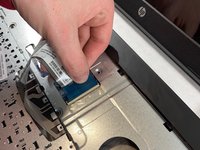
      • Detach the keyboard by prying it free from the laptop using a spudger.

      • Do not completely remove the keyboard yet. It is still attached by a ribbon cable.

      • Disconnect the keyboard ribbon cable.

      crwdns2952109:0crwdne2952109:0

      crwdns2917038:0crwdne2917038:0

    5. How to Access the Internal Components of an HP 15-R011DX: crwdns2935265:07crwdnd2935265:01crwdnd2935265:02crwdne2935265:0 How to Access the Internal Components of an HP 15-R011DX: crwdns2935265:07crwdnd2935265:02crwdnd2935265:02crwdne2935265:0
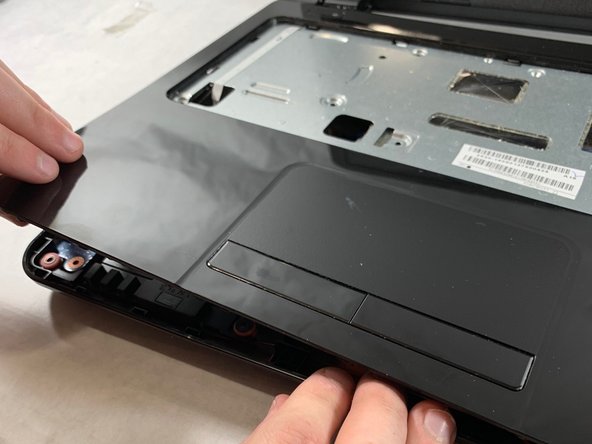
      • Disconnect the two narrow ribbon cables to the left of the keyboard connection.

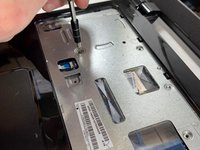
      • Remove five 4 mm Phillips #1 screws from the metal tray for the keyboard.

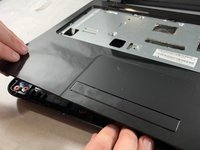
      • Pry open the plastic casing using a spudger.

      • If struggling to remove the plastic case, check that all screws have been removed.

      crwdns2952109:0crwdne2952109:0

      crwdns2917038:0crwdne2917038:0

crwdns2915888:0crwdne2915888:0

To reassemble your device, follow these instructions in reverse order.

crwdns2935221:0crwdne2935221:0

crwdns2935229:02crwdne2935229:0

Ethan Guillotte

crwdns2935283:003/20/19crwdne2935283:0

517 crwdns2915208:0crwdne2915208:0

crwdns2935297:03crwdne2935297:0

crwdns2935287:0crwdne2935287:0

UMass Dartmouth, Team S2-G4, Bailey Spring 2019 crwdns2935289:0UMass Dartmouth, Team S2-G4, Bailey Spring 2019crwdne2935289:0

UMASSD-BAILEY-S19S2G4

crwdns2931471:03crwdne2931471:0

crwdns2935297:072crwdne2935297:0

crwdns2947412:00crwdne2947412:0

crwdns2917038:0crwdne2917038:0

crwdns2936625:0crwdne2936625:0:

crwdns2936751:024crwdne2936751:0 5

crwdns2936753:07crwdne2936753:0 22

crwdns2936753:030crwdne2936753:0 41

crwdns2942667:0crwdne2942667:0 879