crwdns2915892:0crwdne2915892:0
Replacing in the battery in your Hover-1 H1 hoverboard might help to solve charging problems.
crwdns2942213:0crwdne2942213:0
-
-
Remove the ten 9mm machine screws by using a long Phillips #2 screwdriver to rotate the screws counterclockwise.
-
Remove the twelve 9mm sheet metal screws by using a long Phillips #2 screwdriver to rotate the screws counterclockwise.
-
-
-
Puncture the two black stickers by using the tip of a screwdriver.
-
Remove the two 9mm machine screws by using a long Phillips #2 screwdriver to rotate the screws counterclockwise.
-
-
-
-
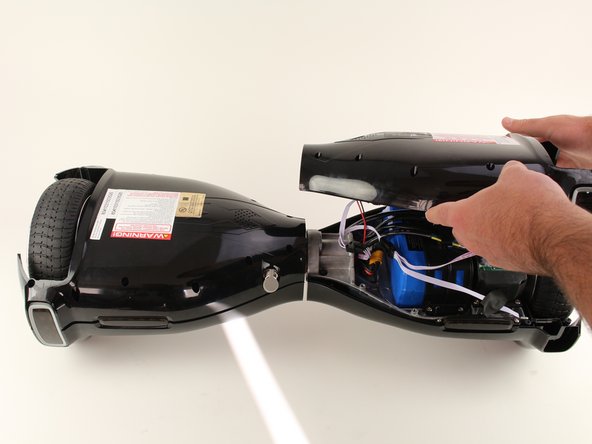
Lift each side of the bottom shell by pulling up.
-
-
-
Unplug the battery by pulling gently on both sides of the orange connector.
-
-
-
Remove the four 7mm screws by using a Phillips #2 screwdriver to rotate the screws counterclockwise.
-
-
-
Gently lift the battery harness and remove the battery by lifting the battery and moving it away from the hoverboard.
-




To reassemble your device, follow these instructions in reverse order.
crwdns2935221:0crwdne2935221:0
crwdns2935229:05crwdne2935229:0

crwdns2935287:0crwdne2935287:0

Cal Poly, Team S17-G6, White Fall 2018 crwdns2935289:0Cal Poly, Team S17-G6, White Fall 2018crwdne2935289:0
CPSU-WHITE-F18S17G6
crwdns2931471:04crwdne2931471:0
crwdns2935297:09crwdne2935297:0
crwdns2947412:015crwdne2947412:0
The stickers were the trick. I didn’t see them!
Daniel D - crwdns2934203:0crwdne2934203:0 crwdns2950251:0crwdne2950251:0
After removing the 4 screws that is holding the battery in place I still can't remove the battery. I tried gently to pry under the battery but it doesn't budge. Uni Sun model HY-A01B. How do I solve this problem?
Terry Pollard - crwdns2934203:0crwdne2934203:0 crwdns2950251:0crwdne2950251:0
Where do I get another battery to replace it???
Tony Pate - crwdns2934203:0crwdne2934203:0 crwdns2950251:0crwdne2950251:0
That's the question I can't seem to find the answer to
Very low quality. Bought for my son who haven’t even used it for 15 times. Got it during winter and before summer the product stopped working.
tosin3in1 - crwdns2934203:0crwdne2934203:0 crwdns2950251:0crwdne2950251:0
