
Hipstreet Titan Plus Camera Replacement

crwdns2959932:0crwdnd2959932:0Kari Cannoncrwdnd2959932:0crwdnd2959932:0crwdnd2959932:06crwdnd2959932:0crwdne2959932:0
crwdns2959936:0Mud 7, 2024crwdne2959936:0
crwdns2869540:0crwdne2869540:0: 513
crwdns2959988:0crwdne2959988:0
- crwdns2959990:0crwdne2959990:0
- 3
- crwdns2959992:0crwdne2959992:0
- 15
- crwdns2959994:0crwdne2959994:0
- 85
- crwdns2959996:0crwdne2959996:0
- 513
crwdns2955950:0crwdne2955950:0: 0
crwdns2959998:0crwdne2959998:0
crwdns2960000:0crwdne2960000:0crwdns2959984:0crwdne2959984:0: 2 3
crwdns2959974:02crwdne2959974:0
crwdns2959970:03crwdne2959970:0
crwdns2959986:0crwdne2959986:0: 0 1
crwdns2959958:0crwdne2959958:0
crwdns2959976:01crwdne2959976:0
crwdns2862611:0crwdne2862611:0
crwdns2862612:0crwdne2862612:0
crwdns2915892:0crwdne2915892:0
crwdns2959928:0crwdne2959928:0 ↓This camera replacement guide demonstrates how to remove the necessary components to access the camera. Replacing the camera is a simple three step process using the necessary tools.
crwdns2959930:0crwdne2959930:0
crwdns2943215:0crwdne2943215:0
-
-
Spudger4.9


-
-
-
Use the plastic opening tools to pry open the back case of the device.
 crwdns2952109:0crwdne2952109:0
-
-
crwdns2935267:0crwdne2935267:0Tweezers$4.99
-
Use tweezers to remove the black adhesive strips from the wires. Set aside
-
-
-
-
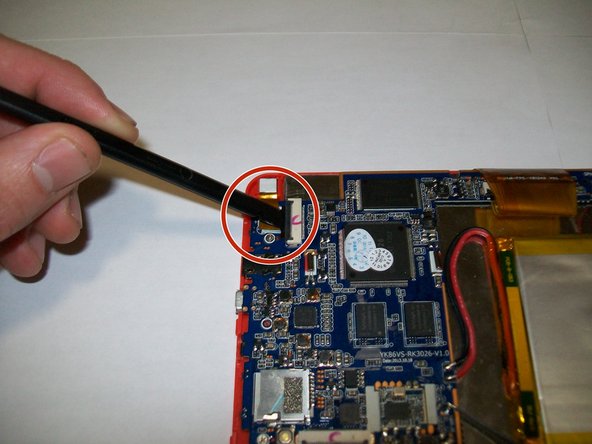
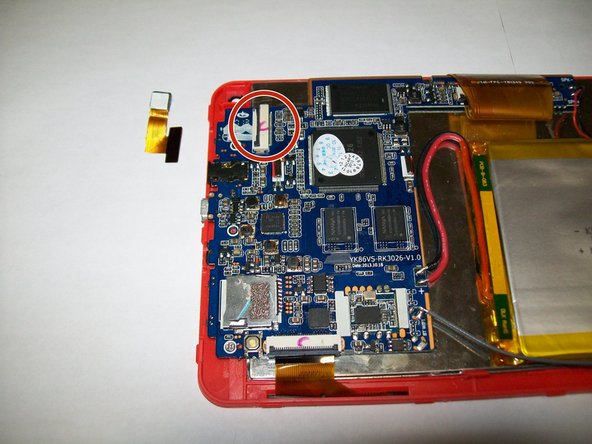
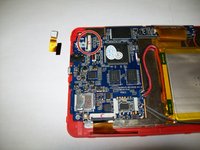
Use a spudger to undo the black clip connecting the camera wires to the motherboard.
-
-


To reassemble your device, follow these instructions in reverse order.
crwdns2935221:0crwdne2935221:0
crwdns2935229:02crwdne2935229:0

crwdns2935287:0crwdne2935287:0

UMass Dartmouth, Team 1-1, Miles Fall 2015 crwdns2935289:0UMass Dartmouth, Team 1-1, Miles Fall 2015crwdne2935289:0
UMASSD-MILES-F15S1G1
crwdns2931471:03crwdne2931471:0
crwdns2935297:060crwdne2935297:0
