
HTC Touch Pro 2 SIM Card Replacement

crwdns2959932:0crwdnd2959932:0Melinda Phancrwdnd2959932:0crwdnd2959932:0crwdnd2959932:05crwdnd2959932:0crwdne2959932:0
crwdns2959936:0Maw 30, 2014crwdne2959936:0
crwdns2869540:0crwdne2869540:0: 8,4 тыс.
crwdns2959988:0crwdne2959988:0
- crwdns2959990:0crwdne2959990:0
- 2
- crwdns2959992:0crwdne2959992:0
- 33
- crwdns2959994:0crwdne2959994:0
- 102
- crwdns2959996:0crwdne2959996:0
- 8 356
crwdns2955950:0crwdne2955950:0: 1
crwdns2960006:01crwdne2960006:0
crwdns2960000:0crwdne2960000:0crwdns2959984:0crwdne2959984:0: 1 2
crwdns2959972:01crwdne2959972:0
crwdns2959970:02crwdne2959970:0
crwdns2959986:0crwdne2959986:0: 2 3
crwdns2959982:02crwdne2959982:0
crwdns2959978:03crwdne2959978:0
crwdns2869444:0crwdne2869444:0
crwdns2869445:0crwdne2869445:0
-
-
-
Apply pressure and slide upward to remove back cover.
-
Lift the back cover up away from the phone.
 crwdns2952109:0crwdne2952109:0
-
-
-
-
Lift battery upward on the upper right-hand side to remove it.
-
Check the battery to make sure there's no bent corners.
-
-
-
-
-
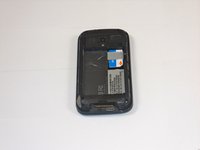
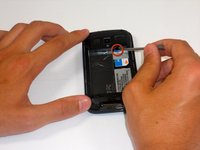
Insert stylus into black slot and gentle pry SIM card out a little bit.
-
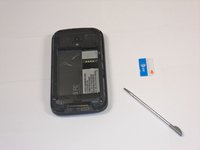
Slide out SIM card rest of the way with your finger.
-
-


To reassemble your device, follow these instructions in reverse order.
crwdns2935221:0crwdne2935221:0
crwdns2935227:0crwdne2935227:0

crwdns2935287:0crwdne2935287:0

Cal Poly, Team 9-64, Walters Spring 2011 crwdns2935289:0Cal Poly, Team 9-64, Walters Spring 2011crwdne2935289:0
CPSU-WALTERS-S11S9G64
crwdns2931471:05crwdne2931471:0
crwdns2935297:0108crwdne2935297:0
crwdns2947410:01crwdne2947410:0
how to change language to English
onlyisaac4real - crwdns2934203:0crwdne2934203:0 crwdns2950251:0crwdne2950251:0
