crwdns2933423:0crwdne2933423:0
crwdns2947577:0crwdnd2947577:0crwdne2947577:0

HTC Touch Pro 2 Keyboard Replacement

crwdns2869540:0crwdne2869540:0: 5090

crwdns2959988:0crwdne2959988:0

crwdns2959990:0crwdne2959990:0
1
crwdns2959992:0crwdne2959992:0
28
crwdns2959994:0crwdne2959994:0
94
crwdns2959996:0crwdne2959996:0
5.090
crwdns2955950:0crwdne2955950:0: 0

crwdns2959998:0crwdne2959998:0

crwdns2960000:0crwdne2960000:0
crwdns2959984:0crwdne2959984:0: 1

crwdns2959972:01crwdne2959972:0

crwdns2959986:0crwdne2959986:0: 3

crwdns2959982:03crwdne2959982:0

crwdns2955944:0crwdne2955944:0: crwdns2931273:0crwdne2931273:0
crwdns2955970:0crwdne2955970:0: crwdns2937801:0crwdne2937801:0
crwdns2890100:0crwdne2890100:0

crwdns2944378:0crwdne2944378:0

crwdns2862633:0crwdne2862633:0

crwdns2862634:0crwdne2862634:0

crwdns2862635:0crwdne2862635:0

crwdns2862636:0crwdne2862636:0

HTC Touch Pro 2 Keyboard Replacement

crwdns2959930:0crwdne2959930:0

crwdns2943215:0crwdne2943215:0

    1. HTC Touch Pro 2 Keyboard Replacement, Battery: crwdns2935265:01crwdnd2935265:01crwdnd2935265:03crwdne2935265:0 HTC Touch Pro 2 Keyboard Replacement, Battery: crwdns2935265:01crwdnd2935265:02crwdnd2935265:03crwdne2935265:0 HTC Touch Pro 2 Keyboard Replacement, Battery: crwdns2935265:01crwdnd2935265:03crwdnd2935265:03crwdne2935265:0
      • Apply pressure and slide upward to remove back cover.

      • Lift the back cover up away from the phone.

      crwdns2952109:0crwdne2952109:0

      crwdns2917038:0crwdne2917038:0

    2. HTC Touch Pro 2 Keyboard Replacement: crwdns2935265:02crwdnd2935265:01crwdnd2935265:02crwdne2935265:0 HTC Touch Pro 2 Keyboard Replacement: crwdns2935265:02crwdnd2935265:02crwdnd2935265:02crwdne2935265:0
      • Lift battery upward on the upper right-hand side to remove it.

      • Check the battery to make sure there's no bent corners.

      crwdns2952109:0crwdne2952109:0

      crwdns2917038:0crwdne2917038:0

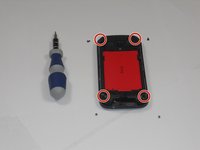
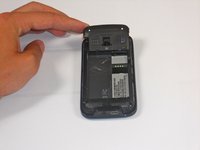
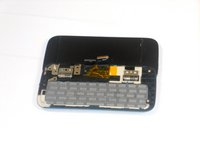
    1. HTC Touch Pro 2 Keyboard Replacement, Housing: crwdns2935265:03crwdnd2935265:01crwdnd2935265:02crwdne2935265:0 HTC Touch Pro 2 Keyboard Replacement, Housing: crwdns2935265:03crwdnd2935265:02crwdnd2935265:02crwdne2935265:0
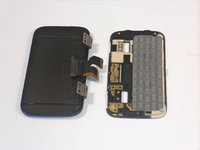
      • Using a T5 screwdriver, remove the four screws in corners as shown.

      • Lift the top portion of the rear case.

      • Potential for device damage: There is a ribbon attached on the back of this part that requires caution to remove.

      crwdns2952109:0crwdne2952109:0

      crwdns2917038:0crwdne2917038:0

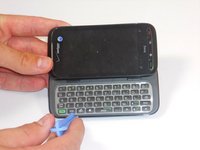
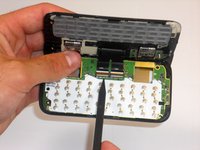
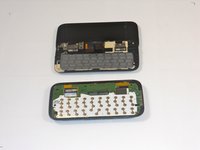
    2. HTC Touch Pro 2 Keyboard Replacement: crwdns2935265:04crwdnd2935265:01crwdnd2935265:03crwdne2935265:0 HTC Touch Pro 2 Keyboard Replacement: crwdns2935265:04crwdnd2935265:02crwdnd2935265:03crwdne2935265:0 HTC Touch Pro 2 Keyboard Replacement: crwdns2935265:04crwdnd2935265:03crwdnd2935265:03crwdne2935265:0
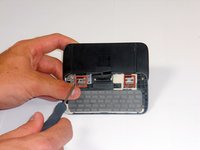
      • Using an IfixIt Plastic Tool, detach the plastic casing from the keyboard. This may require some force.

      • Using a spudger or other thin tool, carefully pry up ZIF connectors as shown. This will allow the black ribbons to detach from the keyboard.

      • Slide the two parts away from each other so that the black ribbons slide through the slots and you will now have housing into two parts.

      crwdns2952109:0crwdne2952109:0

      crwdns2917038:0crwdne2917038:0

    1. HTC Touch Pro 2 Keyboard Replacement, Keyboard: crwdns2935265:05crwdnd2935265:01crwdnd2935265:03crwdne2935265:0 HTC Touch Pro 2 Keyboard Replacement, Keyboard: crwdns2935265:05crwdnd2935265:02crwdnd2935265:03crwdne2935265:0 HTC Touch Pro 2 Keyboard Replacement, Keyboard: crwdns2935265:05crwdnd2935265:03crwdnd2935265:03crwdne2935265:0
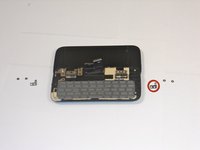
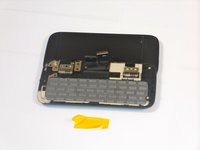
      • Peel off the yellow ribbon shown slowly.

      • Unscrew the fours screws shown in red squares (two in each square) using a 00 screwdriver.

      • After the screws are out, you will be able to easily take off the small metal pieces circled in red.

      crwdns2952109:0crwdne2952109:0

      crwdns2917038:0crwdne2917038:0

    2. HTC Touch Pro 2 Keyboard Replacement: crwdns2935265:06crwdnd2935265:01crwdnd2935265:03crwdne2935265:0 HTC Touch Pro 2 Keyboard Replacement: crwdns2935265:06crwdnd2935265:02crwdnd2935265:03crwdne2935265:0 HTC Touch Pro 2 Keyboard Replacement: crwdns2935265:06crwdnd2935265:03crwdnd2935265:03crwdne2935265:0
      crwdns2935267:0crwdne2935267:0
      Tweezers
      $4.99
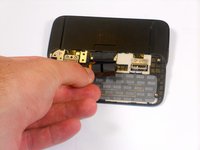
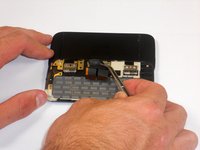
      • Slowly pull dual black strip off using force.

      • Behind the dual black strip is very sticky piece of grey tape. Use tweezers (preferably ones with ridges) to peel off the tape. Be careful not to rip it.

      crwdns2952109:0crwdne2952109:0

      crwdns2917038:0crwdne2917038:0

    3. HTC Touch Pro 2 Keyboard Replacement: crwdns2935265:07crwdnd2935265:01crwdnd2935265:02crwdne2935265:0 HTC Touch Pro 2 Keyboard Replacement: crwdns2935265:07crwdnd2935265:02crwdnd2935265:02crwdne2935265:0
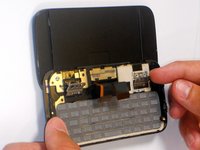
      • Lift ZIF connectors up.

      • Carefully lift keyboard frame away from display screen.

      • You now have the keyboard detached.

      crwdns2952109:0crwdne2952109:0

      crwdns2917038:0crwdne2917038:0

crwdns2915888:0crwdne2915888:0

To reassemble your device, follow these instructions in reverse order.

crwdns2935221:0crwdne2935221:0

crwdns2935227:0crwdne2935227:0

Melinda Phan

crwdns2935283:004/17/11crwdne2935283:0

438 crwdns2915208:0crwdne2915208:0

crwdns2935297:09crwdne2935297:0

crwdns2935287:0crwdne2935287:0

Cal Poly, Team 9-64, Walters Spring 2011 crwdns2935289:0Cal Poly, Team 9-64, Walters Spring 2011crwdne2935289:0

CPSU-WALTERS-S11S9G64

crwdns2931471:05crwdne2931471:0

crwdns2935297:0108crwdne2935297:0

crwdns2947412:00crwdne2947412:0

crwdns2917038:0crwdne2917038:0

crwdns2936625:0crwdne2936625:0:

crwdns2936751:024crwdne2936751:0 1

crwdns2936753:07crwdne2936753:0 28

crwdns2936753:030crwdne2936753:0 94

crwdns2959996:0crwdne2959996:0 5,090