crwdns2933423:0crwdne2933423:0
crwdns2947577:0crwdnd2947577:0crwdne2947577:0

HTC Excalibur Screen Replacement

crwdns2942213:0crwdne2942213:0

    1. HTC Excalibur Screen Replacement, Motherboard: crwdns2935265:01crwdnd2935265:01crwdnd2935265:01crwdne2935265:0
      • Remove the rubber screw covers. If needed, use a thin object to help pry them off. There should be two of them on top of the phone. Skip this step if already removed.

      • Pry loose the metal cover near the camera lens.

      crwdns2952109:0crwdne2952109:0

      crwdns2917038:0crwdne2917038:0

    2. HTC Excalibur Screen Replacement: crwdns2935265:02crwdnd2935265:01crwdnd2935265:01crwdne2935265:0
      • Remove the battery cover.

      • Gripping the battery by the bottom, lift and remove it from the phone.

      crwdns2952109:0crwdne2952109:0

      crwdns2917038:0crwdne2917038:0

    3. HTC Excalibur Screen Replacement: crwdns2935265:03crwdnd2935265:01crwdnd2935265:03crwdne2935265:0 HTC Excalibur Screen Replacement: crwdns2935265:03crwdnd2935265:02crwdnd2935265:03crwdne2935265:0 HTC Excalibur Screen Replacement: crwdns2935265:03crwdnd2935265:03crwdnd2935265:03crwdne2935265:0
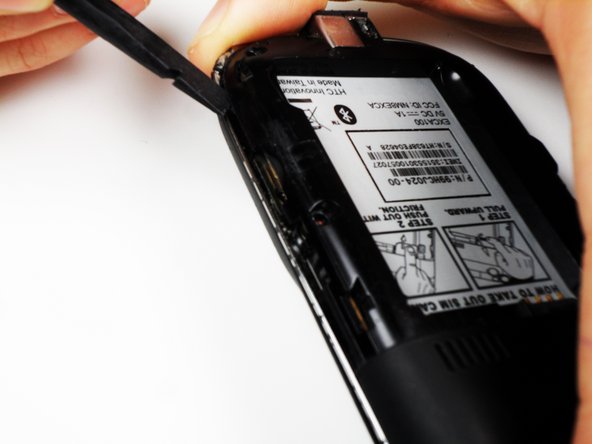
      • After removing the rubber stoppers on top, there should be six exposed screws. Remove these using the T6 screwdriver.

      • Next, use the spudger to loosen the case underneath the shiny metal edge. Go all the way around the phone until completely loosened.

      • The case is superglued on and will not permanently damage the phone when removed, but you should still use caution.

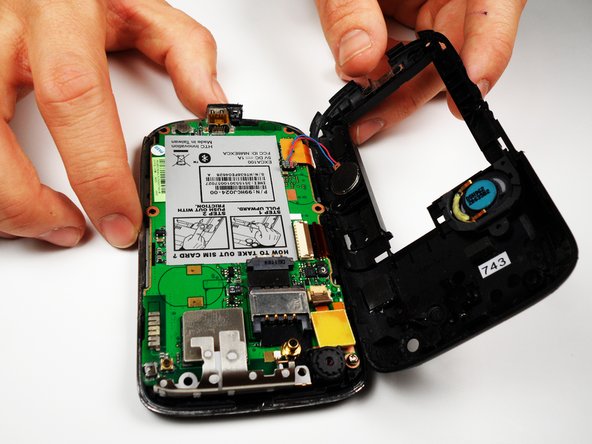
      • After loosening the case, remove it.

      • There is a wire that connects both the top and bottom of the case. If you are not careful when removing the case, you might snap the wire.

      crwdns2952109:0crwdne2952109:0

      crwdns2917038:0crwdne2917038:0

    4. HTC Excalibur Screen Replacement: crwdns2935265:04crwdnd2935265:01crwdnd2935265:02crwdne2935265:0 HTC Excalibur Screen Replacement: crwdns2935265:04crwdnd2935265:02crwdnd2935265:02crwdne2935265:0
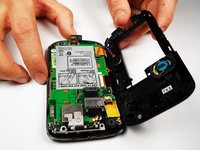
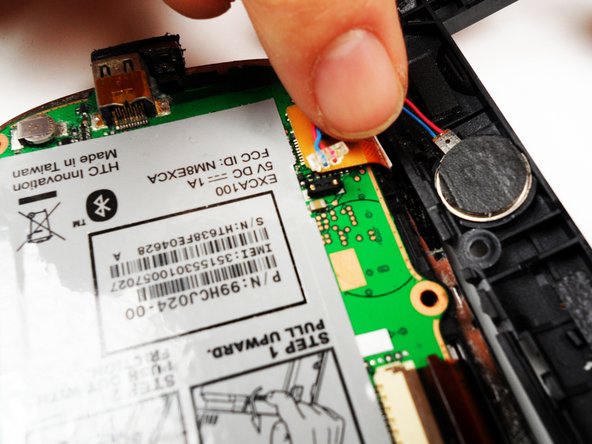
      • Remove the one remaining screw in the logic board.

      • Unclip the wire that connects the back of the case to the logic board.

      crwdns2952109:0crwdne2952109:0

      crwdns2917038:0crwdne2917038:0

    5. HTC Excalibur Screen Replacement: crwdns2935265:05crwdnd2935265:01crwdnd2935265:03crwdne2935265:0 HTC Excalibur Screen Replacement: crwdns2935265:05crwdnd2935265:02crwdnd2935265:03crwdne2935265:0 HTC Excalibur Screen Replacement: crwdns2935265:05crwdnd2935265:03crwdnd2935265:03crwdne2935265:0
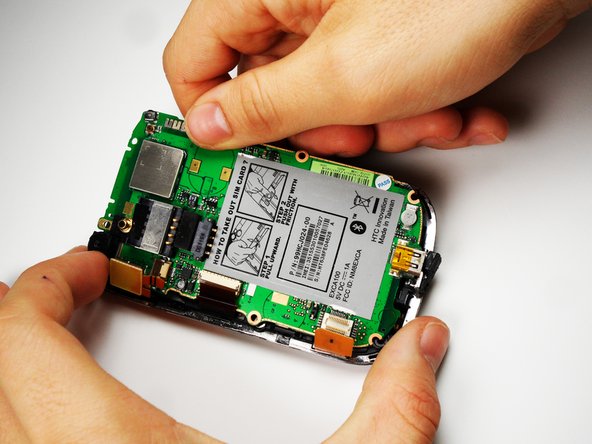
      • On the left side of the phone, there are three copper colored clips.

      • Unclip the bottom clip, thread the middle one through the logic board, and pull the top one out gently.

      • You can then lift the logic board out of the phone.

      • Do this at an angle, lifting the side to the right of the SIM card instructions.

      • One of the strips is attached to the front of the case, and goes through the logic board. Be careful not to break this piece.

      crwdns2952109:0crwdne2952109:0

      crwdns2917038:0crwdne2917038:0

    1. HTC Excalibur Screen Replacement, Screen: crwdns2935265:06crwdnd2935265:01crwdnd2935265:01crwdne2935265:0
      • Remove the metal frame. Slip out the copper clips still attached to the bottom frame from the frame carefully.

      crwdns2952109:0crwdne2952109:0

      crwdns2917038:0crwdne2917038:0

    2. HTC Excalibur Screen Replacement: crwdns2935265:07crwdnd2935265:01crwdnd2935265:01crwdne2935265:0
      • Grab the screen by the bottom edge, and lift it out at an angle.

      • Replace the screen, and reassemble the phone.

      crwdns2952109:0crwdne2952109:0

      crwdns2917038:0crwdne2917038:0

crwdns2915888:0crwdne2915888:0

To reassemble your device, follow these instructions in reverse order.

crwdns2935221:0crwdne2935221:0

Ian Mitchell

crwdns2935283:004/19/11crwdne2935283:0

142 crwdns2915208:0crwdne2915208:0

crwdns2935297:05crwdne2935297:0

crwdns2935287:0crwdne2935287:0

Cal Poly, Team 25-27, Garner Spring 2011 crwdns2935289:0Cal Poly, Team 25-27, Garner Spring 2011crwdne2935289:0

CPSU-GARNER-S11S25G27

crwdns2931471:04crwdne2931471:0

crwdns2935297:060crwdne2935297:0

crwdns2947412:00crwdne2947412:0

crwdns2917038:0crwdne2917038:0

crwdns2936625:0crwdne2936625:0:

crwdns2936751:024crwdne2936751:0 0

crwdns2936753:07crwdne2936753:0 3

crwdns2936753:030crwdne2936753:0 36

crwdns2942667:0crwdne2942667:0 2,193