crwdns2933423:0crwdne2933423:0
crwdns2947577:0crwdnd2947577:0crwdne2947577:0

HTC Evo 4G Front Facing Camera Replacement

crwdns2942213:0crwdne2942213:0

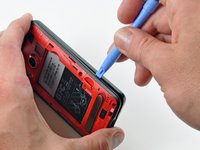
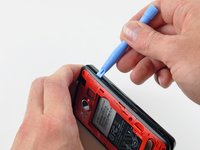
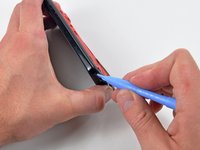
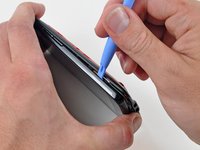
    1. HTC Evo 4G Front Facing Camera Replacement, Rear Panel: crwdns2935265:01crwdnd2935265:01crwdnd2935265:01crwdne2935265:0
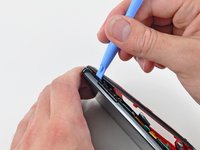
      • Gently insert an iPod opening tool between the rear panel and the inner rear frame near the headphone jack.

      • Use your iPod opening tool to pry up the rear case around the perimeter of the Evo.

      crwdns2952109:0crwdne2952109:0

      crwdns2917038:0crwdne2917038:0

    2. HTC Evo 4G Front Facing Camera Replacement: crwdns2935265:02crwdnd2935265:01crwdnd2935265:01crwdne2935265:0
      • Lift the rear panel off of the inner rear frame.

      crwdns2952109:0crwdne2952109:0

      crwdns2917038:0crwdne2917038:0

    1. HTC Evo 4G Front Facing Camera Replacement, Battery: crwdns2935265:03crwdnd2935265:01crwdnd2935265:02crwdne2935265:0 HTC Evo 4G Front Facing Camera Replacement, Battery: crwdns2935265:03crwdnd2935265:02crwdnd2935265:02crwdne2935265:0
      • Using the tip of your finger, lift the battery from the end closest to the camera.

      • Remove the battery from the rear inner frame.

      crwdns2952109:0crwdne2952109:0

      crwdns2917038:0crwdne2917038:0

    1. HTC Evo 4G Front Facing Camera Replacement, MicroSD card: crwdns2935265:04crwdnd2935265:01crwdnd2935265:01crwdne2935265:0
      • Use the flat end of a spudger to pry up the red MicroSD retainer attached to the inner frame.

      • The retainer will move about 1 mm and stop. Do not attempt to completely remove the MicroSD card retainer.

      crwdns2952109:0crwdne2952109:0

      crwdns2917038:0crwdne2917038:0

    2. HTC Evo 4G Front Facing Camera Replacement: crwdns2935265:05crwdnd2935265:01crwdnd2935265:01crwdne2935265:0
      crwdns2935267:0crwdne2935267:0
      Tweezers
      $4.99
      • Use a pair of tweezers to carefully pull the MicroSD card out of its slot in the inner rear frame.

      crwdns2952109:0crwdne2952109:0

      crwdns2917038:0crwdne2917038:0

    1. HTC Evo 4G Front Facing Camera Replacement, Rear Inner Frame: crwdns2935265:06crwdnd2935265:01crwdnd2935265:01crwdne2935265:0
      • Remove six T5 Torx screws securing the rear inner frame to the inner case.

      crwdns2952109:0crwdne2952109:0

      crwdns2917038:0crwdne2917038:0

    2. HTC Evo 4G Front Facing Camera Replacement: crwdns2935265:07crwdnd2935265:01crwdnd2935265:01crwdne2935265:0
      • Gently insert an iPod opening tool between the rear inner frame and its plastic surround near the Micro HDMI port.

      • Carefully pry the top edge of the rear inner frame away from the front surround of the Evo.

      crwdns2952109:0crwdne2952109:0

      crwdns2917038:0crwdne2917038:0

    3. HTC Evo 4G Front Facing Camera Replacement: crwdns2935265:08crwdnd2935265:01crwdnd2935265:02crwdne2935265:0 HTC Evo 4G Front Facing Camera Replacement: crwdns2935265:08crwdnd2935265:02crwdnd2935265:02crwdne2935265:0
      • Insert the iPod opening tool between the rear inner frame and its plastic surround and pry up at several points along the left edge of the Evo.

      crwdns2952109:0crwdne2952109:0

      crwdns2917038:0crwdne2917038:0

    4. HTC Evo 4G Front Facing Camera Replacement: crwdns2935265:09crwdnd2935265:01crwdnd2935265:03crwdne2935265:0 HTC Evo 4G Front Facing Camera Replacement: crwdns2935265:09crwdnd2935265:02crwdnd2935265:03crwdne2935265:0 HTC Evo 4G Front Facing Camera Replacement: crwdns2935265:09crwdnd2935265:03crwdnd2935265:03crwdne2935265:0
      • Continue the prying procedure, now focusing on detaching the plastic surround from the bottom of the Evo.

      • Pry up the rear inner frame along the right edge using the method described in previous steps.

      • Eventually work around the entire perimeter of the rear inner frame until it is lifted slightly from the inner case.

      crwdns2952109:0crwdne2952109:0

      crwdns2917038:0crwdne2917038:0

    5. HTC Evo 4G Front Facing Camera Replacement: crwdns2935265:010crwdnd2935265:01crwdnd2935265:01crwdne2935265:0
      • Remove the rear inner frame from the rest of the Evo.

      crwdns2952109:0crwdne2952109:0

      crwdns2917038:0crwdne2917038:0

    1. HTC Evo 4G Front Facing Camera Replacement, Motherboard: crwdns2935265:011crwdnd2935265:01crwdnd2935265:01crwdne2935265:0
      • Remove the single Phillips screw securing the motherboard to the inner case near the headphone jack.

      crwdns2952109:0crwdne2952109:0

      crwdns2917038:0crwdne2917038:0

    2. HTC Evo 4G Front Facing Camera Replacement: crwdns2935265:012crwdnd2935265:01crwdnd2935265:01crwdne2935265:0
      • Use the flat end of a spudger to pry the motherboard off the posts securing it to the metal display tray.

      • Do not try to completely remove the motherboard just yet. It is still attached by three ribbon cables.

      crwdns2952109:0crwdne2952109:0

      crwdns2917038:0crwdne2917038:0

    3. HTC Evo 4G Front Facing Camera Replacement: crwdns2935265:013crwdnd2935265:01crwdnd2935265:01crwdne2935265:0
      • Carefully peel the device information sticker off the left edge of the motherboard and EMI shield to reveal three connectors covered with tape.

      • It is not necessary to peel the entire device information sticker off the EMI shield.

      crwdns2952109:0crwdne2952109:0

      crwdns2917038:0crwdne2917038:0

    4. HTC Evo 4G Front Facing Camera Replacement: crwdns2935265:014crwdnd2935265:01crwdnd2935265:01crwdne2935265:0
      • Fold the device information sticker up against the top of the motherboard to keep it out of the way while you work.

      • Remove the pieces of tape covering the following ribbon cables:

      • Front-facing camera

      • Front panel ribbon cable

      • Display ribbon cable

      crwdns2952109:0crwdne2952109:0

      crwdns2917038:0crwdne2917038:0

    5. HTC Evo 4G Front Facing Camera Replacement: crwdns2935265:015crwdnd2935265:01crwdnd2935265:02crwdne2935265:0 HTC Evo 4G Front Facing Camera Replacement: crwdns2935265:015crwdnd2935265:02crwdnd2935265:02crwdne2935265:0
      crwdns2935267:0crwdne2935267:0
      Tweezers
      $4.99
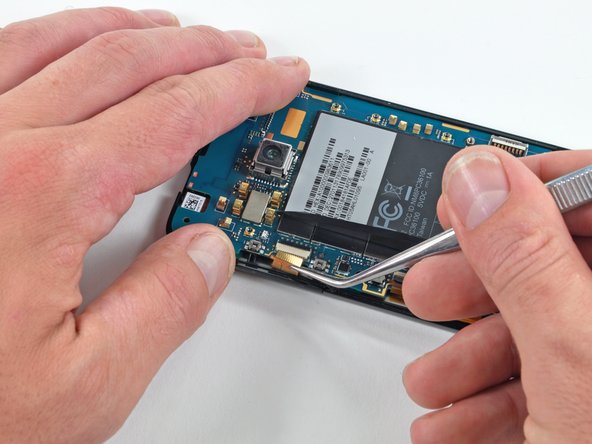
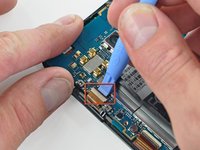
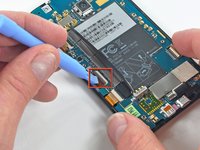
      • Using the tip of an iPod opening tool, flip up the front-facing camera ribbon cable retaining flap.

      • Be very careful and gentle with these flaps. They are very easy to break or dislodge and equally difficult to reinstall.

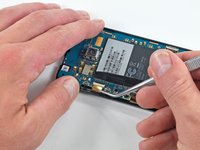
      • Use a pair of tweezers to pull the front-facing camera ribbon cable straight out of its socket.

      crwdns2952109:0crwdne2952109:0

      crwdns2917038:0crwdne2917038:0

    6. HTC Evo 4G Front Facing Camera Replacement: crwdns2935265:016crwdnd2935265:01crwdnd2935265:02crwdne2935265:0 HTC Evo 4G Front Facing Camera Replacement: crwdns2935265:016crwdnd2935265:02crwdnd2935265:02crwdne2935265:0
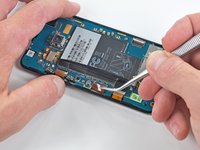
      • Using the tip of an iPod opening tool, flip up the front panel ribbon cable retaining flap.

      • Use a pair of tweezers to pull the front panel ribbon cable straight out of its socket.

      crwdns2952109:0crwdne2952109:0

      crwdns2917038:0crwdne2917038:0

    7. HTC Evo 4G Front Facing Camera Replacement: crwdns2935265:017crwdnd2935265:01crwdnd2935265:02crwdne2935265:0 HTC Evo 4G Front Facing Camera Replacement: crwdns2935265:017crwdnd2935265:02crwdnd2935265:02crwdne2935265:0
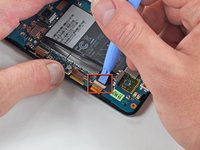
      • Using the tip of an iPod opening tool, flip up the display ribbon cable retaining flap.

      • Grasp the display ribbon cable with a pair of tweezers and pull it straight out of its socket.

      crwdns2952109:0crwdne2952109:0

      crwdns2917038:0crwdne2917038:0

    8. HTC Evo 4G Front Facing Camera Replacement: crwdns2935265:018crwdnd2935265:01crwdnd2935265:01crwdne2935265:0
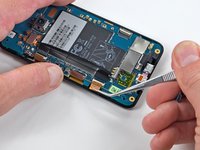
      • Carefully lift the motherboard out of the inner case, minding any cables that may get caught.

      • Be mindful of the top power button and side rocker switch, which may fall out of the front case when the board is removed.

      crwdns2952109:0crwdne2952109:0

      crwdns2917038:0crwdne2917038:0

    1. HTC Evo 4G Front Facing Camera Replacement, Front Facing Camera: crwdns2935265:019crwdnd2935265:01crwdnd2935265:01crwdne2935265:0
      • Gently lift the front-facing camera out of its recess in the inner case and remove it from the Evo.

      crwdns2952109:0crwdne2952109:0

      crwdns2917038:0crwdne2917038:0

crwdns2915888:0crwdne2915888:0

To reassemble your device, follow these instructions in reverse order.

crwdns2935221:0crwdne2935221:0

crwdns2935229:03crwdne2935229:0

Walter Galan

710,761 crwdns2915208:0crwdne2915208:0

crwdns2935297:01,203crwdne2935297:0

crwdns2947412:00crwdne2947412:0

crwdns2917038:0crwdne2917038:0

crwdns2936625:0crwdne2936625:0:

crwdns2936751:024crwdne2936751:0 0

crwdns2936753:07crwdne2936753:0 2

crwdns2936753:030crwdne2936753:0 34

crwdns2942667:0crwdne2942667:0 25,012