crwdns2933423:0crwdne2933423:0
crwdns2947577:0crwdnd2947577:0crwdne2947577:0

HP Z2 Mini G3 CPU Fan Replacement

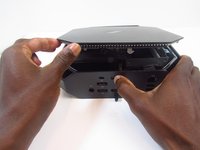
    1. HP Z2 Mini G3 CPU Fan Replacement, Access Panel: crwdns2935265:01crwdnd2935265:01crwdnd2935265:01crwdne2935265:0
      • Turn the device so the back-side of the device is facing you.

      • Be sure that the power is off and the A/C power cord has been disconnected before starting. Removing hardware while the power is on could damage the device or harm yourself.

      • Components of the device are subject to static damage. Work on a hard, grounded surface to prevent damage to the workstation.

      crwdns2952109:0crwdne2952109:0

      crwdns2917038:0crwdne2917038:0

    2. HP Z2 Mini G3 CPU Fan Replacement: crwdns2935265:02crwdnd2935265:01crwdnd2935265:02crwdne2935265:0 HP Z2 Mini G3 CPU Fan Replacement: crwdns2935265:02crwdnd2935265:02crwdnd2935265:02crwdne2935265:0
      • Slide and hold the latch in the direction of the engraved arrow (to the right).

      crwdns2952109:0crwdne2952109:0

      crwdns2917038:0crwdne2917038:0

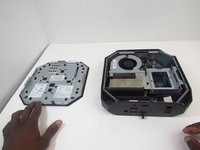
    3. HP Z2 Mini G3 CPU Fan Replacement: crwdns2935265:03crwdnd2935265:01crwdnd2935265:02crwdne2935265:0 HP Z2 Mini G3 CPU Fan Replacement: crwdns2935265:03crwdnd2935265:02crwdnd2935265:02crwdne2935265:0
      • While holding the latch, lift the access panel upwards and towards yourself and set it aside upside-down.

      crwdns2952109:0crwdne2952109:0

      crwdns2917038:0crwdne2917038:0

    1. HP Z2 Mini G3 CPU Fan Replacement, CPU Fan: crwdns2935265:04crwdnd2935265:01crwdnd2935265:01crwdne2935265:0
      • Rotate the device so the front side is facing you (the side with the power button) and locate the CPU fan.

      crwdns2952109:0crwdne2952109:0

      crwdns2917038:0crwdne2917038:0

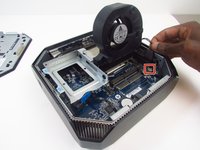
    2. HP Z2 Mini G3 CPU Fan Replacement: crwdns2935265:05crwdnd2935265:01crwdnd2935265:01crwdne2935265:0
      • Swing the fan upward, to a 90-degree angle.

      crwdns2952109:0crwdne2952109:0

      crwdns2917038:0crwdne2917038:0

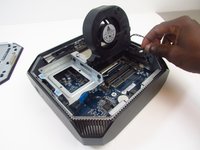
    3. HP Z2 Mini G3 CPU Fan Replacement: crwdns2935265:06crwdnd2935265:01crwdnd2935265:02crwdne2935265:0 HP Z2 Mini G3 CPU Fan Replacement: crwdns2935265:06crwdnd2935265:02crwdnd2935265:02crwdne2935265:0
      • Carefully disconnect the CPU fan by pulling out the wires from the motherboard.

      crwdns2952109:0crwdne2952109:0

      crwdns2917038:0crwdne2917038:0

    4. HP Z2 Mini G3 CPU Fan Replacement: crwdns2935265:07crwdnd2935265:01crwdnd2935265:01crwdne2935265:0
      • Swing the fan back down and carefully unhook the CPU fan notches by pulling each tab away from the heat sink holes.

      crwdns2952109:0crwdne2952109:0

      crwdns2917038:0crwdne2917038:0

    5. HP Z2 Mini G3 CPU Fan Replacement: crwdns2935265:08crwdnd2935265:01crwdnd2935265:01crwdne2935265:0
      • Swing the fan up again and pull it out.

      crwdns2952109:0crwdne2952109:0

      crwdns2917038:0crwdne2917038:0

crwdns2915888:0crwdne2915888:0

To reassemble your device, follow these instructions in reverse order.

crwdns2935221:0crwdne2935221:0

crwdns2935227:0crwdne2935227:0

Christian Ogburn

crwdns2935283:001/14/20crwdne2935283:0

514 crwdns2915208:0crwdne2915208:0

crwdns2935297:03crwdne2935297:0

crwdns2935287:0crwdne2935287:0

Embry-Riddle Aeronautical University, Team S16-G4, Branham Spring 2020 crwdns2935289:0Embry-Riddle Aeronautical University, Team S16-G4, Branham Spring 2020crwdne2935289:0

ERAU-BRANHAM-S20S16G4

crwdns2931471:03crwdne2931471:0

crwdns2935297:072crwdne2935297:0

crwdns2947412:00crwdne2947412:0

crwdns2917038:0crwdne2917038:0

crwdns2936625:0crwdne2936625:0:

crwdns2936751:024crwdne2936751:0 2

crwdns2936753:07crwdne2936753:0 29

crwdns2936753:030crwdne2936753:0 96

crwdns2942667:0crwdne2942667:0 2,539