crwdns2933423:0crwdne2933423:0
crwdns2947577:0crwdnd2947577:0crwdne2947577:0

HP Stream TPN-Q155 Keyboard replacement

crwdns2942213:0crwdne2942213:0

  1. HP Stream TPN-Q155 Keyboard replacement, HP Stream TPN-Q155 Keyboard replacement: crwdns2935265:01crwdnd2935265:01crwdnd2935265:01crwdne2935265:0
    • Unscrew all the screws on the back of the laptop and remove the cover

    crwdns2952109:0crwdne2952109:0

    crwdns2917038:0crwdne2917038:0

  2. HP Stream TPN-Q155 Keyboard replacement: crwdns2935265:02crwdnd2935265:01crwdnd2935265:02crwdne2935265:0 HP Stream TPN-Q155 Keyboard replacement: crwdns2935265:02crwdnd2935265:02crwdnd2935265:02crwdne2935265:0
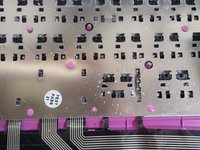
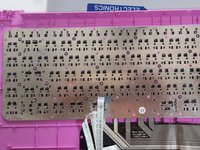
    • Remove the black adhesive to expose plastic rivets.

    crwdns2952109:0crwdne2952109:0

    crwdns2917038:0crwdne2917038:0

  3. HP Stream TPN-Q155 Keyboard replacement: crwdns2935265:03crwdnd2935265:01crwdnd2935265:03crwdne2935265:0 HP Stream TPN-Q155 Keyboard replacement: crwdns2935265:03crwdnd2935265:02crwdnd2935265:03crwdne2935265:0 HP Stream TPN-Q155 Keyboard replacement: crwdns2935265:03crwdnd2935265:03crwdnd2935265:03crwdne2935265:0
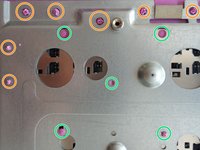
    • Now, get a tissue and prepare for the sweat.

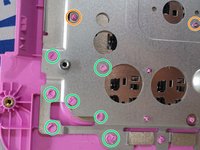
    • And melt any rivet from green marker to orange marker like. Try not to cut it off, or you might be in trouble to hold the metal cover

    crwdns2952109:0crwdne2952109:0

    crwdns2917038:0crwdne2917038:0

  4. HP Stream TPN-Q155 Keyboard replacement: crwdns2935265:04crwdnd2935265:01crwdnd2935265:02crwdne2935265:0 HP Stream TPN-Q155 Keyboard replacement: crwdns2935265:04crwdnd2935265:02crwdnd2935265:02crwdne2935265:0
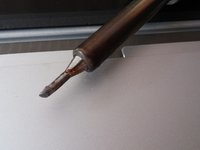
    • Same process and keep melting the rest of the plastic rivets after the metal cover. This can easily going over 2 or 3 hours if you are not quick enough.

    • And if everything goes alright, you might eventually get the problem keyboard removed and put a new keyboard back in.

    • then, use your solder station the melt the plastic back to the keyboard.

    crwdns2952109:0crwdne2952109:0

    crwdns2917038:0crwdne2917038:0

crwdns2915888:0crwdne2915888:0

To reassemble your device, follow these instructions in reverse order.

crwdns2935221:0crwdne2935221:0

Jim Yang

crwdns2935283:002/06/17crwdne2935283:0

112 crwdns2915208:0crwdne2915208:0

crwdns2935295:0crwdne2935295:0

crwdns2935287:0crwdne2935287:0

Jim The Computer Man crwdns2935289:0Jim The Computer Mancrwdne2935289:0

Business

crwdns2934841:01crwdne2934841:0

crwdns2935303:01crwdne2935303:0

crwdns2947412:00crwdne2947412:0

crwdns2917038:0crwdne2917038:0

crwdns2936625:0crwdne2936625:0:

crwdns2936751:024crwdne2936751:0 2

crwdns2936753:07crwdne2936753:0 5

crwdns2936753:030crwdne2936753:0 34

crwdns2942667:0crwdne2942667:0 1,506