
HP Stream 8 Speakers Replacement

crwdns2959932:0crwdnd2959932:0Nick Millercrwdnd2959932:0crwdnd2959932:0crwdne2959932:0
crwdns2959936:0Sun 15, 2026crwdne2959936:0
crwdns2869540:0crwdne2869540:0: 908
crwdns2959988:0crwdne2959988:0
- crwdns2959990:0crwdne2959990:0
- 5
- crwdns2959992:0crwdne2959992:0
- 27
- crwdns2959994:0crwdne2959994:0
- 94
- crwdns2959996:0crwdne2959996:0
- 908
crwdns2955950:0crwdne2955950:0: 1
crwdns2960002:01crwdne2960002:0.
crwdns2959984:0crwdne2959984:0: 1 2
crwdns2959972:01crwdne2959972:0
crwdns2959970:02crwdne2959970:0
crwdns2959986:0crwdne2959986:0: 0 1
crwdns2959958:0crwdne2959958:0
crwdns2959976:01crwdne2959976:0
crwdns2862633:0crwdne2862633:0
crwdns2862634:0crwdne2862634:0
crwdns2915892:0crwdne2915892:0
crwdns2959928:0crwdne2959928:0 ↓This guide will provide a step-by-step walk through on replacing the speakers in a HP Stream 8.
crwdns2959930:0crwdne2959930:0
crwdns2943215:0crwdne2943215:0


-
-
-
Use your nail or a spudger to pry the back cover off of the device.
 crwdns2952109:0crwdne2952109:0
-
-
-
Slide your finger around the rest of the back cover, lifting it completely off of the device.
-
-
-
-
Remove ten Phillips #00 screws from the inside cover.
-
-
-
Pry up the inside cover the same way as in the first step.
-
-
-
-
crwdns2935267:0crwdne2935267:0Tweezers$4.99
-
Locate the two speakers at the bottom of the device.
-
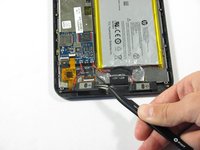
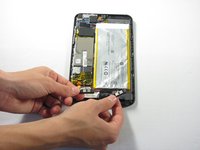
Remove the two speakers by prying them out using a pair of tweezers.
-
Detach the red and black power wiring from the device and pull the speakers entirely out of the HP Stream 8.
-
-
-
Grab the two replacement speakers and the soldering iron.
-
Locate where the red and black power wiring previously connected to the device.
-
Attach and re-solder the red and black power wiring.
-
-



To reassemble your device, follow these instructions in reverse order.
crwdns2935221:0crwdne2935221:0
crwdns2935227:0crwdne2935227:0

crwdns2935287:0crwdne2935287:0

Cal Poly, Team 34-14, Maness Spring 2016 crwdns2935289:0Cal Poly, Team 34-14, Maness Spring 2016crwdne2935289:0
CPSU-MANESS-S16S34G14
crwdns2931471:04crwdne2931471:0
crwdns2935297:072crwdne2935297:0
