crwdns2933423:0crwdne2933423:0
crwdns2947577:0crwdnd2947577:0crwdne2947577:0

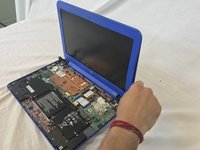
HP Stream 13-c010nr Display Replacement

crwdns2942213:0crwdne2942213:0

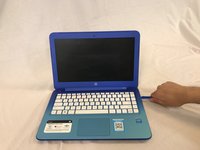
    1. HP Stream 13-c010nr Display Replacement, laptop: crwdns2935265:01crwdnd2935265:01crwdnd2935265:01crwdne2935265:0
      • Remove the five rubber feet from the bottom of the laptop with a plastic opening tool.

      crwdns2952109:0crwdne2952109:0

      crwdns2917038:0crwdne2917038:0

    2. HP Stream 13-c010nr Display Replacement: crwdns2935265:02crwdnd2935265:01crwdnd2935265:02crwdne2935265:0 HP Stream 13-c010nr Display Replacement: crwdns2935265:02crwdnd2935265:02crwdnd2935265:02crwdne2935265:0
      • Remove the thirteen 5mm Phillips #0 screws from the bottom case.

      crwdns2952109:0crwdne2952109:0

      crwdns2917038:0crwdne2917038:0

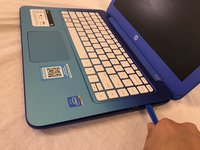
    3. HP Stream 13-c010nr Display Replacement: crwdns2935265:03crwdnd2935265:01crwdnd2935265:02crwdne2935265:0 HP Stream 13-c010nr Display Replacement: crwdns2935265:03crwdnd2935265:02crwdnd2935265:02crwdne2935265:0
      • Flip the laptop over and open it up.

      • Wedge a plastic opening tool between the keyboard and bottom case, pry upwards to separate the two pieces.

      • Lift up the keyboard.

      • Ribbon cables still connect the two pieces.

      crwdns2952109:0crwdne2952109:0

      crwdns2917038:0crwdne2917038:0

    4. HP Stream 13-c010nr Display Replacement: crwdns2935265:04crwdnd2935265:01crwdnd2935265:01crwdne2935265:0
      • Use a spudger to flip up the retaining flaps on the keyboard ribbon cable ZIF sockets.

      • Pull up the ribbon cables from their sockets.

      crwdns2952109:0crwdne2952109:0

      crwdns2917038:0crwdne2917038:0

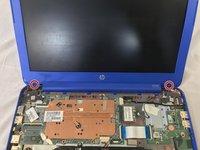
    1. HP Stream 13-c010nr Display Replacement, Display: crwdns2935265:05crwdnd2935265:01crwdnd2935265:01crwdne2935265:0
      • Remove the screw covers from the bottom corner edges of the screen.

      crwdns2952109:0crwdne2952109:0

      crwdns2917038:0crwdne2917038:0

    2. HP Stream 13-c010nr Display Replacement: crwdns2935265:06crwdnd2935265:01crwdnd2935265:02crwdne2935265:0 HP Stream 13-c010nr Display Replacement: crwdns2935265:06crwdnd2935265:02crwdnd2935265:02crwdne2935265:0
      • Remove the two 5mm Phillips #0 screws from the screen bezel.

      crwdns2952109:0crwdne2952109:0

      crwdns2917038:0crwdne2917038:0

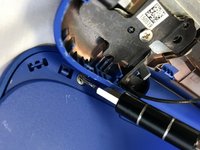
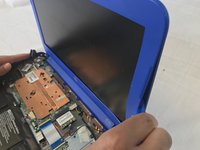
    3. HP Stream 13-c010nr Display Replacement: crwdns2935265:07crwdnd2935265:01crwdnd2935265:02crwdne2935265:0 HP Stream 13-c010nr Display Replacement: crwdns2935265:07crwdnd2935265:02crwdnd2935265:02crwdne2935265:0
      • Wedge the plastic opening tool between the frame of the screen and the casing of the laptop.

      • Pry upwards on the plastic opening tool to separate the bezel from the display.

      crwdns2952109:0crwdne2952109:0

      crwdns2917038:0crwdne2917038:0

    4. HP Stream 13-c010nr Display Replacement: crwdns2935265:08crwdnd2935265:01crwdnd2935265:01crwdne2935265:0
      • Remove the four 3mm Phillips #0 screws from the screen.

      crwdns2952109:0crwdne2952109:0

      crwdns2917038:0crwdne2917038:0

    5. HP Stream 13-c010nr Display Replacement: crwdns2935265:09crwdnd2935265:01crwdnd2935265:01crwdne2935265:0
      • Use a spudger to flip up the retaining flap on the screen ribbon cable ZIF socket.

      • Pull the ribbon cable out of the ZIF socket.

      • Remove the screen.

      crwdns2952109:0crwdne2952109:0

      crwdns2917038:0crwdne2917038:0

crwdns2915888:0crwdne2915888:0

To reassemble your device, follow these instructions in reverse order.

crwdns2935221:0crwdne2935221:0

Keegan Lapham

crwdns2935283:002/22/18crwdne2935283:0

759 crwdns2915208:0crwdne2915208:0

crwdns2935297:06crwdne2935297:0

crwdns2935287:0crwdne2935287:0

USF Tampa, Team S1-G3, Cagle Spring 2018 crwdns2935289:0USF Tampa, Team S1-G3, Cagle Spring 2018crwdne2935289:0

USFT-CAGLE-S18S1G3

crwdns2931471:04crwdne2931471:0

crwdns2935297:072crwdne2935297:0

crwdns2947412:00crwdne2947412:0

crwdns2917038:0crwdne2917038:0

crwdns2936625:0crwdne2936625:0:

crwdns2936751:024crwdne2936751:0 1

crwdns2936753:07crwdne2936753:0 3

crwdns2936753:030crwdne2936753:0 17

crwdns2942667:0crwdne2942667:0 1,081