crwdns2933423:0crwdne2933423:0
crwdns2947577:0crwdnd2947577:0crwdne2947577:0

HP Stream 11-d010nr Battery Replacement

crwdns2942213:0crwdne2942213:0

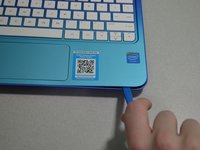
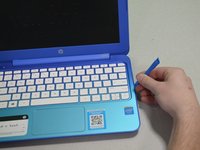
    1. HP Stream 11-d010nr Battery Replacement, Pry out the inserts: crwdns2935265:01crwdnd2935265:01crwdnd2935265:02crwdne2935265:0 HP Stream 11-d010nr Battery Replacement, Pry out the inserts: crwdns2935265:01crwdnd2935265:02crwdnd2935265:02crwdne2935265:0
      • Unplug and turn off the HP Stream 11 before disassembling the device.

      • Using a spudger, gently pry off the two elliptical rubber inserts located in the top corners.

      • Carefully remove the two circular rubber inserts positioned beneath the removed elliptical inserts.

      crwdns2952109:0crwdne2952109:0

      crwdns2917038:0crwdne2917038:0

    2. HP Stream 11-d010nr Battery Replacement, Unscrew the back cover: crwdns2935265:02crwdnd2935265:01crwdnd2935265:01crwdne2935265:0
      • Using a Phillips #1 screwdriver, remove the eleven 5.6 mm screws securing the back cover.

      • Keep the screws in a safe place for reassembly.

      crwdns2952109:0crwdne2952109:0

      crwdns2917038:0crwdne2917038:0

    3. HP Stream 11-d010nr Battery Replacement, Pry the keyboard casing up: crwdns2935265:03crwdnd2935265:01crwdnd2935265:02crwdne2935265:0 HP Stream 11-d010nr Battery Replacement, Pry the keyboard casing up: crwdns2935265:03crwdnd2935265:02crwdnd2935265:02crwdne2935265:0
      • Using an iFixit opening tool, carefully pry open the case to separate the keyboard from the main body. Work slowly to avoid damaging the edges.

      • HP Stream 11s tend to be really difficult to open. If your device is not opening with a standard iFixit opening tool, use a nylon spudger, then the metal spudger, or a metal Jimmy as the last resort.

      • When using the metal spudger or Jimmy, be careful not to bring these tools into contact with any electronic components of the device as this can damage the device.

      crwdns2952109:0crwdne2952109:0

      crwdns2917038:0crwdne2917038:0

    4. HP Stream 11-d010nr Battery Replacement, Identify the connectors: crwdns2935265:04crwdnd2935265:01crwdnd2935265:01crwdne2935265:0
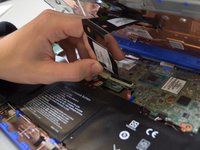
      • Carefully lift the keyboard and identify the three ribbon cables connecting the main body of the laptop to the keyboard.

      • Lift the keyboard with extreme care to avoid damaging the delicate ribbon cables. Applying excessive force can easily tear or break them easily.

      crwdns2952109:0crwdne2952109:0

      crwdns2917038:0crwdne2917038:0

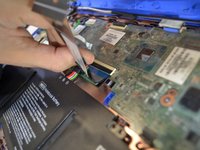
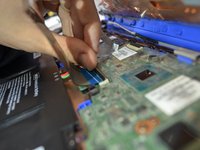
    5. HP Stream 11-d010nr Battery Replacement, Disconnect the cables: crwdns2935265:05crwdnd2935265:01crwdnd2935265:03crwdne2935265:0 HP Stream 11-d010nr Battery Replacement, Disconnect the cables: crwdns2935265:05crwdnd2935265:02crwdnd2935265:03crwdne2935265:0 HP Stream 11-d010nr Battery Replacement, Disconnect the cables: crwdns2935265:05crwdnd2935265:03crwdnd2935265:03crwdne2935265:0
      • Using a spudger, gently lift the flaps on the ZIF connectors to release the three ribbon cables securely attached to them.

      • Carefully disconnect the three ribbon cables.

      crwdns2952109:0crwdne2952109:0

      crwdns2917038:0crwdne2917038:0

    6. HP Stream 11-d010nr Battery Replacement, Lift the keyboard out: crwdns2935265:06crwdnd2935265:01crwdnd2935265:01crwdne2935265:0
      • Gently lift the keyboard out of the laptop to fully detach it from the device.

      • While handling, avoid damaging any remaining components.

      crwdns2952109:0crwdne2952109:0

      crwdns2917038:0crwdne2917038:0

    1. HP Stream 11-d010nr Battery Replacement, Battery: crwdns2935265:07crwdnd2935265:01crwdnd2935265:01crwdne2935265:0
      • Remove any tape holding the battery connector in place.

      • Using your fingers, carefully unplug the battery.

      crwdns2952109:0crwdne2952109:0

      crwdns2917038:0crwdne2917038:0

    2. HP Stream 11-d010nr Battery Replacement: crwdns2935265:08crwdnd2935265:01crwdnd2935265:02crwdne2935265:0 HP Stream 11-d010nr Battery Replacement: crwdns2935265:08crwdnd2935265:02crwdnd2935265:02crwdne2935265:0
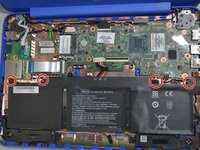
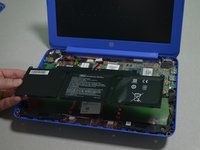
      • Remove the four 3mm #000 Phillips screws holding the battery in place.

      • Carefully lift the battery out of the laptop.

      crwdns2952109:0crwdne2952109:0

      crwdns2917038:0crwdne2917038:0

crwdns2915888:0crwdne2915888:0

To reassemble your device, follow these instructions in reverse order.

crwdns2935221:0crwdne2935221:0

crwdns2935229:04crwdne2935229:0

Zachary Heisler

crwdns2935283:001/24/19crwdne2935283:0

382 crwdns2915208:0crwdne2915208:0

crwdns2935297:03crwdne2935297:0

crwdns2935287:0crwdne2935287:0

Cal Poly, Team S1-G3, White Winter 2019 crwdns2935289:0Cal Poly, Team S1-G3, White Winter 2019crwdne2935289:0

CPSU-WHITE-W19S1G3

crwdns2931471:04crwdne2931471:0

crwdns2935297:060crwdne2935297:0

crwdns2947412:03crwdne2947412:0

HP lists the screws on the back cover as size pm1.9x5.6. What is wrong with HP that they would use such an odd size? I tried 2x6mm and they seem to work fine.

Greg Worrel - crwdns2934203:0crwdne2934203:0 crwdns2950251:0crwdne2950251:0

Me podrias ayudar con el numero de serie del boton de encendido

sam Carrizales - crwdns2934203:0crwdne2934203:0 crwdns2950251:0crwdne2950251:0

crwdns2917038:0crwdne2917038:0

crwdns2936625:0crwdne2936625:0:

crwdns2936751:024crwdne2936751:0 3

crwdns2936753:07crwdne2936753:0 11

crwdns2936753:030crwdne2936753:0 52

crwdns2942667:0crwdne2942667:0 3,658