crwdns2933423:0crwdne2933423:0
crwdns2947577:0crwdnd2947577:0crwdne2947577:0

HP Stream 11-d008TU Keyboard Assembly Replacement

crwdns2942213:0crwdne2942213:0

    1. HP Stream 11-d008TU Keyboard Assembly Replacement, Rubber Feet Removal: crwdns2935265:01crwdnd2935265:01crwdnd2935265:03crwdne2935265:0 HP Stream 11-d008TU Keyboard Assembly Replacement, Rubber Feet Removal: crwdns2935265:01crwdnd2935265:02crwdnd2935265:03crwdne2935265:0 HP Stream 11-d008TU Keyboard Assembly Replacement, Rubber Feet Removal: crwdns2935265:01crwdnd2935265:03crwdnd2935265:03crwdne2935265:0
      • Use a prying tool to pry the 2 rubber feet off closest to the hinge of the device

      • Repeat this process for the other side of the device

      • The bottom rubber feet do not have hidden screws underneath them, and as such, they are unnecessary to remove

      crwdns2952109:0crwdne2952109:0

      crwdns2917038:0crwdne2917038:0

    2. HP Stream 11-d008TU Keyboard Assembly Replacement, Screw removal: crwdns2935265:02crwdnd2935265:01crwdnd2935265:02crwdne2935265:0 HP Stream 11-d008TU Keyboard Assembly Replacement, Screw removal: crwdns2935265:02crwdnd2935265:02crwdnd2935265:02crwdne2935265:0
      • Remove the 11x 5mm Phillips PH-0 screws (circled)

      crwdns2952109:0crwdne2952109:0

      crwdns2917038:0crwdne2917038:0

    3. HP Stream 11-d008TU Keyboard Assembly Replacement, Keyboard Unclipping: crwdns2935265:03crwdnd2935265:01crwdnd2935265:03crwdne2935265:0 HP Stream 11-d008TU Keyboard Assembly Replacement, Keyboard Unclipping: crwdns2935265:03crwdnd2935265:02crwdnd2935265:03crwdne2935265:0 HP Stream 11-d008TU Keyboard Assembly Replacement, Keyboard Unclipping: crwdns2935265:03crwdnd2935265:03crwdnd2935265:03crwdne2935265:0
      • Use your finger to pry the outer blue shell over the keyboard

      • Continue this process around the edges of the device

      • You may have to use a prying tool to pry the harder edges such as around the I/O ports

      • Do not lift the keyboard once all the clips are undone, as there are still various cables connected

      crwdns2952109:0crwdne2952109:0

      crwdns2917038:0crwdne2917038:0

    4. HP Stream 11-d008TU Keyboard Assembly Replacement, Keyboard removal: crwdns2935265:04crwdnd2935265:01crwdnd2935265:03crwdne2935265:0 HP Stream 11-d008TU Keyboard Assembly Replacement, Keyboard removal: crwdns2935265:04crwdnd2935265:02crwdnd2935265:03crwdne2935265:0 HP Stream 11-d008TU Keyboard Assembly Replacement, Keyboard removal: crwdns2935265:04crwdnd2935265:03crwdnd2935265:03crwdne2935265:0
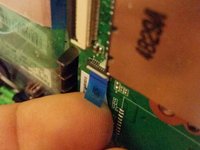
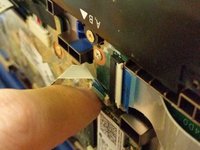
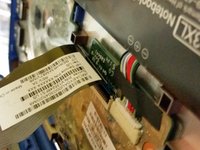
      • Disconnect the power button connector by peeling back the protective tape, using your fingernail to flip the white retaining clip back, and pulling the ribbon cable out

      • Disconnect the touchpad connector by using your fingernail to flip the black retaining clip back, and pulling the ribbon cable out

      • Disconnect the keyboard connector by using your fingernail to flip the black retaining clip back, and pulling the ribbon cable out

      • Your keyboard assembly is now safe to remove

      crwdns2952109:0crwdne2952109:0

      crwdns2917038:0crwdne2917038:0

crwdns2915888:0crwdne2915888:0

To reassemble your device, follow these instructions in reverse order.

crwdns2935221:0crwdne2935221:0

crwdns2935227:0crwdne2935227:0

Joel Taylor

crwdns2935283:003/07/20crwdne2935283:0

1.376 crwdns2915208:0crwdne2915208:0

crwdns2935297:08crwdne2935297:0

crwdns2935287:0crwdne2935287:0

Australia crwdns2935289:0Australiacrwdne2935289:0

Community

crwdns2931471:04crwdne2931471:0

crwdns2935297:014crwdne2935297:0

crwdns2947412:00crwdne2947412:0

crwdns2917038:0crwdne2917038:0

crwdns2936625:0crwdne2936625:0:

crwdns2936751:024crwdne2936751:0 1

crwdns2936753:07crwdne2936753:0 6

crwdns2936753:030crwdne2936753:0 23

crwdns2942667:0crwdne2942667:0 393