crwdns2933423:0crwdne2933423:0
crwdns2947577:0crwdnd2947577:0crwdne2947577:0

HP Split x2 Screen Replacement

crwdns2942213:0crwdne2942213:0

    1. HP Split x2 Screen Replacement, Rear Cover: crwdns2935265:01crwdnd2935265:01crwdnd2935265:01crwdne2935265:0
      • Opening the device voids the manufacturer warranty.

      • Power down the HP Split x2 before beginning the repair

      • Separate the tablet from the keyboard by pushing the slider to the left and lifting the tablet from the keyboard.

      crwdns2952109:0crwdne2952109:0

      crwdns2917038:0crwdne2917038:0

    2. HP Split x2 Screen Replacement: crwdns2935265:02crwdnd2935265:01crwdnd2935265:03crwdne2935265:0 HP Split x2 Screen Replacement: crwdns2935265:02crwdnd2935265:02crwdnd2935265:03crwdne2935265:0 HP Split x2 Screen Replacement: crwdns2935265:02crwdnd2935265:03crwdnd2935265:03crwdne2935265:0
      • Remove the four white caps on the bottom edge of the tablet.

      • Use a tweezer to grasp white caps.

      • The white caps are easily lost. Store them in a secure place.

      crwdns2952109:0crwdne2952109:0

      crwdns2917038:0crwdne2917038:0

    3. HP Split x2 Screen Replacement: crwdns2935265:03crwdnd2935265:01crwdnd2935265:01crwdne2935265:0
      • Use a Phillips #000 screwdriver to remove the four 3mm screws.

      crwdns2952109:0crwdne2952109:0

      crwdns2917038:0crwdne2917038:0

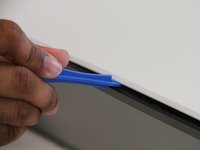
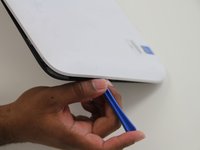
    4. HP Split x2 Screen Replacement: crwdns2935265:04crwdnd2935265:01crwdnd2935265:02crwdne2935265:0 HP Split x2 Screen Replacement: crwdns2935265:04crwdnd2935265:02crwdnd2935265:02crwdne2935265:0
      • Use a plastic opening tool to pry the tabs on the top, left and right sides of the tablet.

      • Only the top and sides have tabs. Remove all tabs before lifting screen.

      crwdns2952109:0crwdne2952109:0

      crwdns2917038:0crwdne2917038:0

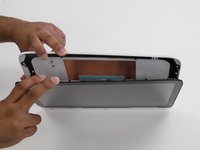
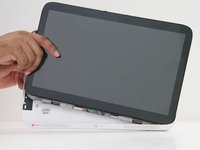
    5. HP Split x2 Screen Replacement: crwdns2935265:05crwdnd2935265:01crwdnd2935265:02crwdne2935265:0 HP Split x2 Screen Replacement: crwdns2935265:05crwdnd2935265:02crwdnd2935265:02crwdne2935265:0
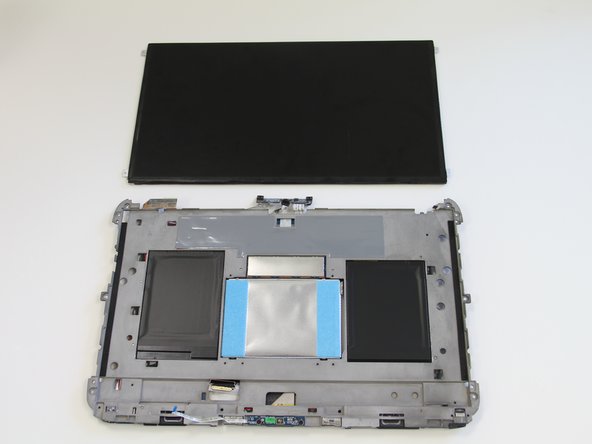
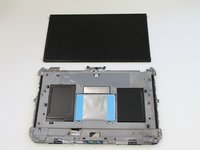
      • Separate the cover and the screen.

      • Gently lift the screen out of the cover.

      crwdns2952109:0crwdne2952109:0

      crwdns2917038:0crwdne2917038:0

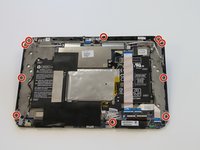
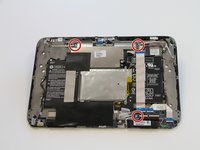
    1. HP Split x2 Screen Replacement, Screen: crwdns2935265:06crwdnd2935265:01crwdnd2935265:02crwdne2935265:0 HP Split x2 Screen Replacement, Screen: crwdns2935265:06crwdnd2935265:02crwdnd2935265:02crwdne2935265:0
      • Use a J0 screwdriver to remove the ten 4mm Phillips screws.

      crwdns2952109:0crwdne2952109:0

      crwdns2917038:0crwdne2917038:0

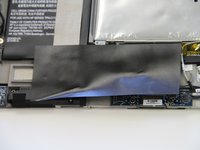
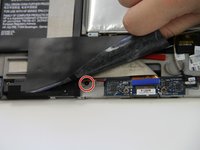
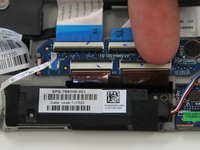
    2. HP Split x2 Screen Replacement: crwdns2935265:07crwdnd2935265:01crwdnd2935265:02crwdne2935265:0 HP Split x2 Screen Replacement: crwdns2935265:07crwdnd2935265:02crwdnd2935265:02crwdne2935265:0
      • Peel back the large black tape.

      • Remove the 4mm Phillips screw.

      crwdns2952109:0crwdne2952109:0

      crwdns2917038:0crwdne2917038:0

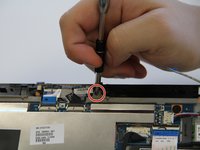
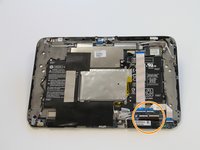
    3. HP Split x2 Screen Replacement: crwdns2935265:08crwdnd2935265:01crwdnd2935265:03crwdne2935265:0 HP Split x2 Screen Replacement: crwdns2935265:08crwdnd2935265:02crwdnd2935265:03crwdne2935265:0 HP Split x2 Screen Replacement: crwdns2935265:08crwdnd2935265:03crwdnd2935265:03crwdne2935265:0
      • Remove three 2 mm zero insertion force (ZIF) connectors. Lift the black tab in front and then remove the ribbon from the rear.

      • Remove two larger zero insertion force (ZIF) connectors. Lift the black tab in front and then remove the ribbon from the rear.

      crwdns2952109:0crwdne2952109:0

      crwdns2917038:0crwdne2917038:0

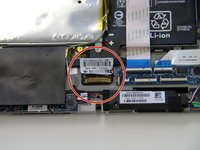
    4. HP Split x2 Screen Replacement: crwdns2935265:09crwdnd2935265:01crwdnd2935265:03crwdne2935265:0 HP Split x2 Screen Replacement: crwdns2935265:09crwdnd2935265:02crwdnd2935265:03crwdne2935265:0 HP Split x2 Screen Replacement: crwdns2935265:09crwdnd2935265:03crwdnd2935265:03crwdne2935265:0
      crwdns2935267:0crwdne2935267:0
      Tweezers
      $4.99
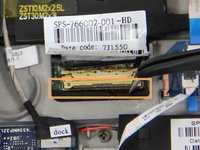
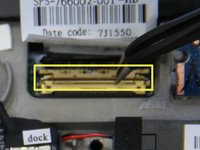
      • The last attachment to the screen is the bronze colored display cable connector.

      • Use a pair of tweezers to lift the metal bar and swing it to the other side on top of the cable.

      • Pull in the direction of the cable to remove the connector.

      crwdns2952109:0crwdne2952109:0

      crwdns2917038:0crwdne2917038:0

    5. HP Split x2 Screen Replacement: crwdns2935265:010crwdnd2935265:01crwdnd2935265:01crwdne2935265:0
      • Glue is holding the device together along the edges. The glue is can be very strong. A heat gun may be required to loosen the glue for removal of the digitizer to prevent damage to the screen.

      • Apply pressure to to the sides of the tablet.

      • Separate the digitizer from the the body of the tablet.

      crwdns2952109:0crwdne2952109:0

      crwdns2917038:0crwdne2917038:0

    6. HP Split x2 Screen Replacement: crwdns2935265:011crwdnd2935265:01crwdnd2935265:02crwdne2935265:0 HP Split x2 Screen Replacement: crwdns2935265:011crwdnd2935265:02crwdnd2935265:02crwdne2935265:0
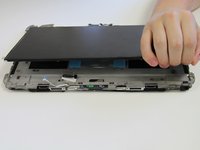
      • Glue is holding the screen on at the four corners.

      • Lift the screen up, breaking any adhesion forced by the glue.

      • Replace the old screen with a new one.

      crwdns2952109:0crwdne2952109:0

      crwdns2917038:0crwdne2917038:0

crwdns2915888:0crwdne2915888:0

To reassemble your device, follow these instructions in reverse order.

crwdns2935221:0crwdne2935221:0

crwdns2935229:011crwdne2935229:0

Ricky Huitema

crwdns2935283:009/24/15crwdne2935283:0

464 crwdns2915208:0crwdne2915208:0

crwdns2935297:02crwdne2935297:0

crwdns2935287:0crwdne2935287:0

Texas Tech, Team 22-5, Rauch Fall 2015 crwdns2935289:0Texas Tech, Team 22-5, Rauch Fall 2015crwdne2935289:0

TTU-RAUCH-F15S22G5

crwdns2931471:03crwdne2931471:0

crwdns2935297:024crwdne2935297:0

crwdns2947412:05crwdne2947412:0

This is not helpful because the one I am working on has no screws.

Matt Brown - crwdns2934203:0crwdne2934203:0 crwdns2950251:0crwdne2950251:0

I also have a Split x2 with no screws

dbmacaulay - crwdns2934203:0crwdne2934203:0 crwdns2950251:0crwdne2950251:0

I want change my screen because My screen is broken but I do not know , where I can buy my screen

Nohora Chitiva - crwdns2934203:0crwdne2934203:0 crwdns2950251:0crwdne2950251:0

Is HP Touch Screen Digitizer Glass for HP Split X2 The same as the screen being replaced here?? I need to know

Nwatu Chineme Edger - crwdns2934203:0crwdne2934203:0 crwdns2950251:0crwdne2950251:0

crwdns2917038:0crwdne2917038:0

crwdns2936625:0crwdne2936625:0:

crwdns2936751:024crwdne2936751:0 11

crwdns2936753:07crwdne2936753:0 30

crwdns2936753:030crwdne2936753:0 59

crwdns2942667:0crwdne2942667:0 14,152