crwdns2933423:0crwdne2933423:0
crwdns2947577:0crwdnd2947577:0crwdne2947577:0

HP ProBook 4520s Optical Drive Replacement

crwdns2942213:0crwdne2942213:0

    1. HP ProBook 4520s Optical Drive Replacement, Battery: crwdns2935265:01crwdnd2935265:01crwdnd2935265:02crwdne2935265:0 HP ProBook 4520s Optical Drive Replacement, Battery: crwdns2935265:01crwdnd2935265:02crwdnd2935265:02crwdne2935265:0
      • Flip the 4520s upside-down with the front toward you.

      • Push the two latches below the battery inwards at the same time.

      crwdns2952109:0crwdne2952109:0

      crwdns2917038:0crwdne2917038:0

    2. HP ProBook 4520s Optical Drive Replacement: crwdns2935265:02crwdnd2935265:01crwdnd2935265:01crwdne2935265:0
      • Remove the battery by holding the latches and sliding the battery away from you.

      crwdns2952109:0crwdne2952109:0

      crwdns2917038:0crwdne2917038:0

    1. HP ProBook 4520s Optical Drive Replacement, Switch Cover: crwdns2935265:03crwdnd2935265:01crwdnd2935265:02crwdne2935265:0 HP ProBook 4520s Optical Drive Replacement, Switch Cover: crwdns2935265:03crwdnd2935265:02crwdnd2935265:02crwdne2935265:0
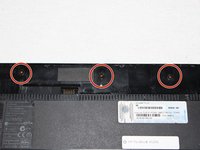
      • Use a Phillips #1 screwdriver to remove three 2mm screws where the battery was located.

      crwdns2952109:0crwdne2952109:0

      crwdns2917038:0crwdne2917038:0

    2. HP ProBook 4520s Optical Drive Replacement: crwdns2935265:04crwdnd2935265:01crwdnd2935265:02crwdne2935265:0 HP ProBook 4520s Optical Drive Replacement: crwdns2935265:04crwdnd2935265:02crwdnd2935265:02crwdne2935265:0
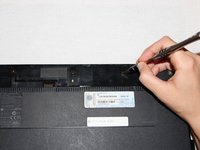
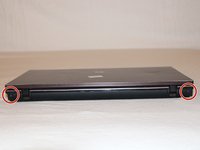
      • Flip the 4520s over and rotate it so the back is facing you.

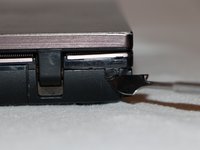
      • Use a metal spudger to peel off two rubber caps located on either side of the battery port.

      crwdns2952109:0crwdne2952109:0

      crwdns2917038:0crwdne2917038:0

    3. HP ProBook 4520s Optical Drive Replacement: crwdns2935265:05crwdnd2935265:01crwdnd2935265:01crwdne2935265:0
      • Use a Phillips #1 screwdriver to remove the 3mm screws behind the caps.

      crwdns2952109:0crwdne2952109:0

      crwdns2917038:0crwdne2917038:0

    4. HP ProBook 4520s Optical Drive Replacement: crwdns2935265:06crwdnd2935265:01crwdnd2935265:03crwdne2935265:0 HP ProBook 4520s Optical Drive Replacement: crwdns2935265:06crwdnd2935265:02crwdnd2935265:03crwdne2935265:0 HP ProBook 4520s Optical Drive Replacement: crwdns2935265:06crwdnd2935265:03crwdnd2935265:03crwdne2935265:0
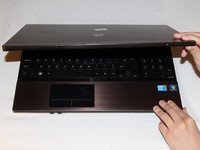
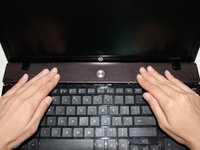
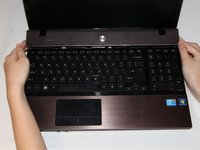
      • Rotate the 4520s and then open it with the screen facing you.

      • The switch cover is located above the keyboard. Push the switch cover away from you until it comes loose from the 4520s.

      • Lift the switch cover away from the 4520s and set it aside.

      crwdns2952109:0crwdne2952109:0

      crwdns2917038:0crwdne2917038:0

    1. HP ProBook 4520s Optical Drive Replacement, Keyboard: crwdns2935265:07crwdnd2935265:01crwdnd2935265:02crwdne2935265:0 HP ProBook 4520s Optical Drive Replacement, Keyboard: crwdns2935265:07crwdnd2935265:02crwdnd2935265:02crwdne2935265:0
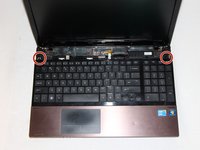
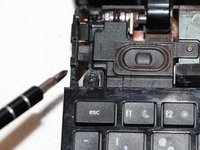
      • Use a Phillips #1 screwdriver to remove the two 7mm screws located on either side of the keyboard panel.

      crwdns2952109:0crwdne2952109:0

      crwdns2917038:0crwdne2917038:0

    2. HP ProBook 4520s Optical Drive Replacement: crwdns2935265:08crwdnd2935265:01crwdnd2935265:01crwdne2935265:0
      • Slide the keyboard panel away from you to free it from the 4520s.

      • Do not yank the keyboard panel away from the 4520s. This may damage the cable.

      crwdns2952109:0crwdne2952109:0

      crwdns2917038:0crwdne2917038:0

    3. HP ProBook 4520s Optical Drive Replacement: crwdns2935265:09crwdnd2935265:01crwdnd2935265:02crwdne2935265:0 HP ProBook 4520s Optical Drive Replacement: crwdns2935265:09crwdnd2935265:02crwdnd2935265:02crwdne2935265:0
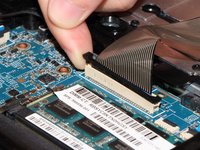
      • Gently raise up the keyboard and flip it over to reveal a ribbon cable.

      • Release the ribbon cable by carefully lifting the black tab upwards, one side at a time.

      • Remove the cable and lift the keyboard panel up. Set it aside.

      • When reassembling, feed the ribbon cable into the port. Press down on the tab to pinch the cable in place.

      crwdns2952109:0crwdne2952109:0

      crwdns2917038:0crwdne2917038:0

    1. HP ProBook 4520s Optical Drive Replacement, Optical Drive: crwdns2935265:010crwdnd2935265:01crwdnd2935265:02crwdne2935265:0 HP ProBook 4520s Optical Drive Replacement, Optical Drive: crwdns2935265:010crwdnd2935265:02crwdnd2935265:02crwdne2935265:0
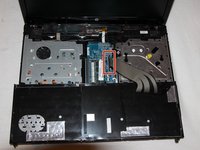
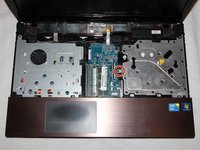
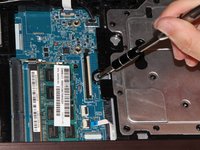
      • The housing for the optical drive is on the right of the device.

      • Remove the 5mm screw on the left side of the metal plate with a Phillips (PH1) head screwdriver.

      crwdns2952109:0crwdne2952109:0

      crwdns2917038:0crwdne2917038:0

    2. HP ProBook 4520s Optical Drive Replacement: crwdns2935265:011crwdnd2935265:01crwdnd2935265:01crwdne2935265:0
      • Use a metal spudger to push the optical drive to the right and partially out of the casing.

      crwdns2952109:0crwdne2952109:0

      crwdns2917038:0crwdne2917038:0

    3. HP ProBook 4520s Optical Drive Replacement: crwdns2935265:012crwdnd2935265:01crwdnd2935265:01crwdne2935265:0
      • Slide the optical drive outward from the 4520s.

      crwdns2952109:0crwdne2952109:0

      crwdns2917038:0crwdne2917038:0

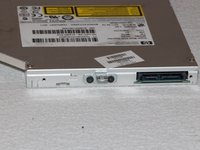
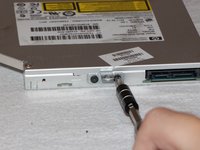
    4. HP ProBook 4520s Optical Drive Replacement: crwdns2935265:013crwdnd2935265:01crwdnd2935265:02crwdne2935265:0 HP ProBook 4520s Optical Drive Replacement: crwdns2935265:013crwdnd2935265:02crwdnd2935265:02crwdne2935265:0
      • Use a Phillips (PH1) head screwdriver to remove two 2mm screws securing the metal tab to the optical drive.

      crwdns2952109:0crwdne2952109:0

      crwdns2917038:0crwdne2917038:0

crwdns2915888:0crwdne2915888:0

To reassemble your device, follow these instructions in reverse order.

crwdns2935221:0crwdne2935221:0

Nicholas Caruso

crwdns2935283:009/21/16crwdne2935283:0

326 crwdns2915208:0crwdne2915208:0

crwdns2935295:0crwdne2935295:0

crwdns2935287:0crwdne2935287:0

UC Davis, Team 1-3, Oliver Fall 2016 crwdns2935289:0UC Davis, Team 1-3, Oliver Fall 2016crwdne2935289:0

UCD-OLIVER-F16S1G3

crwdns2931471:05crwdne2931471:0

crwdns2935297:015crwdne2935297:0

crwdns2947412:00crwdne2947412:0

crwdns2917038:0crwdne2917038:0

crwdns2936625:0crwdne2936625:0:

crwdns2936751:024crwdne2936751:0 1

crwdns2936753:07crwdne2936753:0 16

crwdns2936753:030crwdne2936753:0 34

crwdns2942667:0crwdne2942667:0 2,882