crwdns2933423:0crwdne2933423:0
crwdns2947577:0crwdnd2947577:0crwdne2947577:0

HP Pavilion G60-235DX Screen Replacement

crwdns2942213:0crwdne2942213:0

  1. HP Pavilion G60-235DX Screen Replacement, Keyboard: crwdns2935265:01crwdnd2935265:01crwdnd2935265:02crwdne2935265:0 HP Pavilion G60-235DX Screen Replacement, Keyboard: crwdns2935265:01crwdnd2935265:02crwdnd2935265:02crwdne2935265:0
    • Please turn the power of your device off. If not, it may cause a damage to the computer's hard drive and the person.

    • Slide the lock to remove the battery

    • After removing the battery, you can find 8 screws where battery were placed. Unscrew those 8 screws.

    crwdns2952109:0crwdne2952109:0
  2. HP Pavilion G60-235DX Screen Replacement: crwdns2935265:02crwdnd2935265:01crwdnd2935265:03crwdne2935265:0 HP Pavilion G60-235DX Screen Replacement: crwdns2935265:02crwdnd2935265:02crwdnd2935265:03crwdne2935265:0 HP Pavilion G60-235DX Screen Replacement: crwdns2935265:02crwdnd2935265:03crwdnd2935265:03crwdne2935265:0
    • Do not force if the frame is not coming out. It may break the clip of the frame.

    • After the screws from battery house are removed, open the laptop to remove the keyboard frame.

    • Approach the frame on the side by using the prying tool. Carefully remove the clip. Watch out not to break the clip.

    • Then use the prying tool to carefully remove the frame from the top. Be careful not to break the clip.

    • Then, press the button located top of the touch pad to completely remove the frame from the bottom of the frame.

    crwdns2952109:0crwdne2952109:0
  3. HP Pavilion G60-235DX Screen Replacement: crwdns2935265:03crwdnd2935265:01crwdnd2935265:01crwdne2935265:0
    • When the frame is removed, keyboard will be free to be removed. There is cable ribbon to be removed. Gently pull out the ribbon from where it is plugged.

    • The keyboard is now detached from the computer.

    crwdns2952109:0crwdne2952109:0
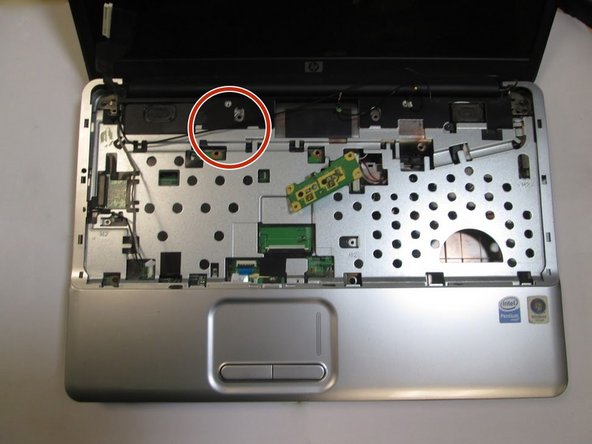
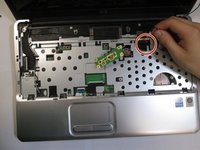
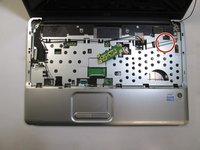
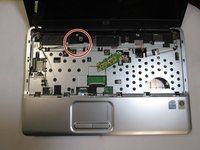
  4. HP Pavilion G60-235DX Screen Replacement, Screen: crwdns2935265:04crwdnd2935265:01crwdnd2935265:03crwdne2935265:0 HP Pavilion G60-235DX Screen Replacement, Screen: crwdns2935265:04crwdnd2935265:02crwdnd2935265:03crwdne2935265:0 HP Pavilion G60-235DX Screen Replacement, Screen: crwdns2935265:04crwdnd2935265:03crwdnd2935265:03crwdne2935265:0
    • Unplug two wires by gently pulling it out.

    • Then remove two wires from the clip that was holding the wire in place.

    crwdns2952109:0crwdne2952109:0
  5. HP Pavilion G60-235DX Screen Replacement: crwdns2935265:05crwdnd2935265:01crwdnd2935265:01crwdne2935265:0
    • Remove the covered cable ribbon that is located at the left side of the computer.

    crwdns2952109:0crwdne2952109:0
  6. HP Pavilion G60-235DX Screen Replacement: crwdns2935265:06crwdnd2935265:01crwdnd2935265:01crwdne2935265:0
    • Gently pull the smaller wire from its clip. Please do not pull the wire by holding the wire itself. Use the plastic cover to pull.

    crwdns2952109:0crwdne2952109:0
  7. HP Pavilion G60-235DX Screen Replacement: crwdns2935265:07crwdnd2935265:01crwdnd2935265:01crwdne2935265:0
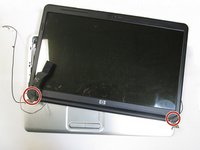
    • There are 3 screws holding the screen from laptop each side. Unscrew every screw for each side.

    • Then gently pull out the screen from its place. Be sure not to force it out.

    crwdns2952109:0crwdne2952109:0
  8. HP Pavilion G60-235DX Screen Replacement: crwdns2935265:08crwdnd2935265:01crwdnd2935265:02crwdne2935265:0 HP Pavilion G60-235DX Screen Replacement: crwdns2935265:08crwdnd2935265:02crwdnd2935265:02crwdne2935265:0
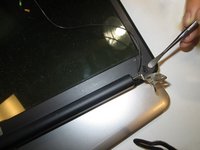
    • Use the spudger to remove the rubber sticker located at the bottom of each side of the screen.

    • Unscrew the the screws from each side.

    crwdns2952109:0crwdne2952109:0
  9. HP Pavilion G60-235DX Screen Replacement: crwdns2935265:09crwdnd2935265:01crwdnd2935265:01crwdne2935265:0
    • Firmly pry the front screen cover off. Slide the prying tool around the front screen. Please be careful not to destroy the clip. It will destroy the entire screen.

    crwdns2952109:0crwdne2952109:0
  10. HP Pavilion G60-235DX Screen Replacement: crwdns2935265:010crwdnd2935265:01crwdnd2935265:01crwdne2935265:0
    • Be careful when moving the screen, you may damage the monitor and webcam cable.

    • Remove the screen from its house.

    • Gently disconnect the webcam cable from the monitor which locate at the back of the laptop.

    crwdns2952109:0crwdne2952109:0
  11. HP Pavilion G60-235DX Screen Replacement: crwdns2935265:011crwdnd2935265:01crwdnd2935265:01crwdne2935265:0
    • Remove four screws from the side.

    crwdns2952109:0crwdne2952109:0
crwdns2915888:0crwdne2915888:0

To reassemble your device, follow these instructions in reverse order.

crwdns2935227:0crwdne2935227:0

Gilbert Han

crwdns2935283:001/24/17crwdne2935283:0

241 crwdns2915208:0crwdne2915208:0

crwdns2935297:02crwdne2935297:0

crwdns2935287:0crwdne2935287:0

Cal Poly, Team 10-5, Banghart Winter 2017 crwdns2935289:0Cal Poly, Team 10-5, Banghart Winter 2017crwdne2935289:0

CPSU-BANGHART-W17S10G5

crwdns2931471:03crwdne2931471:0

crwdns2935297:05crwdne2935297:0

crwdns2947410:01crwdne2947410:0

Thanks helping me me out. left 1 key screw stuck.

Keyboard wudnt come out SUPRISE SUPRISE!. very kind of to help.

tali9 - crwdns2934203:0crwdne2934203:0 crwdns2950251:0crwdne2950251:0

crwdns2917038:0crwdne2917038:0

crwdns2936625:0crwdne2936625:0:

crwdns2936751:024crwdne2936751:0 1

crwdns2936753:07crwdne2936753:0 4

crwdns2936753:030crwdne2936753:0 38

crwdns2942667:0crwdne2942667:0 1,084