crwdns2933423:0crwdne2933423:0
crwdns2947577:0crwdnd2947577:0crwdne2947577:0

HP Pavilion DV3 RAM Replacement

crwdns2869540:0crwdne2869540:0: 2.6천

crwdns2959988:0crwdne2959988:0

crwdns2959990:0crwdne2959990:0
4
crwdns2959992:0crwdne2959992:0
19
crwdns2959994:0crwdne2959994:0
87
crwdns2959996:0crwdne2959996:0
2,614
crwdns2955950:0crwdne2955950:0: 0

crwdns2959998:0crwdne2959998:0

crwdns2960000:0crwdne2960000:0
crwdns2959984:0crwdne2959984:0: 2

crwdns2959974:02crwdne2959974:0

crwdns2959986:0crwdne2959986:0: 4

crwdns2959982:04crwdne2959982:0

crwdns2955944:0crwdne2955944:0: crwdns2931287:010crwdne2931287:0
crwdns2955970:0crwdne2955970:0: crwdns2937799:0crwdne2937799:0
crwdns2862611:0crwdne2862611:0

crwdns2862612:0crwdne2862612:0

HP Pavilion DV3 RAM Replacement

crwdns2915892:0crwdne2915892:0

crwdns2959928:0crwdne2959928:0 ↓

This guide instructs you how to remove the RAM. You will need the screwdriver listed in the tools section.

crwdns2959930:0crwdne2959930:0

crwdns2943215:0crwdne2943215:0

    1. HP Pavilion DV3 RAM Replacement, Battery: crwdns2935265:01crwdnd2935265:01crwdnd2935265:01crwdne2935265:0
      • Step 1 – Battery: Locate the battery release slider on the bottom of the laptop and move it in the direction of the arrow to the unlock position.

      • The yellow highlighted edge of the battery should pop up slightly when the switch is moved

      crwdns2952109:0crwdne2952109:0

      crwdns2917038:0crwdne2917038:0

    2. HP Pavilion DV3 RAM Replacement: crwdns2935265:02crwdnd2935265:01crwdnd2935265:02crwdne2935265:0 HP Pavilion DV3 RAM Replacement: crwdns2935265:02crwdnd2935265:02crwdnd2935265:02crwdne2935265:0
      • Step 2: Using the edge of the battery that has popped up, lift the battery out of the computer.

      crwdns2952109:0crwdne2952109:0

      crwdns2917038:0crwdne2917038:0

    1. HP Pavilion DV3 RAM Replacement, RAM: crwdns2935265:03crwdnd2935265:01crwdnd2935265:03crwdne2935265:0 HP Pavilion DV3 RAM Replacement, RAM: crwdns2935265:03crwdnd2935265:02crwdnd2935265:03crwdne2935265:0 HP Pavilion DV3 RAM Replacement, RAM: crwdns2935265:03crwdnd2935265:03crwdnd2935265:03crwdne2935265:0
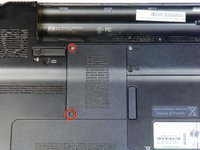
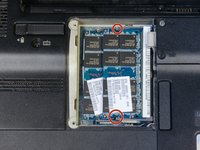
      • Remove the two 3.5 mm diameter head and 7 mm long screws using the Philips PH1 screwdriver.

      • Both screws will remain attached to the cover.

      • Set the cover with attached screws to the side.

      • The RAM will now be exposed

      crwdns2952109:0crwdne2952109:0

      crwdns2917038:0crwdne2917038:0

    2. HP Pavilion DV3 RAM Replacement: crwdns2935265:04crwdnd2935265:01crwdnd2935265:03crwdne2935265:0 HP Pavilion DV3 RAM Replacement: crwdns2935265:04crwdnd2935265:02crwdnd2935265:03crwdne2935265:0 HP Pavilion DV3 RAM Replacement: crwdns2935265:04crwdnd2935265:03crwdnd2935265:03crwdne2935265:0
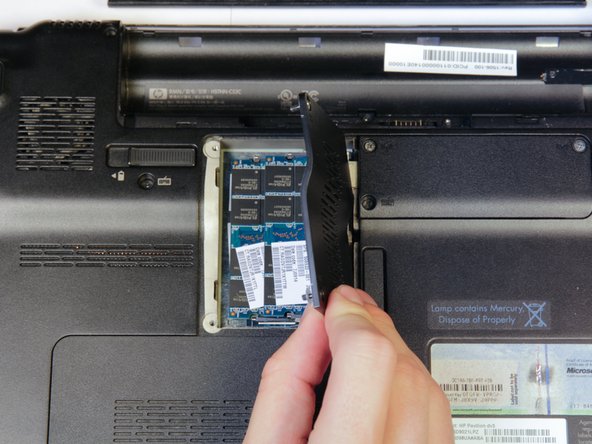
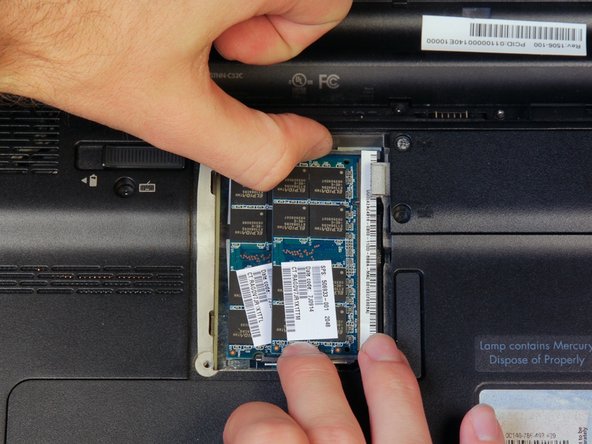
      • Find the two clips located on each side of the RAM.

      • Using both hands, simultaneously grab each clip and open them away from the RAM stick.

      • The RAM will pop up.

      crwdns2952109:0crwdne2952109:0

      crwdns2917038:0crwdne2917038:0

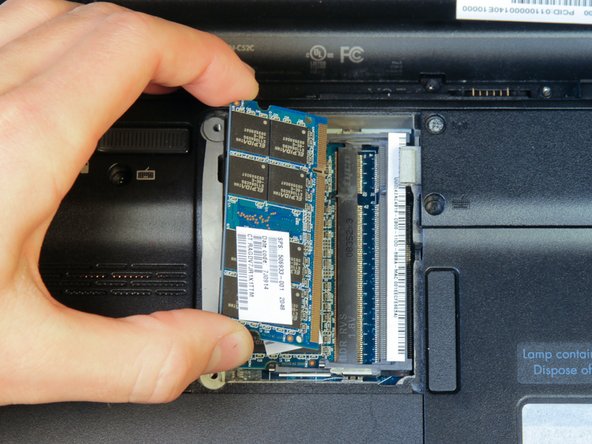
    3. HP Pavilion DV3 RAM Replacement: crwdns2935265:05crwdnd2935265:01crwdnd2935265:02crwdne2935265:0 HP Pavilion DV3 RAM Replacement: crwdns2935265:05crwdnd2935265:02crwdnd2935265:02crwdne2935265:0
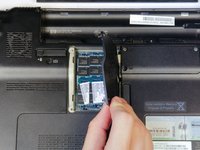
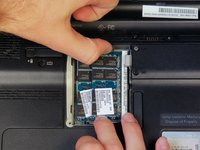
      • Using one hand, pull the RAM up and to the left to remove it.

      crwdns2952109:0crwdne2952109:0

      crwdns2917038:0crwdne2917038:0

    4. HP Pavilion DV3 RAM Replacement: crwdns2935265:06crwdnd2935265:01crwdnd2935265:01crwdne2935265:0
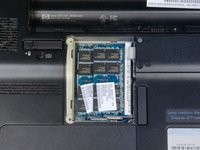
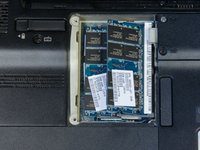
      • If there is a second RAM module present (as shown), repeat steps 2 and 3 to remove it.

      crwdns2952109:0crwdne2952109:0

      crwdns2917038:0crwdne2917038:0

crwdns2915888:0crwdne2915888:0

To reassemble your device, follow these instructions in reverse order.

crwdns2935221:0crwdne2935221:0

crwdns2935229:02crwdne2935229:0

crwdns2862417:0crwdne2862417:0

crwdns2935293:0crwdne2935293:0

Brandon Baldovin

crwdns2935283:009/30/13crwdne2935283:0

548 crwdns2915208:0crwdne2915208:0

crwdns2935297:03crwdne2935297:0

crwdns2935287:0crwdne2935287:0

Cal Poly, Team 14-10, Forte Fall 2013 crwdns2935289:0Cal Poly, Team 14-10, Forte Fall 2013crwdne2935289:0

CPSU-FORTE-F13S14G10

crwdns2931471:04crwdne2931471:0

crwdns2935297:060crwdne2935297:0

crwdns2947412:00crwdne2947412:0

crwdns2917038:0crwdne2917038:0

crwdns2936625:0crwdne2936625:0:

crwdns2936751:024crwdne2936751:0 4

crwdns2936753:07crwdne2936753:0 19

crwdns2936753:030crwdne2936753:0 87

crwdns2959996:0crwdne2959996:0 2,614