crwdns2933423:0crwdne2933423:0
crwdns2947577:0crwdnd2947577:0crwdne2947577:0

HP Pavilion DV3 Hard Drive Replacement

crwdns2942213:0crwdne2942213:0

    1. HP Pavilion DV3 Hard Drive Replacement, Battery: crwdns2935265:01crwdnd2935265:01crwdnd2935265:01crwdne2935265:0
      • Step 1 – Battery: Locate the battery release slider on the bottom of the laptop and move it in the direction of the arrow to the unlock position.

      • The yellow highlighted edge of the battery should pop up slightly when the switch is moved

      crwdns2952109:0crwdne2952109:0

      crwdns2917038:0crwdne2917038:0

    2. HP Pavilion DV3 Hard Drive Replacement: crwdns2935265:02crwdnd2935265:01crwdnd2935265:02crwdne2935265:0 HP Pavilion DV3 Hard Drive Replacement: crwdns2935265:02crwdnd2935265:02crwdnd2935265:02crwdne2935265:0
      • Step 2: Using the edge of the battery that has popped up, lift the battery out of the computer.

      crwdns2952109:0crwdne2952109:0

      crwdns2917038:0crwdne2917038:0

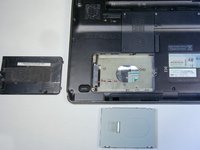
    1. HP Pavilion DV3 Hard Drive Replacement, Hard Drive: crwdns2935265:03crwdnd2935265:01crwdnd2935265:01crwdne2935265:0
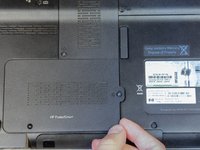
      • Locate the screw for the hard drive cover (The cover has HP ProtectSmart written on it).

      • Remove the 3.5 mm diameter, 7 mm long screw with your Phillips PH1 screwdriver.

      • The screw will remain attached to the cover.

      crwdns2952109:0crwdne2952109:0

      crwdns2917038:0crwdne2917038:0

    2. HP Pavilion DV3 Hard Drive Replacement: crwdns2935265:04crwdnd2935265:01crwdnd2935265:02crwdne2935265:0 HP Pavilion DV3 Hard Drive Replacement: crwdns2935265:04crwdnd2935265:02crwdnd2935265:02crwdne2935265:0
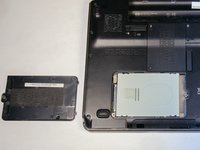
      • Grab the raised edge of the cover lift up. This will separate the cover from the laptop.

      • Put the cover and screw to the.

      • This will reveal the hard drive.

      crwdns2952109:0crwdne2952109:0

      crwdns2917038:0crwdne2917038:0

    3. HP Pavilion DV3 Hard Drive Replacement: crwdns2935265:05crwdnd2935265:01crwdnd2935265:03crwdne2935265:0 HP Pavilion DV3 Hard Drive Replacement: crwdns2935265:05crwdnd2935265:02crwdnd2935265:03crwdne2935265:0 HP Pavilion DV3 Hard Drive Replacement: crwdns2935265:05crwdnd2935265:03crwdnd2935265:03crwdne2935265:0
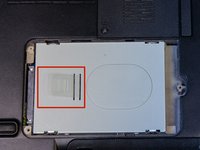
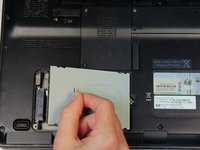
      • With your fingers, grab the clear tab.

      • Pull right first, and then upwards (towards you).

      • The hard drive should slide out of place and detach from the laptop.

      crwdns2952109:0crwdne2952109:0

      crwdns2917038:0crwdne2917038:0

crwdns2915888:0crwdne2915888:0

To reassemble your device, follow these instructions in reverse order.

crwdns2935221:0crwdne2935221:0

crwdns2935229:05crwdne2935229:0

Luke Whitmarsh

crwdns2935283:009/30/13crwdne2935283:0

649 crwdns2915208:0crwdne2915208:0

crwdns2935297:02crwdne2935297:0

crwdns2935287:0crwdne2935287:0

Cal Poly, Team 14-10, Forte Fall 2013 crwdns2935289:0Cal Poly, Team 14-10, Forte Fall 2013crwdne2935289:0

CPSU-FORTE-F13S14G10

crwdns2931471:04crwdne2931471:0

crwdns2935297:030crwdne2935297:0

crwdns2947412:00crwdne2947412:0

crwdns2917038:0crwdne2917038:0

crwdns2936625:0crwdne2936625:0:

crwdns2936751:024crwdne2936751:0 0

crwdns2936753:07crwdne2936753:0 6

crwdns2936753:030crwdne2936753:0 36

crwdns2942667:0crwdne2942667:0 5,433