crwdns2933423:0crwdne2933423:0
crwdns2947577:0crwdnd2947577:0crwdne2947577:0

HP Pavilion 15-cd040wm Screen Replacement

crwdns2942213:0crwdne2942213:0

    1. HP Pavilion 15-cd040wm Screen Replacement, HP Pavilion 15-cd040wm Back Cover Disassembly: crwdns2935265:01crwdnd2935265:01crwdnd2935265:02crwdne2935265:0 HP Pavilion 15-cd040wm Screen Replacement, HP Pavilion 15-cd040wm Back Cover Disassembly: crwdns2935265:01crwdnd2935265:02crwdnd2935265:02crwdne2935265:0
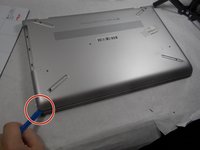
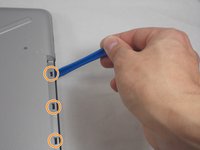
      • The first step is to remove the four rubber non-slip pads on the bottom of the laptop to expose screws hidden underneath them. Peel off each tab with your fingers.

      • If you have trouble gripping a tab, use a spudger to wedge it loose.

      crwdns2952109:0crwdne2952109:0

      crwdns2917038:0crwdne2917038:0

    2. HP Pavilion 15-cd040wm Screen Replacement: crwdns2935265:02crwdnd2935265:01crwdnd2935265:02crwdne2935265:0 HP Pavilion 15-cd040wm Screen Replacement: crwdns2935265:02crwdnd2935265:02crwdnd2935265:02crwdne2935265:0
      • 3x 10mm Phillips scews

      • 2x 5mm Phillips screws

      • 6x 6mm Phillips screws

      • Remove all screws using a size Phillips #0 screwdriver.

      crwdns2952109:0crwdne2952109:0

      crwdns2917038:0crwdne2917038:0

    3. HP Pavilion 15-cd040wm Screen Replacement: crwdns2935265:03crwdnd2935265:01crwdnd2935265:03crwdne2935265:0 HP Pavilion 15-cd040wm Screen Replacement: crwdns2935265:03crwdnd2935265:02crwdnd2935265:03crwdne2935265:0 HP Pavilion 15-cd040wm Screen Replacement: crwdns2935265:03crwdnd2935265:03crwdnd2935265:03crwdne2935265:0
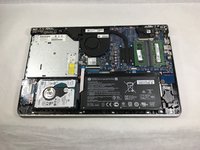
      • Using the iFixit opening tool, carefully pry along the sides of the back cover.

      • After all of the edges of the back cover have been freed, use your opening tool to carefully unclip the tabs holding the back cover to the CD drive.

      • After everything is unclipped, you can safely remove the back cover from the rest of the device.

      crwdns2952109:0crwdne2952109:0

      crwdns2917038:0crwdne2917038:0

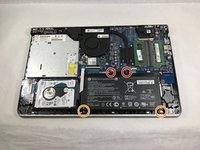
    1. HP Pavilion 15-cd040wm Screen Replacement, Battery: crwdns2935265:04crwdnd2935265:01crwdnd2935265:02crwdne2935265:0 HP Pavilion 15-cd040wm Screen Replacement, Battery: crwdns2935265:04crwdnd2935265:02crwdnd2935265:02crwdne2935265:0
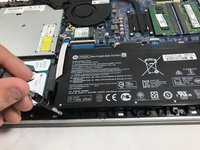
      • 2x 5mm Philips screws

      • 2x 3mm Philips screws

      • Remove all screws using a size Phillips #0 screwdriver.

      crwdns2952109:0crwdne2952109:0

      crwdns2917038:0crwdne2917038:0

    2. HP Pavilion 15-cd040wm Screen Replacement: crwdns2935265:05crwdnd2935265:01crwdnd2935265:02crwdne2935265:0 HP Pavilion 15-cd040wm Screen Replacement: crwdns2935265:05crwdnd2935265:02crwdnd2935265:02crwdne2935265:0
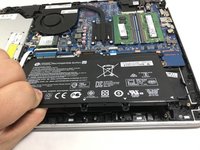
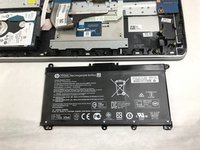
      • Gently pull up on the battery and tilt it away from the rest of the laptop chassis.

      • Pull out the battery at an angle and lift it out of the laptop.

      crwdns2952109:0crwdne2952109:0

      crwdns2917038:0crwdne2917038:0

    1. HP Pavilion 15-cd040wm Screen Replacement, Screen: crwdns2935265:06crwdnd2935265:01crwdnd2935265:03crwdne2935265:0 HP Pavilion 15-cd040wm Screen Replacement, Screen: crwdns2935265:06crwdnd2935265:02crwdnd2935265:03crwdne2935265:0 HP Pavilion 15-cd040wm Screen Replacement, Screen: crwdns2935265:06crwdnd2935265:03crwdnd2935265:03crwdne2935265:0
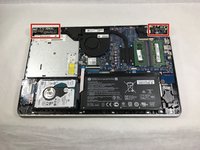
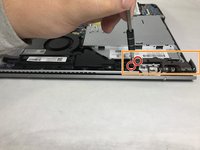
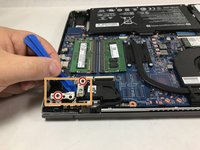
      • Remove the four 6.0 mm screws from the hinges using a size Phillips #0 screwdriver.

      • Use the iFixit opening tool to lift both of the hinges.

      crwdns2952109:0crwdne2952109:0

      crwdns2917038:0crwdne2917038:0

    2. HP Pavilion 15-cd040wm Screen Replacement: crwdns2935265:07crwdnd2935265:01crwdnd2935265:03crwdne2935265:0 HP Pavilion 15-cd040wm Screen Replacement: crwdns2935265:07crwdnd2935265:02crwdnd2935265:03crwdne2935265:0 HP Pavilion 15-cd040wm Screen Replacement: crwdns2935265:07crwdnd2935265:03crwdnd2935265:03crwdne2935265:0
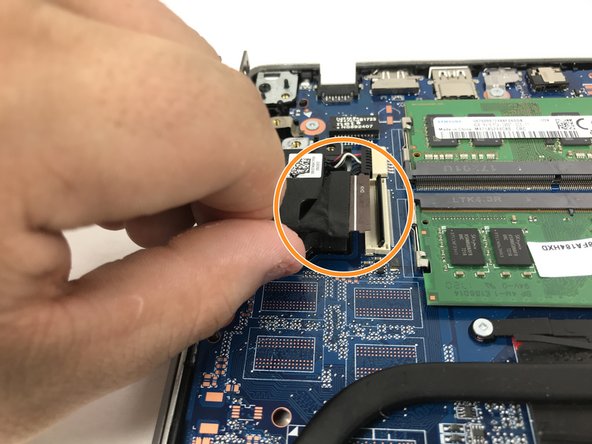
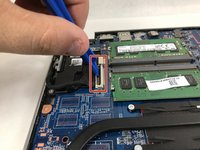
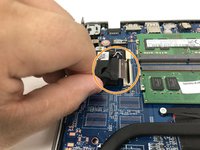
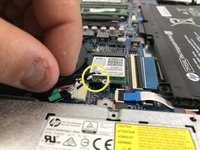
      • Using the spudger or opening tool, remove the ribbon that connects to the screen.

      • Gently pull the ribbon out of the port after using the spudger to lift the supporter up.

      • Carefully remove the two antenna wires that connect to the screen as well. Do this by gently pulling them free from their connectors at the wifi card.

      crwdns2952109:0crwdne2952109:0

      crwdns2917038:0crwdne2917038:0

    3. HP Pavilion 15-cd040wm Screen Replacement: crwdns2935265:08crwdnd2935265:01crwdnd2935265:01crwdne2935265:0
      • Once these steps are completed, you may lift the display assembly free from the rest of the device.

      crwdns2952109:0crwdne2952109:0

      crwdns2917038:0crwdne2917038:0

crwdns2915888:0crwdne2915888:0

To reassemble your device, follow these instructions in reverse order.

crwdns2935221:0crwdne2935221:0

crwdns2935229:02crwdne2935229:0

Zachary Simao

crwdns2935283:003/08/19crwdne2935283:0

423 crwdns2915208:0crwdne2915208:0

crwdns2935297:02crwdne2935297:0

crwdns2935287:0crwdne2935287:0

UMass Dartmouth, Team S1-G1, Botvin Fall 2019 crwdns2935289:0UMass Dartmouth, Team S1-G1, Botvin Fall 2019crwdne2935289:0

UMASSD-BOTVIN-F19S1G1

crwdns2931471:04crwdne2931471:0

crwdns2935297:052crwdne2935297:0

crwdns2947412:00crwdne2947412:0

crwdns2917038:0crwdne2917038:0

crwdns2936625:0crwdne2936625:0:

crwdns2936751:024crwdne2936751:0 0

crwdns2936753:07crwdne2936753:0 4

crwdns2936753:030crwdne2936753:0 29

crwdns2942667:0crwdne2942667:0 1,144