crwdns2915892:0crwdne2915892:0
If your laptop runs slowly or crashes unexpectedly, it may be due to insufficient RAM. The HP Pavilion 15-cd040wm has two RAM modules that can each be upgraded to improve performance.
To access the RAM, you will first need to open your HP Pavilion 15-cd040wm by disassembling its back cover.
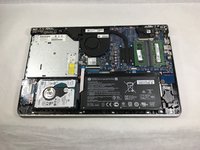
Before beginning, make sure to power off your laptop completely and disconnect it from any external power source. Once the back cover is off, be sure to disconnect the battery from the motherboard to ensure there is no power going to the laptop while it is being worked on.
crwdns2942213:0crwdne2942213:0
-
-
-
The first step is to remove the four rubber non-slip pads on the bottom of the laptop to expose screws hidden underneath them. Peel off each tab with your fingers.
 crwdns2952109:0crwdne2952109:0
-
-
-
3x 10mm Phillips scews
-
2x 5mm Phillips screws
-
6x 6mm Phillips screws
-
Remove all screws using a size Phillips #0 screwdriver.
-
-
-
-
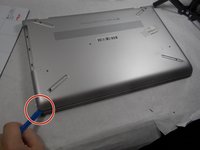
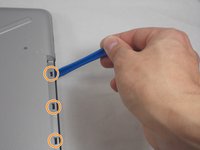
Using the iFixit opening tool, carefully pry along the sides of the back cover.
-
After all of the edges of the back cover have been freed, use your opening tool to carefully unclip the tabs holding the back cover to the CD drive.
-
After everything is unclipped, you can safely remove the back cover from the rest of the device.
-
-
-
-
-
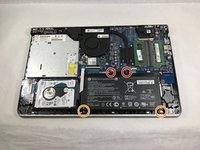
2x 5mm Philips screws
-
2x 3mm Philips screws
-
Remove all screws using a size Phillips #0 screwdriver.
-
-
-
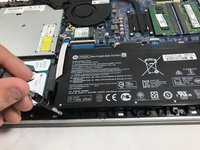
Gently pull up on the battery and tilt it away from the rest of the laptop chassis.
-
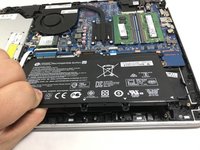
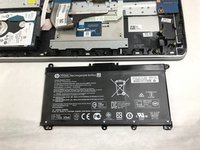
Pull out the battery at an angle and lift it out of the laptop.
-
-
-
-
-
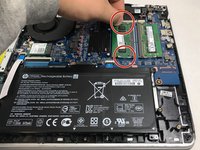
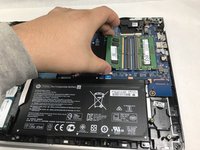
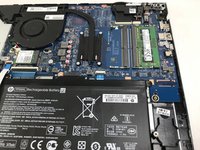
Pull the two tabs at the short ends of the RAM module with your fingers to release it, then pull the RAM module out of the slot.
-
-








To reassemble your device, follow these instructions in reverse order.

crwdns2935287:0crwdne2935287:0

UMass Dartmouth, Team S1-G1, Botvin Fall 2019 crwdns2935289:0UMass Dartmouth, Team S1-G1, Botvin Fall 2019crwdne2935289:0
UMASSD-BOTVIN-F19S1G1
crwdns2931471:04crwdne2931471:0
crwdns2935297:046crwdne2935297:0
