
HP Officejet Pro 8620 Power Button Replacement

crwdns2959932:0crwdnd2959932:0Scottcrwdnd2959932:0crwdnd2959932:0crwdnd2959932:03crwdnd2959932:0crwdne2959932:0
crwdns2959936:0Kul 23, 2018crwdne2959936:0
crwdns2869540:0crwdne2869540:0: 3.3K
crwdns2959988:0crwdne2959988:0
- crwdns2959990:0crwdne2959990:0
- 3
- crwdns2959992:0crwdne2959992:0
- 22
- crwdns2959994:0crwdne2959994:0
- 97
- crwdns2959996:0crwdne2959996:0
- 3,340
crwdns2955950:0crwdne2955950:0: 0
crwdns2959998:0crwdne2959998:0
crwdns2960000:0crwdne2960000:0crwdns2959984:0crwdne2959984:0: 0 1
crwdns2959956:0crwdne2959956:0
crwdns2959968:01crwdne2959968:0
crwdns2959986:0crwdne2959986:0: 0 1
crwdns2959958:0crwdne2959958:0
crwdns2959976:01crwdne2959976:0
crwdns2915892:0crwdne2915892:0
crwdns2959928:0crwdne2959928:0 ↓The button can get stuck or break completely. This guide will show how to remove the button from the printer.
crwdns2959930:0crwdne2959930:0
crwdns2943215:0crwdne2943215:0

-
-
-
Locate the power button on the bottom left side of the device.
-
Wedge the opening tool into the small gap between the power button panel and printer.
-
Apply pressure on the opening tool and open the power button panel.
-
Gently remove the power button panel assembly from the printer to access the power button.
 crwdns2952109:0crwdne2952109:0
-
-
-
-
Press on the power button from the front of the panel to release it.
-
-
-
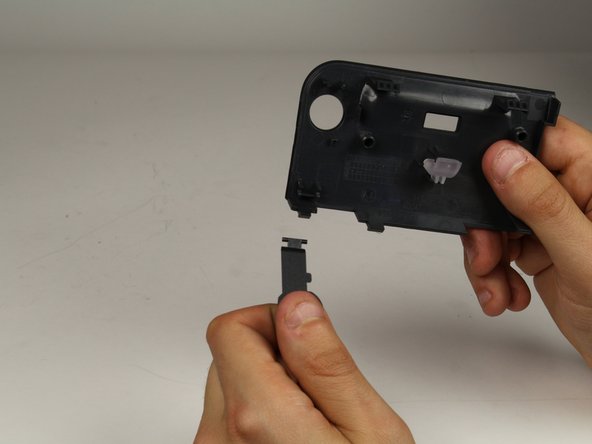
Turn the panel around so you are viewing the back of it.
-
Disconnect the power button from the panel by gently pulling the button out (toward your body).
-
-


To reassemble your device, follow these instructions in reverse order.

crwdns2935287:0crwdne2935287:0

Cal Poly, Team S19-G2, Livingston Spring 2018 crwdns2935289:0Cal Poly, Team S19-G2, Livingston Spring 2018crwdne2935289:0
CPSU-LIVINGSTON-S18S19G2
crwdns2934841:01crwdne2934841:0
crwdns2935297:036crwdne2935297:0
