crwdns2933423:0crwdne2933423:0
crwdns2947577:0crwdnd2947577:0crwdne2947577:0

HP Notebook 15-ba018ds Fan Replacement

crwdns2942213:0crwdne2942213:0

    1. HP Notebook 15-ba018ds Fan Replacement, Battery: crwdns2935265:01crwdnd2935265:01crwdnd2935265:01crwdne2935265:0
      • Before beginning, make sure the laptop is completely turned off by pressing the off button and waiting for the screen to turn black.

      • Flip the laptop over so the battery is exposed which will be next to the hinges on the top left and right.

      crwdns2952109:0crwdne2952109:0

      crwdns2917038:0crwdne2917038:0

    2. HP Notebook 15-ba018ds Fan Replacement: crwdns2935265:02crwdnd2935265:01crwdnd2935265:03crwdne2935265:0 HP Notebook 15-ba018ds Fan Replacement: crwdns2935265:02crwdnd2935265:02crwdnd2935265:03crwdne2935265:0 HP Notebook 15-ba018ds Fan Replacement: crwdns2935265:02crwdnd2935265:03crwdnd2935265:03crwdne2935265:0
      • Place your thumbs on the slide locks that are next to the hinges and simultaneously push them toward each other to unlock the battery.

      • While still holding onto the slide locks, push the battery away from the laptop with your index fingers.

      crwdns2952109:0crwdne2952109:0

      crwdns2917038:0crwdne2917038:0

    1. HP Notebook 15-ba018ds Fan Replacement, Fan: crwdns2935265:03crwdnd2935265:01crwdnd2935265:02crwdne2935265:0 HP Notebook 15-ba018ds Fan Replacement, Fan: crwdns2935265:03crwdnd2935265:02crwdnd2935265:02crwdne2935265:0
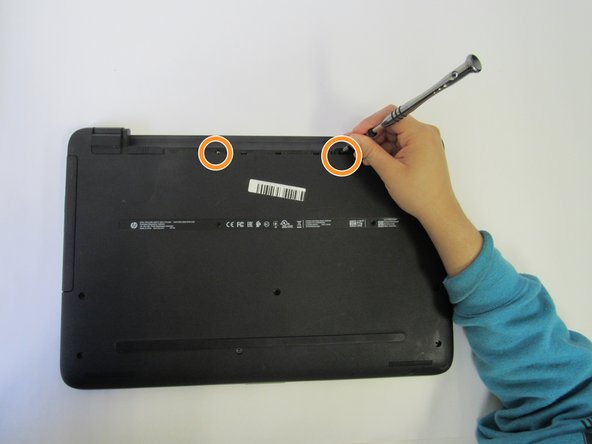
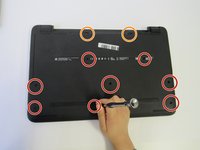
      • Unscrew the 8 screws on the back cover.

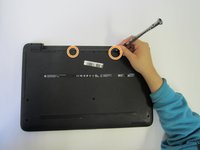
      • There are also two screws in the battery area that need to be removed.

      crwdns2952109:0crwdne2952109:0

      crwdns2917038:0crwdne2917038:0

    2. HP Notebook 15-ba018ds Fan Replacement: crwdns2935265:04crwdnd2935265:01crwdnd2935265:01crwdne2935265:0
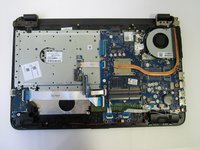
      • Use an opening tool to help remove the back cover.

      • If you look at the side of the laptop, you can see where it can be separated into two parts.

      crwdns2952109:0crwdne2952109:0

      crwdns2917038:0crwdne2917038:0

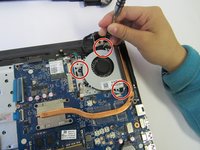
    3. HP Notebook 15-ba018ds Fan Replacement: crwdns2935265:05crwdnd2935265:01crwdnd2935265:02crwdne2935265:0 HP Notebook 15-ba018ds Fan Replacement: crwdns2935265:05crwdnd2935265:02crwdnd2935265:02crwdne2935265:0
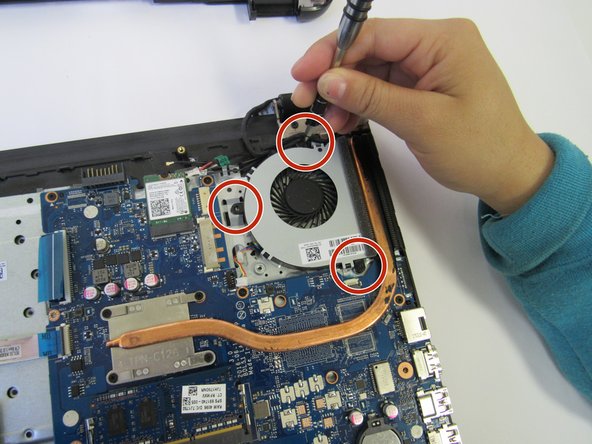
      • Remove the three Phillips head screws attached to the fan.

      crwdns2952109:0crwdne2952109:0

      crwdns2917038:0crwdne2917038:0

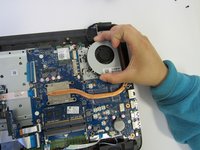
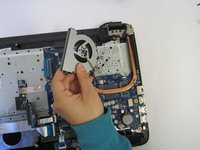
    4. HP Notebook 15-ba018ds Fan Replacement: crwdns2935265:06crwdnd2935265:01crwdnd2935265:02crwdne2935265:0 HP Notebook 15-ba018ds Fan Replacement: crwdns2935265:06crwdnd2935265:02crwdnd2935265:02crwdne2935265:0
      • Remove old fan and replace with a new fan.

      crwdns2952109:0crwdne2952109:0

      crwdns2917038:0crwdne2917038:0

crwdns2915888:0crwdne2915888:0

To reassemble your device, follow these instructions in reverse order.

crwdns2935221:0crwdne2935221:0

crwdns2935227:0crwdne2935227:0

Terrell Bradford

crwdns2935283:009/18/18crwdne2935283:0

443 crwdns2915208:0crwdne2915208:0

crwdns2935297:03crwdne2935297:0

crwdns2935287:0crwdne2935287:0

University of North Texas, Team S3-G2, Raign Fall 2018 crwdns2935289:0University of North Texas, Team S3-G2, Raign Fall 2018crwdne2935289:0

UNT-RAIGN-F18S3G2

crwdns2931471:04crwdne2931471:0

crwdns2935297:04crwdne2935297:0

crwdns2947412:00crwdne2947412:0

crwdns2917038:0crwdne2917038:0

crwdns2936625:0crwdne2936625:0:

crwdns2936751:024crwdne2936751:0 0

crwdns2936753:07crwdne2936753:0 6

crwdns2936753:030crwdne2936753:0 29

crwdns2942667:0crwdne2942667:0 1,607