crwdns2933423:0crwdne2933423:0
crwdns2947577:0crwdnd2947577:0crwdne2947577:0

HP Mini 210-1199DX RAM Replacement

crwdns2942213:0crwdne2942213:0

    1. HP Mini 210-1199DX RAM Replacement, Battery: crwdns2935265:01crwdnd2935265:01crwdnd2935265:02crwdne2935265:0 HP Mini 210-1199DX RAM Replacement, Battery: crwdns2935265:01crwdnd2935265:02crwdnd2935265:02crwdne2935265:0
      • Unplug the netbook.

      • Secure the netbook in a upright position.

      • Slide the plastic battery latch that secures it into the netbook.

      • Keep thumb secure on the right tab as you begin to remove the battery.

      crwdns2952109:0crwdne2952109:0

      crwdns2917038:0crwdne2917038:0

    2. HP Mini 210-1199DX RAM Replacement: crwdns2935265:02crwdnd2935265:01crwdnd2935265:01crwdne2935265:0
      • Remove the battery from the device.

      crwdns2952109:0crwdne2952109:0

      crwdns2917038:0crwdne2917038:0

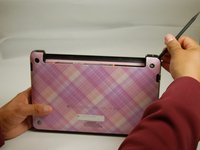
    1. HP Mini 210-1199DX RAM Replacement, Bottom Cover: crwdns2935265:03crwdnd2935265:01crwdnd2935265:01crwdne2935265:0
      • Press down on the two orange buttons to release.

      • If the case does not pop off, begin to use Spudger to pry the case off the back.

      crwdns2952109:0crwdne2952109:0

      crwdns2917038:0crwdne2917038:0

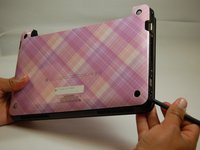
    2. HP Mini 210-1199DX RAM Replacement: crwdns2935265:04crwdnd2935265:01crwdnd2935265:03crwdne2935265:0 HP Mini 210-1199DX RAM Replacement: crwdns2935265:04crwdnd2935265:02crwdnd2935265:03crwdne2935265:0 HP Mini 210-1199DX RAM Replacement: crwdns2935265:04crwdnd2935265:03crwdnd2935265:03crwdne2935265:0
      • Place the spudger on corners and openings in order to begin removal of the back.

      • Continue this on all corner until the case comes fully off of the back.

      crwdns2952109:0crwdne2952109:0

      crwdns2917038:0crwdne2917038:0

    3. HP Mini 210-1199DX RAM Replacement: crwdns2935265:05crwdnd2935265:01crwdnd2935265:01crwdne2935265:0
      • Pull the case off of the device

      crwdns2952109:0crwdne2952109:0

      crwdns2917038:0crwdne2917038:0

    1. HP Mini 210-1199DX RAM Replacement, RAM: crwdns2935265:06crwdnd2935265:01crwdnd2935265:01crwdne2935265:0
      • Locate RAM systems.

      crwdns2952109:0crwdne2952109:0

      crwdns2917038:0crwdne2917038:0

    2. HP Mini 210-1199DX RAM Replacement: crwdns2935265:07crwdnd2935265:01crwdnd2935265:01crwdne2935265:0
      • Use spudger to carefully pull the holding devices back.

      • RAM should pop out once this is completed.

      crwdns2952109:0crwdne2952109:0

      crwdns2917038:0crwdne2917038:0

    3. HP Mini 210-1199DX RAM Replacement: crwdns2935265:08crwdnd2935265:01crwdnd2935265:01crwdne2935265:0
      • Carefully pull the RAM card out.

      crwdns2952109:0crwdne2952109:0

      crwdns2917038:0crwdne2917038:0

crwdns2915888:0crwdne2915888:0

To reassemble your device, follow these instructions in reverse order.

crwdns2935221:0crwdne2935221:0

crwdns2935227:0crwdne2935227:0

Phillip Winston

crwdns2935283:003/21/17crwdne2935283:0

655 crwdns2915208:0crwdne2915208:0

crwdns2935297:06crwdne2935297:0

crwdns2935287:0crwdne2935287:0

Texas Tech, Team S46-G3, Bennett Spring 2017 crwdns2935289:0Texas Tech, Team S46-G3, Bennett Spring 2017crwdne2935289:0

TTU-BENNETT-S17S46G3

crwdns2931471:03crwdne2931471:0

crwdns2935297:068crwdne2935297:0

crwdns2947412:00crwdne2947412:0

crwdns2917038:0crwdne2917038:0

crwdns2936625:0crwdne2936625:0:

crwdns2936751:024crwdne2936751:0 9

crwdns2936753:07crwdne2936753:0 25

crwdns2936753:030crwdne2936753:0 47

crwdns2942667:0crwdne2942667:0 683