crwdns2933423:0crwdne2933423:0
crwdns2947577:0crwdnd2947577:0crwdne2947577:0

HP Mini 110-3735dx Hard Drive Replacement

crwdns2942213:0crwdne2942213:0

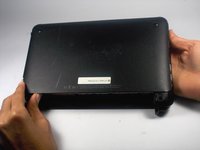
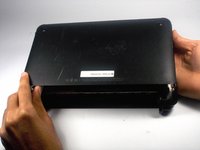
    1. HP Mini 110-3735dx Hard Drive Replacement, Battery: crwdns2935265:01crwdnd2935265:01crwdnd2935265:03crwdne2935265:0 HP Mini 110-3735dx Hard Drive Replacement, Battery: crwdns2935265:01crwdnd2935265:02crwdnd2935265:03crwdne2935265:0 HP Mini 110-3735dx Hard Drive Replacement, Battery: crwdns2935265:01crwdnd2935265:03crwdnd2935265:03crwdne2935265:0
      • With the bottom of the HP Mini facing up, slide both switches inward towards each other.

      crwdns2952109:0crwdne2952109:0

      crwdns2917038:0crwdne2917038:0

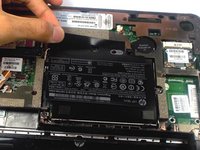
    2. HP Mini 110-3735dx Hard Drive Replacement: crwdns2935265:02crwdnd2935265:01crwdnd2935265:02crwdne2935265:0 HP Mini 110-3735dx Hard Drive Replacement: crwdns2935265:02crwdnd2935265:02crwdnd2935265:02crwdne2935265:0
      • With the left switch still pushed inward, pull the battery towards you to remove it from the computer.

      crwdns2952109:0crwdne2952109:0

      crwdns2917038:0crwdne2917038:0

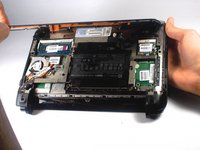
    1. HP Mini 110-3735dx Hard Drive Replacement, Backcover: crwdns2935265:03crwdnd2935265:01crwdnd2935265:03crwdne2935265:0 HP Mini 110-3735dx Hard Drive Replacement, Backcover: crwdns2935265:03crwdnd2935265:02crwdnd2935265:03crwdne2935265:0 HP Mini 110-3735dx Hard Drive Replacement, Backcover: crwdns2935265:03crwdnd2935265:03crwdnd2935265:03crwdne2935265:0
      • Pull upward from under the back cover via the missing battery area.

      • Best to start from one of the corners.

      crwdns2952109:0crwdne2952109:0

      crwdns2917038:0crwdne2917038:0

    1. HP Mini 110-3735dx Hard Drive Replacement, Hard Drive Cage: crwdns2935265:04crwdnd2935265:01crwdnd2935265:01crwdne2935265:0
      • Remove the three 5.0 mm screws holding the hard drive cage in place using a Phillips #1 screw driver.

      crwdns2952109:0crwdne2952109:0

      crwdns2917038:0crwdne2917038:0

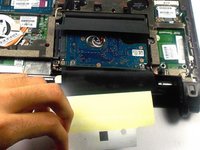
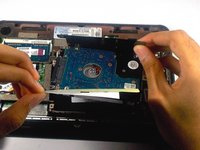
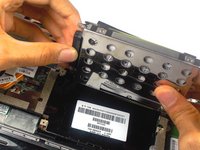
    2. HP Mini 110-3735dx Hard Drive Replacement: crwdns2935265:05crwdnd2935265:01crwdnd2935265:03crwdne2935265:0 HP Mini 110-3735dx Hard Drive Replacement: crwdns2935265:05crwdnd2935265:02crwdnd2935265:03crwdne2935265:0 HP Mini 110-3735dx Hard Drive Replacement: crwdns2935265:05crwdnd2935265:03crwdnd2935265:03crwdne2935265:0
      • Lift the hard drive cage by pulling the tape upward.

      • Start by pulling the tape from the side with the keyboard symbol.

      crwdns2952109:0crwdne2952109:0

      crwdns2917038:0crwdne2917038:0

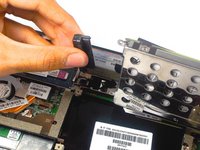
    3. HP Mini 110-3735dx Hard Drive Replacement: crwdns2935265:06crwdnd2935265:01crwdnd2935265:02crwdne2935265:0 HP Mini 110-3735dx Hard Drive Replacement: crwdns2935265:06crwdnd2935265:02crwdnd2935265:02crwdne2935265:0
      • Unplug the cable connecting to the hard drive.

      crwdns2952109:0crwdne2952109:0

      crwdns2917038:0crwdne2917038:0

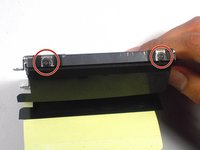
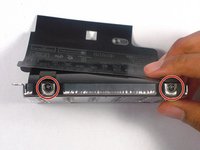
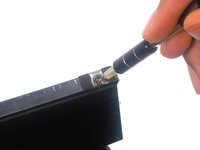
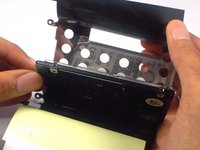
    1. HP Mini 110-3735dx Hard Drive Replacement, Hard Drive: crwdns2935265:07crwdnd2935265:01crwdnd2935265:03crwdne2935265:0 HP Mini 110-3735dx Hard Drive Replacement, Hard Drive: crwdns2935265:07crwdnd2935265:02crwdnd2935265:03crwdne2935265:0 HP Mini 110-3735dx Hard Drive Replacement, Hard Drive: crwdns2935265:07crwdnd2935265:03crwdnd2935265:03crwdne2935265:0
      • Remove the four 4.0 mm screws on both sides of the cage using a Phillips #1 screw driver.

      crwdns2952109:0crwdne2952109:0

      crwdns2917038:0crwdne2917038:0

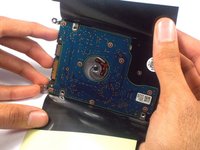
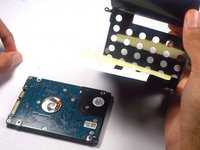
    2. HP Mini 110-3735dx Hard Drive Replacement: crwdns2935265:08crwdnd2935265:01crwdnd2935265:03crwdne2935265:0 HP Mini 110-3735dx Hard Drive Replacement: crwdns2935265:08crwdnd2935265:02crwdnd2935265:03crwdne2935265:0 HP Mini 110-3735dx Hard Drive Replacement: crwdns2935265:08crwdnd2935265:03crwdnd2935265:03crwdne2935265:0
      • Gently remove the hard drive from it's cage.

      crwdns2952109:0crwdne2952109:0

      crwdns2917038:0crwdne2917038:0

crwdns2915888:0crwdne2915888:0

To reassemble your device, follow these instructions in reverse order.

crwdns2935221:0crwdne2935221:0

crwdns2935229:02crwdne2935229:0

Tyrone Williams

crwdns2935283:003/10/16crwdne2935283:0

923 crwdns2915208:0crwdne2915208:0

crwdns2935297:07crwdne2935297:0

crwdns2935287:0crwdne2935287:0

UMass Dartmouth, Team 4-1, Catania Spring 2016 crwdns2935289:0UMass Dartmouth, Team 4-1, Catania Spring 2016crwdne2935289:0

UMASSD-CATANIA-S16S4G1

crwdns2931471:04crwdne2931471:0

crwdns2935297:040crwdne2935297:0

crwdns2947412:00crwdne2947412:0

crwdns2917038:0crwdne2917038:0

crwdns2936625:0crwdne2936625:0:

crwdns2936751:024crwdne2936751:0 1

crwdns2936753:07crwdne2936753:0 4

crwdns2936753:030crwdne2936753:0 27

crwdns2942667:0crwdne2942667:0 970