
HP Media Center 876x RAM Replacement

crwdns2959932:0crwdnd2959932:0Balakrishnan Pillaicrwdnd2959932:0crwdnd2959932:0crwdnd2959932:03crwdnd2959932:0crwdne2959932:0
crwdns2959936:0Maw 18, 2019crwdne2959936:0
crwdns2869540:0crwdne2869540:0: 921
crwdns2959988:0crwdne2959988:0
- crwdns2959990:0crwdne2959990:0
- 1
- crwdns2959992:0crwdne2959992:0
- 22
- crwdns2959994:0crwdne2959994:0
- 90
- crwdns2959996:0crwdne2959996:0
- 921
crwdns2955950:0crwdne2955950:0: 0
crwdns2959998:0crwdne2959998:0
crwdns2960000:0crwdne2960000:0crwdns2959984:0crwdne2959984:0: 0 1
crwdns2959956:0crwdne2959956:0
crwdns2959968:01crwdne2959968:0
crwdns2959986:0crwdne2959986:0: 0 1
crwdns2959958:0crwdne2959958:0
crwdns2959976:01crwdne2959976:0
crwdns2915892:0crwdne2915892:0
crwdns2959928:0crwdne2959928:0 ↓RAM is essential to all computational processes. Qualitatively, high quantities of RAM result in a "faster" user experience, while low levels of RAM result in sluggish computer response. If your HP Media Center 876x is unusually slow, it may be necessary to add new, or replace existing, RAM.
crwdns2959930:0crwdne2959930:0
crwdns2943215:0crwdne2943215:0

-
-
-
Remove the two (9 mm) hand screws on the back panel.
 crwdns2952109:0crwdne2952109:0
-
-
-
Place the tower on its side.
-
Slide the side panel horizontally to detach, and pull upward to remove.
-
-
-
-
-
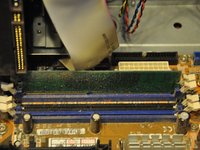
Identify the RAM card (distinguished by the beige fastening tabs).
-
Push tab away from RAM card (into the open position).
-
-
-
-
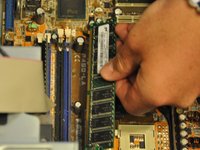
Pull RAM card vertically out of slot.
-
-


To reassemble your device, follow these instructions in reverse order.

crwdns2935287:0crwdne2935287:0

Clemson, Team 6-1, Benson Spring 2014 crwdns2935289:0Clemson, Team 6-1, Benson Spring 2014crwdne2935289:0
CLEM-BENSON-S14S6G1
crwdns2931471:03crwdne2931471:0
crwdns2935297:096crwdne2935297:0
