crwdns2933423:0crwdne2933423:0
crwdns2947577:0crwdnd2947577:0crwdne2947577:0

HP G60T-600 CTO Power Button Frame Replacement

crwdns2942213:0crwdne2942213:0

    1. HP G60T-600 CTO Power Button Frame Replacement, Battery: crwdns2935265:01crwdnd2935265:01crwdnd2935265:01crwdne2935265:0
      • Failure to remove the battery before performing any replacement guide may result in electric shock.

      • Close your device, then turn it over.

      crwdns2952109:0crwdne2952109:0

      crwdns2917038:0crwdne2917038:0

    2. HP G60T-600 CTO Power Button Frame Replacement: crwdns2935265:02crwdnd2935265:01crwdnd2935265:02crwdne2935265:0 HP G60T-600 CTO Power Button Frame Replacement: crwdns2935265:02crwdnd2935265:02crwdnd2935265:02crwdne2935265:0
      • Place your index finger on the ridged tab.

      crwdns2952109:0crwdne2952109:0

      crwdns2917038:0crwdne2917038:0

    3. HP G60T-600 CTO Power Button Frame Replacement: crwdns2935265:03crwdnd2935265:01crwdnd2935265:01crwdne2935265:0
      • Apply moderate pressure to the tab and slide it to the right.

      • While the tab is on the right, you should be able to gently slide your battery out of your device.

      crwdns2952109:0crwdne2952109:0

      crwdns2917038:0crwdne2917038:0

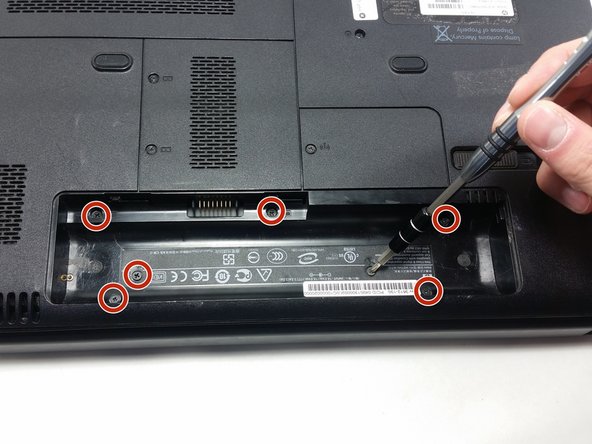
    1. HP G60T-600 CTO Power Button Frame Replacement, Keyboard: crwdns2935265:04crwdnd2935265:01crwdnd2935265:02crwdne2935265:0 HP G60T-600 CTO Power Button Frame Replacement, Keyboard: crwdns2935265:04crwdnd2935265:02crwdnd2935265:02crwdne2935265:0
      • Unscrew the following 5mm screws with a #0 Phillips screwdriver.

      crwdns2952109:0crwdne2952109:0

      crwdns2917038:0crwdne2917038:0

    2. HP G60T-600 CTO Power Button Frame Replacement: crwdns2935265:05crwdnd2935265:01crwdnd2935265:01crwdne2935265:0
      • Turn your laptop over and open it up.

      • Grip your laptop firmly from both sides and use your thumbs to slide the keyboard towards the screen.

      crwdns2952109:0crwdne2952109:0

      crwdns2917038:0crwdne2917038:0

    3. HP G60T-600 CTO Power Button Frame Replacement: crwdns2935265:06crwdnd2935265:01crwdnd2935265:01crwdne2935265:0
      • Pull up on the top of your keyboard with medium force. It should start to pop out.

      • A plastic opening tool may facilitate this task.

      • Run your hands underneath the edges of the keyboard until it is free from the device.

      • Do not pull hard to take the keyboard out. There is a small connection that needs to be undone.

      crwdns2952109:0crwdne2952109:0

      crwdns2917038:0crwdne2917038:0

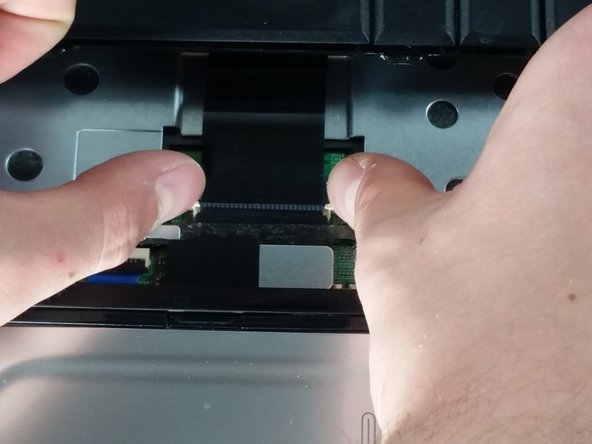
    4. HP G60T-600 CTO Power Button Frame Replacement: crwdns2935265:07crwdnd2935265:01crwdnd2935265:02crwdne2935265:0 HP G60T-600 CTO Power Button Frame Replacement: crwdns2935265:07crwdnd2935265:02crwdnd2935265:02crwdne2935265:0
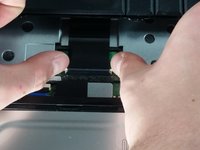
      • Place your thumbs on the two small, white tabs.

      • Push these tabs forward to release the connection and free the keyboard from the device.

      crwdns2952109:0crwdne2952109:0

      crwdns2917038:0crwdne2917038:0

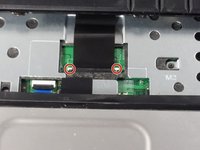
    1. HP G60T-600 CTO Power Button Frame Replacement, Power Button Frame: crwdns2935265:08crwdnd2935265:01crwdnd2935265:01crwdne2935265:0
      • Similarly to how you remove the keyboard, gently pry a small section of the power button frame up.

      crwdns2952109:0crwdne2952109:0

      crwdns2917038:0crwdne2917038:0

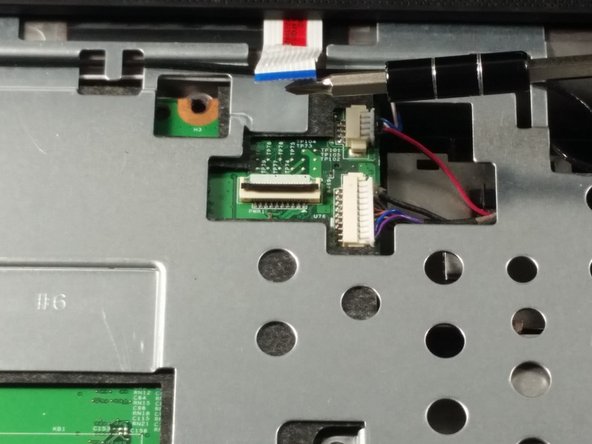
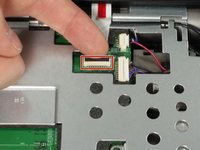
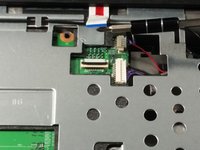
    2. HP G60T-600 CTO Power Button Frame Replacement: crwdns2935265:09crwdnd2935265:01crwdnd2935265:02crwdne2935265:0 HP G60T-600 CTO Power Button Frame Replacement: crwdns2935265:09crwdnd2935265:02crwdnd2935265:02crwdne2935265:0
      • Gently pull the white tab upwards.

      • With similar force, pull the connection out.

      • You are now free to pull the power button frame off of your device.

      crwdns2952109:0crwdne2952109:0

      crwdns2917038:0crwdne2917038:0

    3. HP G60T-600 CTO Power Button Frame Replacement: crwdns2935265:010crwdnd2935265:01crwdnd2935265:01crwdne2935265:0
      • Unscrew the 5mm screw holding the CD player in place.

      crwdns2952109:0crwdne2952109:0

      crwdns2917038:0crwdne2917038:0

crwdns2915888:0crwdne2915888:0

To reassemble your device, follow these instructions in reverse order.

crwdns2935221:0crwdne2935221:0

Dominic DeSantis

crwdns2935283:010/19/16crwdne2935283:0

772 crwdns2915208:0crwdne2915208:0

crwdns2935297:06crwdne2935297:0

crwdns2935287:0crwdne2935287:0

UMass Dartmouth, Team 4-5, Catania Fall 2016 crwdns2935289:0UMass Dartmouth, Team 4-5, Catania Fall 2016crwdne2935289:0

UMASSD-CATANIA-F16S4G5

crwdns2931471:03crwdne2931471:0

crwdns2935297:054crwdne2935297:0

crwdns2947412:00crwdne2947412:0

crwdns2917038:0crwdne2917038:0

crwdns2936625:0crwdne2936625:0:

crwdns2936751:024crwdne2936751:0 4

crwdns2936753:07crwdne2936753:0 9

crwdns2936753:030crwdne2936753:0 27

crwdns2942667:0crwdne2942667:0 411