crwdns2933423:0crwdne2933423:0
crwdns2947577:0crwdnd2947577:0crwdne2947577:0

HP Envy TouchSmart 15 RAM Replacement

crwdns2869540:0crwdne2869540:0: 2122

crwdns2959988:0crwdne2959988:0

crwdns2959990:0crwdne2959990:0
1
crwdns2959992:0crwdne2959992:0
27
crwdns2959994:0crwdne2959994:0
95
crwdns2959996:0crwdne2959996:0
2,122
crwdns2955950:0crwdne2955950:0: 0

crwdns2959998:0crwdne2959998:0

crwdns2960000:0crwdne2960000:0
crwdns2959984:0crwdne2959984:0: 3

crwdns2959974:03crwdne2959974:0

crwdns2959986:0crwdne2959986:0: 1

crwdns2959980:01crwdne2959980:0

crwdns2955944:0crwdne2955944:0: 1 - 5 crwdns2931279:0crwdne2931279:0
crwdns2955970:0crwdne2955970:0: crwdns2937799:0crwdne2937799:0
HP Envy TouchSmart 15 RAM Replacement

crwdns2915892:0crwdne2915892:0

crwdns2959928:0crwdne2959928:0 ↓

Replacing the RAM module might be necessary if you have random crashes and blue screens of death. Be sure to test them before you condemn them to the trash.

crwdns2959930:0crwdne2959930:0

crwdns2943215:0crwdne2943215:0

    1. HP Envy TouchSmart 15 RAM Replacement, Battery: crwdns2935265:01crwdnd2935265:01crwdnd2935265:01crwdne2935265:0
      • Press the battery release tab and the battery will pop up.

      crwdns2952109:0crwdne2952109:0

      crwdns2917038:0crwdne2917038:0

    2. HP Envy TouchSmart 15 RAM Replacement: crwdns2935265:02crwdnd2935265:01crwdnd2935265:01crwdne2935265:0
      • Remove the battery from the laptop, it will come out easily.

      crwdns2952109:0crwdne2952109:0

      crwdns2917038:0crwdne2917038:0

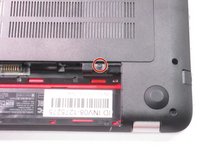
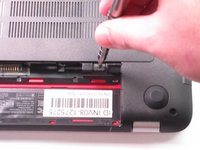
    1. HP Envy TouchSmart 15 RAM Replacement, Accessory Plate: crwdns2935265:03crwdnd2935265:01crwdnd2935265:02crwdne2935265:0 HP Envy TouchSmart 15 RAM Replacement, Accessory Plate: crwdns2935265:03crwdnd2935265:02crwdnd2935265:02crwdne2935265:0
      • Remove the single screw holding the accessory plate. This is a PH0 2.0x2.5 screw.

      crwdns2952109:0crwdne2952109:0

      crwdns2917038:0crwdne2917038:0

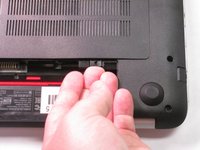
    2. HP Envy TouchSmart 15 RAM Replacement: crwdns2935265:04crwdnd2935265:01crwdnd2935265:03crwdne2935265:0 HP Envy TouchSmart 15 RAM Replacement: crwdns2935265:04crwdnd2935265:02crwdnd2935265:03crwdne2935265:0 HP Envy TouchSmart 15 RAM Replacement: crwdns2935265:04crwdnd2935265:03crwdnd2935265:03crwdne2935265:0
      • Pry the accessory plate up from the back of the laptop by applying force upwards where the screw was removed.

      crwdns2952109:0crwdne2952109:0

      crwdns2917038:0crwdne2917038:0

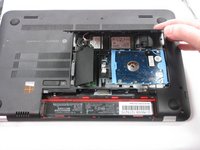
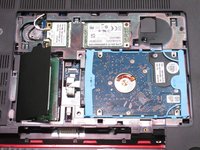
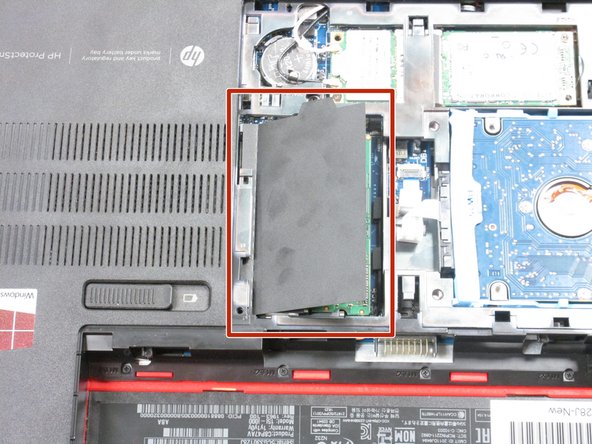
    1. HP Envy TouchSmart 15 RAM Replacement, RAM: crwdns2935265:05crwdnd2935265:01crwdnd2935265:02crwdne2935265:0 HP Envy TouchSmart 15 RAM Replacement, RAM: crwdns2935265:05crwdnd2935265:02crwdnd2935265:02crwdne2935265:0
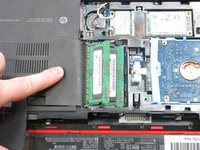
      • Hold back the covering to reveal the RAM modules.

      crwdns2952109:0crwdne2952109:0

      crwdns2917038:0crwdne2917038:0

    2. HP Envy TouchSmart 15 RAM Replacement: crwdns2935265:06crwdnd2935265:01crwdnd2935265:01crwdne2935265:0
      • Press the clips on the edges of the RAM modules outward to pop them out.

      crwdns2952109:0crwdne2952109:0

      crwdns2917038:0crwdne2917038:0

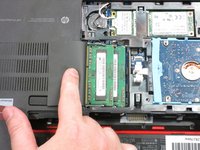
    3. HP Envy TouchSmart 15 RAM Replacement: crwdns2935265:07crwdnd2935265:01crwdnd2935265:03crwdne2935265:0 HP Envy TouchSmart 15 RAM Replacement: crwdns2935265:07crwdnd2935265:02crwdnd2935265:03crwdne2935265:0 HP Envy TouchSmart 15 RAM Replacement: crwdns2935265:07crwdnd2935265:03crwdnd2935265:03crwdne2935265:0
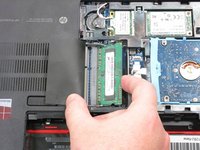
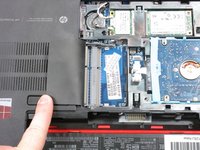
      • You can now remove the RAM modules you need to replace. You can replace the top one, the bottom one, or both if needed.

      crwdns2952109:0crwdne2952109:0

      crwdns2917038:0crwdne2917038:0

crwdns2915888:0crwdne2915888:0

To reassemble your device, follow these instructions in reverse order.

crwdns2935221:0crwdne2935221:0

crwdns2935229:03crwdne2935229:0

Robert Patterson

crwdns2935283:009/04/15crwdne2935283:0

1,494 crwdns2915208:0crwdne2915208:0

crwdns2935297:05crwdne2935297:0

crwdns2935287:0crwdne2935287:0

USF Tampa, Team 2-6, Sullivan Fall 2015 crwdns2935289:0USF Tampa, Team 2-6, Sullivan Fall 2015crwdne2935289:0

USFT-SULLIVAN-F15S2G6

crwdns2931471:04crwdne2931471:0

crwdns2935297:0120crwdne2935297:0

crwdns2947412:00crwdne2947412:0

crwdns2917038:0crwdne2917038:0

crwdns2936625:0crwdne2936625:0:

crwdns2936751:024crwdne2936751:0 1

crwdns2936753:07crwdne2936753:0 27

crwdns2936753:030crwdne2936753:0 95

crwdns2959996:0crwdne2959996:0 2,122