crwdns2915892:0crwdne2915892:0
The following instructions will explain the process of safely replacing the RAM chips in the HP EliteBook 745 G2. RAM (random-access memory) is what is used to store any short-term information so that it can be quickly accessed again. If you are experiencing long application launch times or a sluggish and slow feeling as you use the computer, then it might be time to consider replacing the RAM chip.
Before beginning, ensure that you follow steps 1-3 to disconnect the battery as this will help keep you and the rest of the electronics safe. Using the required tools and a great deal of caution is vital as the component and the surrounding components are delicate. In case you need to acquire a new RAM chip, you can use the keyword DDR4 SDRAM Memory Module to search online for a replacement part.
crwdns2942213:0crwdne2942213:0
-
-
Gently place the laptop down on a suitable workplace with the back of the laptop facing up
 crwdns2952109:0crwdne2952109:0
-
-
-
Remove the cover by sliding the lock to the left. You will hear a click once the cover has been unlocked. Gently push down on the cover and slide it towards you to remove it.
-
-
-
-
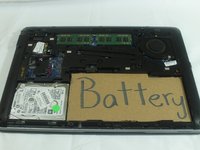
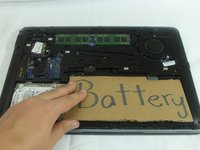
Gently lift up on the battery (represented by this cardboard cutout) until it disconnects. Once the battery is disconnected lift away from laptop.
-
-
crwdns2935267:0crwdne2935267:0Anti-Static Wrist Strap$7.95
-
Attach the anti-static wrist strap to any metal part of the computer to prevent electrical damage.
-
-
-
Using the spudger, gently press down on the tabs holding the chip to release it. Repeat this step for the other chip.
-
-
-
Grab the chip and lift it away from the laptop at a 45 degree angle.
-




To reassemble your device, follow these instructions in reverse order.

crwdns2935287:0crwdne2935287:0

Western Carolina University, Team S1-G3, Virtue Fall 2019 crwdns2935289:0Western Carolina University, Team S1-G3, Virtue Fall 2019crwdne2935289:0
WCU-VIRTUE-F19S1G3
crwdns2931471:05crwdne2931471:0
crwdns2935297:010crwdne2935297:0
